

Artificial intelligence is changing how organisations deliver training and assessment. AI tools have moved from early experiments to reliable features. They now support everyday learning activities.
There are many tools available, and each one promises different benefits. AI can create content, guide learners and analyse skills data. It can also support assessors, manage workflows and help teams keep training up to date. With so many options, it can be difficult to know which features are worth your attention.
This guide highlights the AI features that matter most in training and assessment. These features help teams build learning experiences that support real workplace performance.
1. AI-Generated Training Content
AI-generated training content uses machine learning to create lessons, modules, and microlearning. It works from prompts or existing documents. These tools analyse source material and identify key information. They organise that information into clear, structured training resources. AI can also produce different types of learning material. It can create text- based lessons, short scenarios, checklists and practical activities. These formats support a wide range of training needs.
They can convert standard operating procedures, policies, and manuals into training content. This content reflects real tasks, procedures, and expectations. It supports skills development and compliance needs. It also allows for role-specific training across different learning environments. These capabilities help teams create and update content at scale. They support consistent training across programs and locations. They also reduce the time required for manual content development.
2. Auto-Tagging & Content Organisation
Auto tagging uses AI to classify training materials with accurate labels. It reviews documents, videos, and resources and assigns tags based on key themes. These tools analyse language, topics, and skills within the content. They use this information to group resources in a clear and consistent way.
They can also identify related content. This helps teams link modules, assessments, and reference materials without manual sorting. Auto tagging supports efficient content management. It keeps large libraries organised and easy to search.
These features also help trainers find the right material faster. They reduce time spent navigating folders or reviewing outdated versions. This process supports consistent training delivery across programs. It also helps organisations keep content aligned with current processes and learning needs.
3. Adaptive Learning Paths
Adaptive learning paths use AI to adjust training based on each learner’s progress. They respond to performance data and tailor the sequence of content. These features review learner activity and identify where support is needed. They guide learners toward material that suits their current skill level.
They can make training harder or easier in real time. This helps learners build confidence while staying challenged at the right level. Adaptive paths can also manage pacing. They slow down when a learner needs more practice and speed up when the learner shows strong understanding.
These capabilities support targeted development across varied skill levels. They help learners stay engaged and reduce time spent on content they already understand. They also help trainers track learner progress with greater clarity. This gives teams a clearer view of strengths, skill gaps and training needs.
4. Personalised Recommendations
Personalised recommendations use AI to guide learners toward relevant training content. They review learner activity and suggest modules, resources, or practice tasks that match current needs. These tools analyse progress, skill levels, and past performance. They use that information to predict what will help the learner improve.
They can highlight gaps that need attention. They can also point learners toward advanced material when they show strong understanding. Personalised recommendations support continuous learning. They encourage learners to take the next step without waiting for scheduled training or direct instruction.
These recommendations also help trainers understand learner behaviour. They provide insight into which resources learners use most and which skills need more support. This level of guidance helps create training experiences that feel tailored and practical. It also supports consistent development across teams with different roles and experience levels.
5. AI-Powered Coaching & Virtual Assistants
AI-powered coaching tools give learners direct support during training. They provide clear explanations, answer questions and guide learners through tasks. All without changing the learning path. These tools use natural language processing to understand questions and deliver accurate information. They help learners interpret instructions, understand processes, and complete activities with more confidence.They can walk learners through step-by-step procedures. They can also clarify workplace terms, safety requirements, or system tasks while the learner works.
Virtual assistants support learning in real time. Learners can ask for help during simulations, assessments or practical activities. They can receive immediate guidance. Virtual assistants also handle common queries that usually take trainer time. They give consistent answers and reduce interruptions during scheduled training.
These types of support give learners reliable assistance when they need it. It also reduces the pressure on trainers to provide constant on-demand help.
6. Workflow Automation for Training Delivery
Workflow automation uses AI to handle routine training tasks. It sends reminders, manages enrolments, and triggers follow-up actions based on learner activity. These tools review progress and apply rules set by trainers or administrators. They enrol learners into modules, send notifications, and update records without manual work.
They can also schedule tasks that support compliance. They prompt learners to complete overdue training and notify teams when deadlines approach. Automation helps reduce repetitive admin work. It gives trainers more time to focus on learning design and learner support.
They ensure each learner receives the right messages, tasks and updates at the right time. This level of automation helps organisations deliver training at scale.
7. Skills Gap Analysis
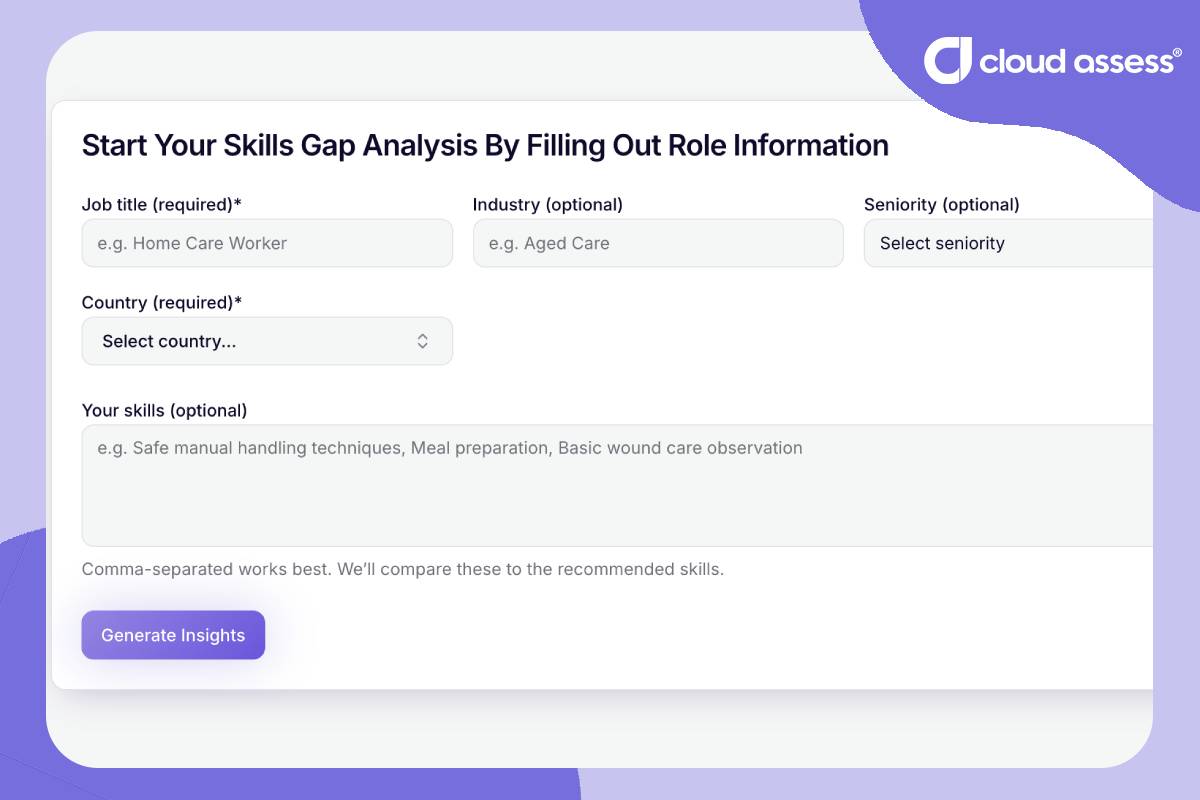
Skills gap analysis tools use AI to compare a learner’s current skills with those required for their role. They review performance data and identify where support is needed. These tools can analyse assessment results, training activity, and workplace tasks. They use this information to highlight strengths and areas that need development.
They can map learner performance to specific skills or competency standards. This helps teams see which skills are progressing and which require more practice. AI-driven analysis can also track changes over time. It shows how learners improve and where gaps remain across repeated training or assessments.
These insights guide decisions about training priorities and follow-up activities. This helps organisations keep training aligned with business goals and real workplace expectations. It also supports consistent skill development across teams with different responsibilities.
8. Real-World Simulations & Scenario Engines
Real-world simulations use AI to create practice environments that mirror workplace tasks. They present realistic situations and allow learners to make decisions in a safe setting. These tools generate roleplays, customer interactions and safety scenarios. They adjust details to match the learner’s context and learning goals.
They can also adapt as the learner progresses. They introduce new challenges when learners perform well and provide simpler paths when extra support is needed. Scenario engines create scenario-based learning experiences. These experiences help learners apply knowledge to practical situations.
These tools also provide trainers with insight into learner behaviour. They show how learners respond to real-time challenges and where extra training may help.
9. AI-Generated Assessment
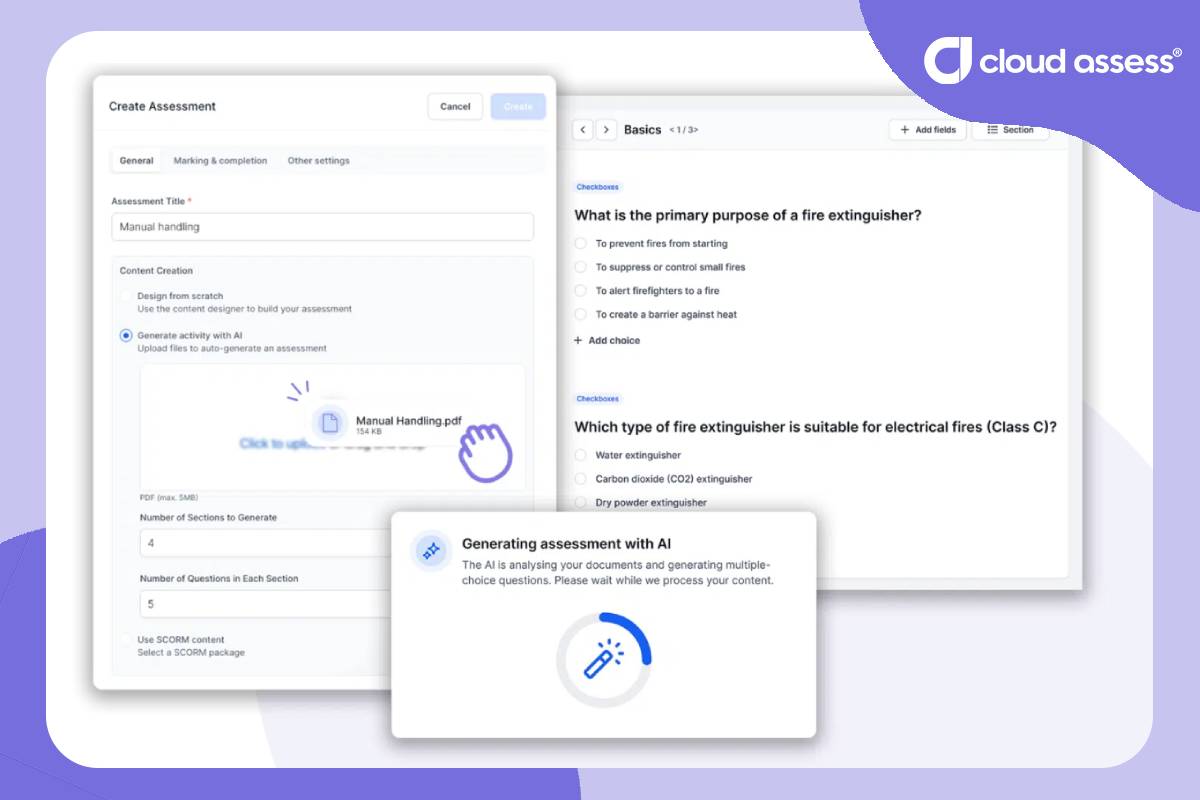
AI-assessment generators create questions, scenarios, and practical tasks. They generate these from prompts or source documents. They analyse the content provided and shape it into assessment items that reflect real skills and requirements. These tools can produce multiple question types, such as:
- Quizzes
- Short answer questions
- Scenario-based questions
- Practical task descriptions
Each item is matched to the skill or outcome being assessed. For example, Cloud Assess can turn an uploaded document into a multiple-choice assessment. It then links each question to the correct skill or outcome. It does this through its AI-powered assessment generation tool.
AI can align assessment items with standards or competency frameworks. It reviews key criteria and ensures each question relates to the skills being measured. These tools reduce manual drafting time and keep assessment materials accurate and current.
10. Adaptive Assessments
Adaptive assessments use AI to tailor assessment difficulty while the learner completes tasks. They adjust questions based on each response. But the goal is accurate measurement, not guided learning. These tools review answers in real time and choose the next question to match the learner’s performance level.
They focus on finding the point where the learner can show their actual skill. They can also reduce the number of questions needed. They remove items once the system has enough evidence to judge competency. Adaptive assessments limit results influenced by guessing. They respond quickly when a question is too easy or too hard, which keeps the assessment fair.
These tools give assessors clearer insight into learner performance. They highlight strengths, reveal gaps and support confident assessment decisions.
11. AI Marking & Feedback
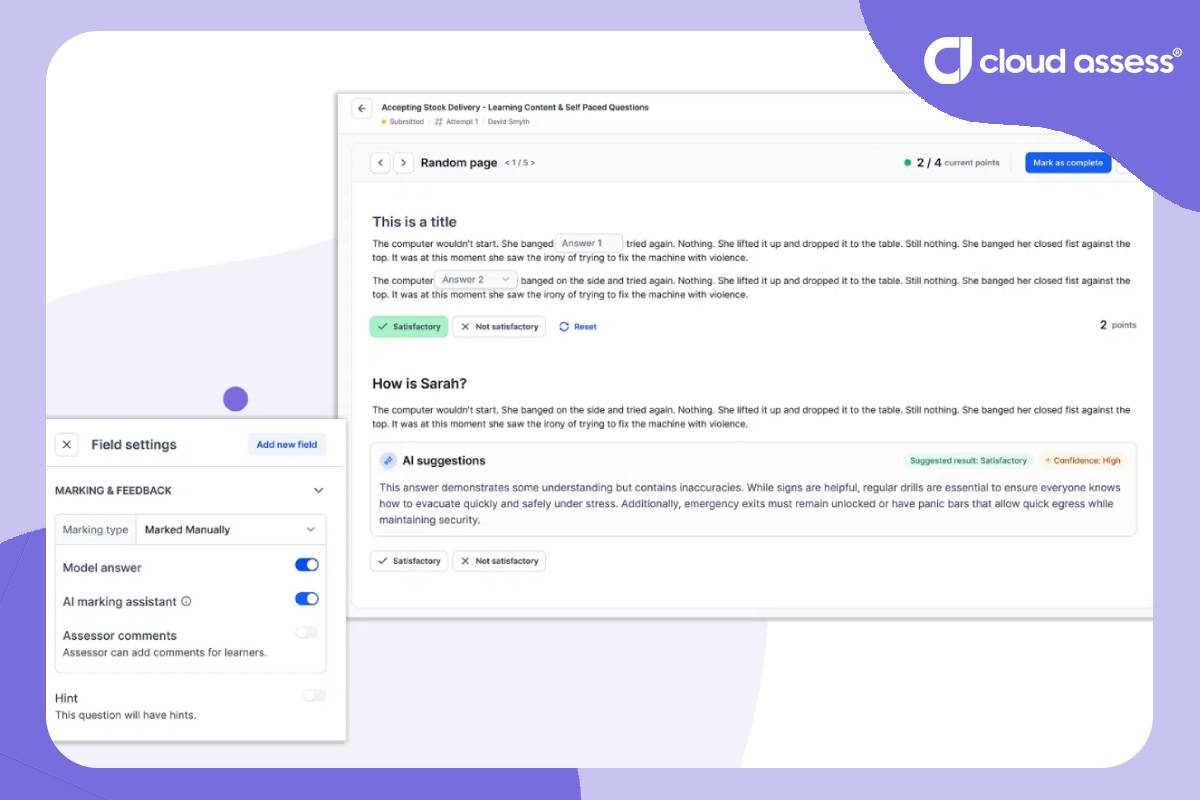
AI marking reviews learner responses and scores them against set criteria. These tools assess quizzes, written answers and practical tasks with speed and accuracy. They analyse language patterns and key details in each response. They compare the response to expected outcomes and apply scoring rules without delay.
They can also generate clear, instant feedback. This explains what the learner did well and what needs attention. Feedback can include examples, suggestions or reminders about key steps. It helps learners understand how to improve for their next attempt.
AI marking tools support consistent decisions across assessors and teams. They help reduce delays caused by manual review and high assessment volumes. This type of marking gives trainers more time for coaching. It also helps learners progress with a clearer understanding of their performance.
12. Intelligent Proctoring & Integrity Tools
Intelligent proctoring tools use AI to protect the integrity of online assessments. They verify identity, monitor behaviour, and flag activity that may need review. These tools check identification before the assessment begins. They confirm that the correct person is completing the task.
They can also track behaviour during the assessment. They look for patterns like unusual movements, extra voices, or screen switching. AI proctoring tools highlight events that may require assessor attention. They help teams review only the moments that matter, rather than watching long recordings.
Integrity tools can also detect plagiarism in assessments. They compare written responses to large data sources and identify content that may not be original. This support helps maintain fairness across assessments. It also gives organisations confidence that results reflect genuine learner performance.
13. Smart Competency Mapping
Smart competency mapping uses AI to link assessment results to specific competencies. It can also link to specific competency standards, which ensures each result is tied to the right capability. It reviews learner performance and aligns each result with required outcomes. These features analyse responses, scores, and practical evidence. They identify which competencies the learner has demonstrated and which need more development.
They can also organise results into clear competency records. They group outcomes by unit, skill area, or workplace requirement. Smart mapping helps assessors make accurate decisions. It provides structured evidence that supports consistent judgement across different assessors.
These tools also help teams track progress over time. They show how learners move toward full competency and where extra support may help. This process makes compliance and reporting easier. It helps organisations maintain accurate records while supporting skill development across varied roles.
14. Predictive Insights & Reporting
Predictive insights use AI to highlight patterns in learner data. They review historical activity, progress, and assessment results to identify what may happen next. These features can flag learners who may need support. They spot reduced engagement, missed deadlines, or repeated errors across tasks.
They also summarise assessment outcomes. They show clear trends that help teams understand strengths and gaps. They can also help them understand overall training performance. AI reporting tools organise information into simple dashboards. They present key metrics that support quick decisions.
These insights help trainers plan follow-up actions. They also help organisations track training quality. They can highlight where programs may need improvement. This level of reporting supports proactive training decisions. It enables teams to respond early and maintain strong learning outcomes across programs.
15. Assessment Workflow Automation
Assessment workflow automation uses AI to manage routine assessment tasks. It can automatically assign assessors based on workload or rules. It can start marking processes as soon as an assessment is submitted. It can also provide suggestions that support accurate evaluation. These features also help trainers and assessors manage certification tasks. They do this by enabling issuing or revoking of training certificates when requirements are met or no longer valid.
They can also assign follow-up tasks. They prompt learners to review feedback, complete extra practice, or submit missing evidence. Automation supports accurate and timely assessment processes. It reduces delays caused by manual administration and high workloads.
These tools help assessors maintain consistent workflows. They ensure each learner receives the right steps, reminders, and tasks at the right time. This approach helps organisations manage assessment at scale. It keeps processes efficient, compliant and easy to track across teams.
Find the Right AI Tools for Your Training and Assessment Needs
There are many types of AI tools available to support training and assessment across different industries. Finding the right mix requires a clear view of your programs. It also requires an understanding of your compliance needs and the level of automation that will help your organisation.
If your focus is strong learning programs, look for features that support content creation and adaptive pathways. Coaching tools can also help maintain quality and consistency. If assessment is your priority, choose tools that support marking, competency mapping, and workflow automation. These features help reduce manual work and improve accuracy.
Choosing the right tools keeps training current and efficient. It also helps your organisation deliver learning that aligns with real workplace needs.



