

What's new
Cloud Assess now includes two AI-assisted question authoring tools built directly into the content designer: the AI Question Generator and the AI Question Enhancer.
The Generator creates a draft question from a description you provide. The Enhancer refines questions you’ve already written. Both work inside the designer – no switching tools, no copy-pasting, no interrupting your flow.
Who is this for?
This feature is for anyone who designs or reviews assessment questions inside Cloud Assess, including instructional designers, trainers, assessors, and RTO managers.
It’s particularly useful for teams who are building new question banks from scratch, working through large volumes of questions, or looking to improve the consistency and quality of existing content.
Why it matters
Writing well-pitched questions takes time. Getting the difficulty right, choosing the right question type, writing plausible distractors – these are skilled tasks that slow down even experienced designers.
AI doesn’t replace that skill. It gives you a better starting point. A draft to react to rather than a blank page to fill. The judgement – whether the question is fair, accurate, and fit for purpose – stays with you.
Key features
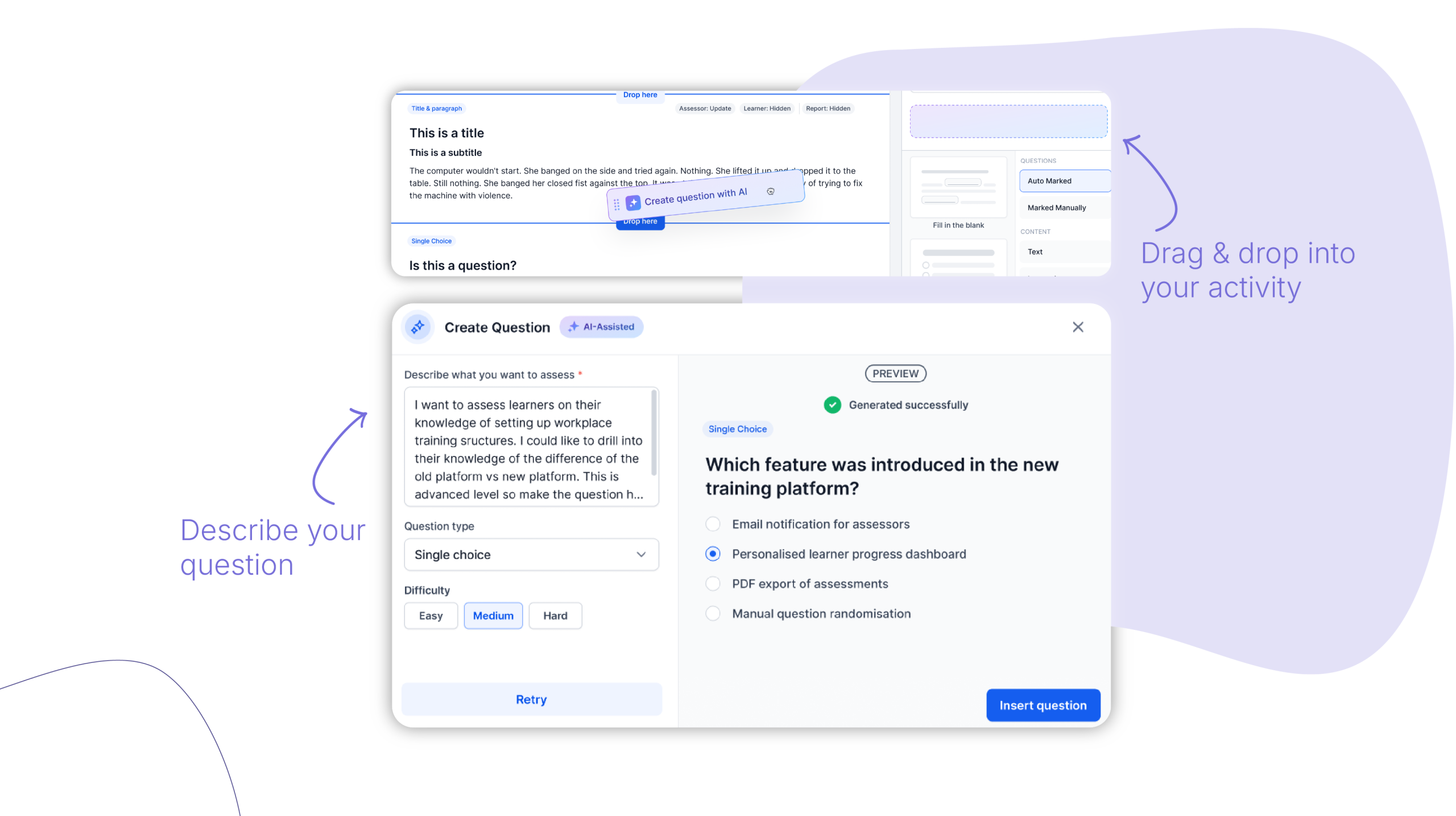
AI Question Generator – Describe what you want to assess, select a question type and difficulty level, and AI generates a draft question ready to preview. From there you can insert it into your activity, retry for a different version, or edit it manually before applying.
AI Question Enhancer – Already have a question written? The Enhancer lets you refine it without starting over. Choose from a set of enhancement options – adjust difficulty, simplify language, fix grammar, or add a distractor – and AI generates a suggested revision. You can compare the suggestion side by side with the original before deciding whether to apply it.
Stays inside your designer – Both tools are accessible directly within the content designer. There’s no need to leave the platform, use a separate AI tool, or manually transfer content back in. Your authoring flow stays intact.
How to get started
The AI Question Generator & Enhancer is available now to all Cloud Assess workspaces.
To use it, open an activity in the content designer and look for the AI assistant icon when adding or editing a question.
Keen to learn more?
Book a demo to speak with our sales team or visit our help centre if you are an existing Cloud Assess customer.



