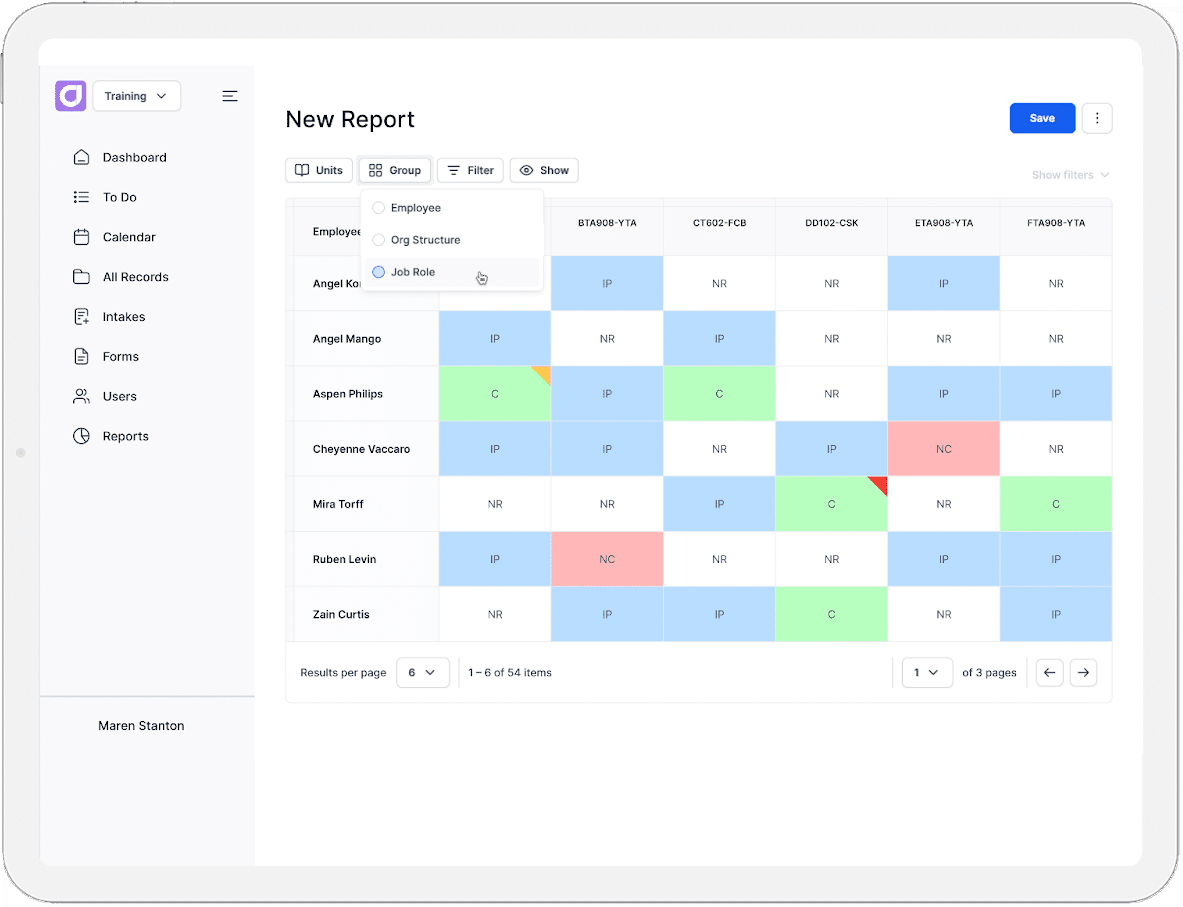
Keeping employee training compliant at enterprise scale requires more than knowing who has completed a course. Organisations need to track what each role requires, across every team and location. They also need to keep those records accurate as requirements change and certifications expire.
It also requires proof. An audit tests whether a worker was competent to do the task, who verified that, and when. Those records have to be produced years later, in a form the regulator accepts, often for workers who have since left the organisation.
In this blog, we’ll explore:
- What enterprise training compliance tracking involves
- The six ways enterprises track training today
- The Australian and UK legal requirements shaping the system
- Where enterprise tracking usually breaks down
- Nine steps for building an effective tracking system at scale
- What to look for in a training compliance system
What’s the Difference Between Compliance Training and Training Compliance
Compliance training is content. It teaches employees their obligations across topics like work health and safety, anti-bribery, and data protection.
Training compliance is evidence. It proves that a worker completed what their role requires, that their competence was verified, and that the record can be produced on request.
What Enterprise Training Compliance Tracking Involves
Enterprise training compliance tracking involves maintaining an accurate, evidenced record of which workers are trained and competent for the work assigned to them, across every site, department, and role. It also involves keeping that record current as legislation changes, workers transfer, sites open and close, and certifications expire.
It covers the full set of requirements attached to a role. That includes statutory training, licences and tickets, plant-specific competencies, client site inductions, and internal policy sign-offs.
At scale, this means the system has to answer five questions at any point in time.
- What is required, and under which rules. Requirements come from legislation, regulators and licensing bodies, and from client or principal contractor agreements. Organisations operating across states, territories, or countries hold different obligations for the same role depending on where the work happens.
- Who needs it, by when, and where. Requirements attach to roles, sites and risk levels rather than to individuals. A worker moving between sites or job codes inherits a different set of obligations. That change has to apply without manual intervention.
- What counts as complete. A course completion, a passing score, a supervisor sign-off, and an uploaded external ticket are all valid evidence. But each sets a different standard. The definition has to be fixed per requirement and applied identically at every location.
- What happens when someone is not compliant. The system needs to identify who is not currently trained for the work assigned to them, escalate it to a named owner, and record the action taken. Without this, non-compliance appears in a report but has no path to resolution.
- How long the record has to survive. Retention periods differ by record type and jurisdiction. The obligation to produce a record usually outlasts the worker’s employment. This means retention is set against the longest applicable period.
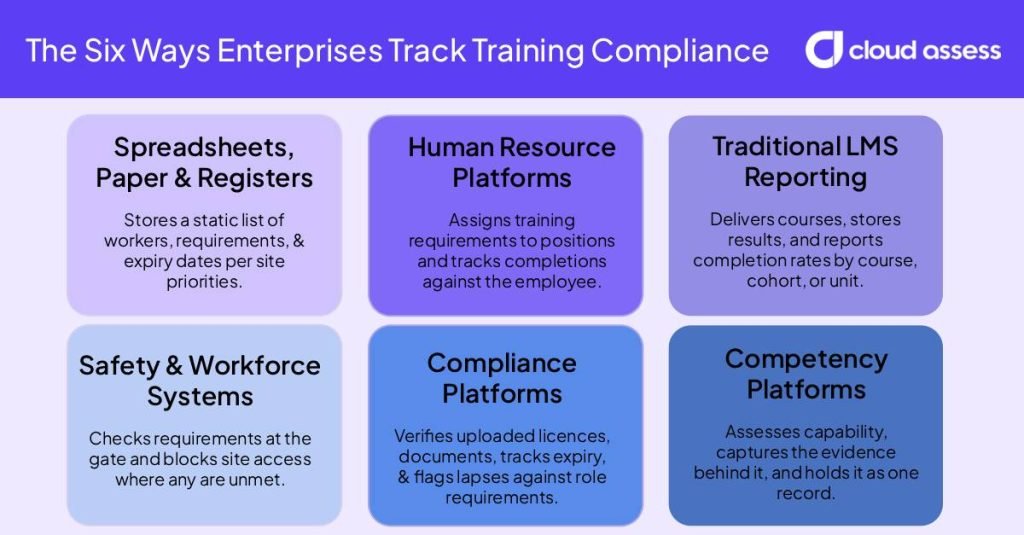
The Six Ways Enterprises Track Training Compliance
Spreadsheets, Paper, and Manual Registers
Each site keeps its own register, usually a spreadsheet listing workers against required training with expiry dates in a column. Site administrators file sign-in sheets and certificates locally, either in hard copy or scanned to a shared drive. When the business needs a group figure, a central team requests registers from every site and consolidates them by hand.
This costs nothing to run and adapts to any requirement. The difficulty comes at group level, where every site records something slightly different and nothing shows who changed a record or when.
HR Platforms
The organisation configures training requirements against positions in the HCM or HR system, so assignment follows the employee record. When someone changes a role or site, their requirements change with the position. Managers record completions against the employee profile. The business reports on them alongside headcount, turnover, and payroll data.
Assignment is the strength here, since it updates itself. Evidence is the gap. The system records that training was completed, not what was observed or by whom. Contractors outside the employee master file need tracking elsewhere.
Traditional LMS Reporting
Administrators assign mandatory courses by group or role. They set the completion rule, usually finishing the content or passing an assessment at a defined score. Workers complete the course through the learning management system, and their results are stored automatically against their profile. Reporting runs off enrolment data, showing completion rates by course, cohort, or business unit. Learners upload external certificates as attachments to their training record.
For high-volume online rollouts and refresher cycles, this works well. It reaches its limit at anything requiring practical demonstration, where the record has to come from someone watching the work.
Safety and Workforce Management Systems
The organisation ties training requirements to site access, permits, or work allocation. The system checks workers and contractors against their requirements at induction or gate entry, and refuses access where a requirement is unmet. Contractor companies often manage their own workers’ documents through a supplier portal.
Enforcement is what this does that the others do not. Non-compliance stops work rather than appearing in a report. Delivery usually runs in a separate system, which leaves two sets of records to reconcile.
Compliance Management Platforms
The organisation holds a central register of requirements and the documents that satisfy each one. Workers and contracting companies upload licences, tickets, and insurances through a portal. Compliance management platforms check each document, record its expiry, and flag what has lapsed. Requirements sit in a matrix against roles, sites, and contract types rather than against named people.
Verification is the strength here. Someone confirms the ticket is real and current before it counts towards anything. Delivery is the gap. These platforms hold proof that training happened without holding the training itself. That leaves two sets of records to keep aligned.
Competency Management Platforms
The organisation defines what competence looks like for each role, site, and risk level. Assessors observe the worker doing the task and record what they saw against set criteria. Evidence includes photos, video, checklists, and supervisor sign-off. Competency management systems store who assessed it, what they were qualified to judge, and the evidence behind the outcome as one record. It then runs the reassessment cycle and escalates lapses to a named owner.
This is the only approach that records capability rather than attendance. The reporting is only as reliable as the competency definitions sitting behind it. That makes the setup work carry more weight than in the other approaches.
What Law Affects How You Build The System
- AU requires competence to be verified, not assumed. Section 19 of the WHS Act requires the training necessary to protect workers from risk. High-risk work carries its own licensing requirements. Evidence has to show what was assessed and by whom.
- AU retention periods vary by record type. Notifiable incident records must be retained for five years. Hazardous chemicals health monitoring is typically around 30 years, with longer periods for asbestos and carcinogen exposure. Fair Work employee records must be kept for seven years. A single organisation-wide setting will either delete too early or keep everything.
- AU obligations differ by state and territory. Every jurisdiction except Victoria has adopted the model WHS laws, and adopting states have made their own variations. Jurisdiction has to be a field on the requirement, not an assumption.
- UK’s harassment duty rises to “all reasonable steps”. From 30 October 2026, the standard moves up from reasonable steps, and a new third-party liability applies. It covers harassment linked to any protected characteristic, not only sexual harassment. Records need to show who was trained and when, at an individual level.
- UK’s tribunal claims get a six-month window. From 1 October 2026, most claims move from three months to six, where the act falls on or after that date. Records have to stay retrievable longer after a worker leaves.
Where Enterprise Tracking Usually Fails

- Assessor drift between sites. Two assessors sign off the same competency to different standards. Both records look identical in the system. The difference only becomes visible when one of them is examined closely.
- Undocumented verbal exceptions. A supervisor allows someone to work while a renewal is pending. The decision is reasonable and nobody records it. There is then no trace of who approved it or on what basis.
- Sites never migrated. A site keeps its own spreadsheet alongside the central system. Its workers appear compliant in one place and missing in the other, depending on which system is asked.
- Dashboard numbers trusted without checking the definition underneath. A figure gets reported upwards for months before anyone asks what it counts. By then, decisions have been made on it.
- Audit reporting still assembled by hand. The system holds the data but cannot produce it in the format the regulator wants. Every audit becomes a manual export and rebuild.
- Expired records hidden by a role change. Someone moves roles and their old requirements drop off their profile. The expired record disappears from reporting rather than being resolved.
- Historic records that cannot be verified. Old records sit in the system with no evidence attached and no way to confirm what happened. They count towards compliance until somebody tests them.
How to Build A Compliance Tracking System for Your Enterprise
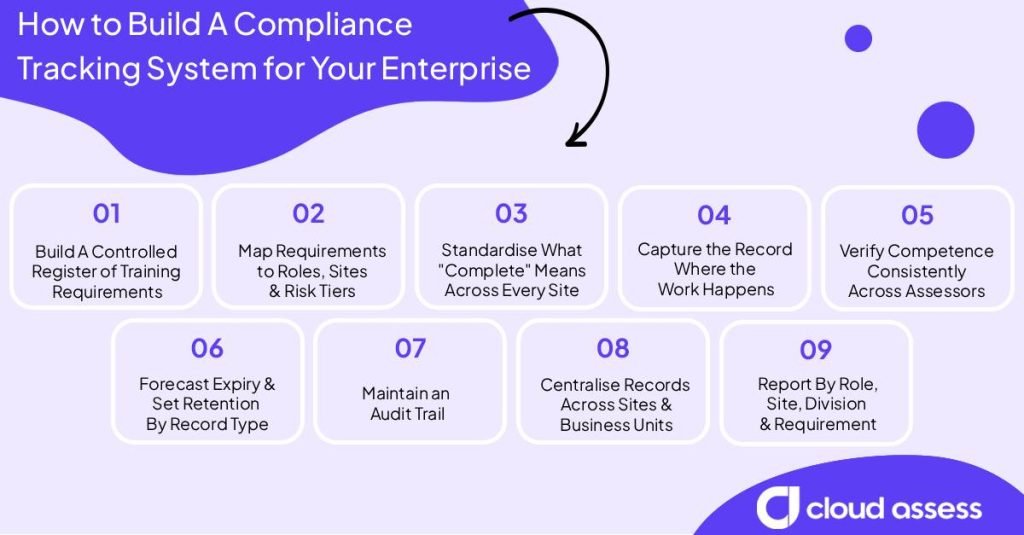
1. Build a Controlled Register of Training Requirements
List every training requirement in one place. Everything else you build depends on this list being right. For each requirement, record what it is and the law or contract that requires it. Also record where it applies, who it covers, how often it repeats, what proves it was met, and how long the record must be kept. Give the list a named owner. Requirements grow with every site and business you add, and a list nobody owns falls out of date within months.
8. Centralise Records Across Sites and Business Units
Pick one system to hold the real record and make everything else feed into it. When two systems both claim to be right, your numbers stop matching and preparing for an audit turns into manual reconciliation. Move any site running its own records onto the central system rather than letting it continue in parallel.
What To Look For in a Training Compliance Tracking System
Automated Expiry Tracking and Reminder Logic
LMS platforms track currency for the records they hold. This covers completions and any external certificates uploaded against a learner. Compliance systems and competency platforms track expiry per record type across the full requirement set. This includes licences and tickets sourced from outside. Check that reminders escalate to a named owner rather than only the worker.
Role and Site-Based Requirement Matrices
Compliance platforms and competency systems hold the requirement against roles, sites, and risk tiers. This means a transfer changes what someone needs without manual reassignment. LMS platforms hold it against groups and cohorts, and enterprise tiers increasingly add a skills matrix. Ask whether the matrix updates the requirement or only reports against it.
Offline Record Creation

Competency management platforms create the record on the device and hold the time the sign-off actually happened. That timestamp is what makes the record defensible. Records written up later break it. Ask what happens to the date when the device has no signal.
Evidence Held Inside the Record
Compliance platforms hold the document and its verification status. Competency management platforms hold what the assessor observed. They also hold the criteria they judged against, and who they were. LMS platforms hold the score and the completion date. An audit tests the second, so check what sits behind each outcome.
Contractor and Multi-Entity Records
Compliance platforms and safety systems hold contractors against the same requirements as employees. But they do this without placing them in the employee master file. HR platform modules cannot, since assignment follows the employee record. Check how a worker who belongs to more than one entity appears.
Integration with HR and payroll systems
The HR platform owns role, site, and employment status, so it should be the source. Native integration is standard across enterprise LMS, compliance, and competency platforms. What matters is whether the receiving system reassigns requirements when those fields change.
Configurable Reporting and Export for Auditors
Compliance and competency platforms report by requirement, so you can filter to one obligation across one site and one date range. LMS reporting runs off enrolment data, which gives completion rates by course, cohort, and business unit. Ask to see an export built from live data during the demo.
Real-Time Compliance Dashboards
Compliance, competency, and safety platforms report a current position rather than a snapshot from the last cycle. Several LMS platforms embed BI tooling for the same job. What differs is the definition behind each figure, so look for it visible on the dashboard itself.
Change Logs and Edit Permissions
Every change to a completed record should be logged, with a limited list of people able to make one. Compliance and competency platforms hold this natively. Ask who can edit a closed record and whether that action is visible afterwards.
Retention Set By Record Type
Compliance systems and competency platforms can hold retention as a field on the requirement. This means a licence and an incident record keep different clocks. LMS and HR platforms typically apply one retention window across everything, which will either delete too early or keep the lot. Ask whether retention is configurable per requirement or only per system.
How Cloud Assess Helps Enterprises Track Training Compliance
Cloud Assess is a flexible all-in-one platform built for frontline and high-risk work. Rather than running an LMS, a compliance management platform, and a competency management platform as three separate systems, enterprises can run all three from Cloud Assess. Training delivery, requirement tracking, and skills verification sit against the same worker record, so a person’s compliance status and their demonstrated competence never live in different places.
Here’s how that combination supports each part of enterprise training compliance tracking:
- Requirements sit against roles, not course lists. The skills matrix maps job roles to the skills each one needs and runs gap analysis across the workforce, so requirements follow the role rather than a named list someone has to maintain.
- Records are captured where the work happens. The mobile app lets workers complete assessments, capture evidence, and sign off competencies with no connectivity, and everything syncs when the device comes back online. That matters for the point raised in step four, where the record has to be created on site rather than written up later.
- Competence is evidenced, not assumed. Cloud Assess offers photo, video, and audio evidence captured in the field. It also offers verification of competency and practical observation records, and evidence portfolios and logbooks built against the worker’s record
- Expiry is tracked without anyone running a report. Alerts fire before certifications lapse, renewal workflows are automated, and each worker carries a full audit trail.
- Contractors sit in the same system as employees. Permanent employees, contractors, and casual workers are held in one record set, which removes the reconciliation problem described in step eight.
- Reporting runs from the same data at every level. Dashboards and exportable reports cover completion rates, competency trends, and training gaps.
- It connects to the systems that own your workforce data. Cloud Assess integrates with major HRIS, ERP, and payroll systems including SAP, Oracle, and Workday, with custom integrations available via API.
See how Cloud Assess handles training compliance across your sites. Request a demo.