

Construction compliance training is harder to manage than most industries. The work is high risk, the workforce changes weekly, and a large share of it belongs to somebody else. Subcontractors and labour hire crews sit inside your duty of care, but their training records sit outside your system.
Delivering the training is only half the obligation. The other half is proving it happened. That means knowing which worker completed what, when it expires, and whether they can perform the task rather than pass a quiz about it. Spreadsheets hold up until a project scales, a site loses connectivity, or a regulator asks for evidence.
Compliance training software is built to close that gap, but the platforms differ more than their marketing suggests. Some deliver the training. Some verify it on site. Some mainly hold the records. This guide compares the platforms built for construction compliance training, covering what each does well and where each falls short.
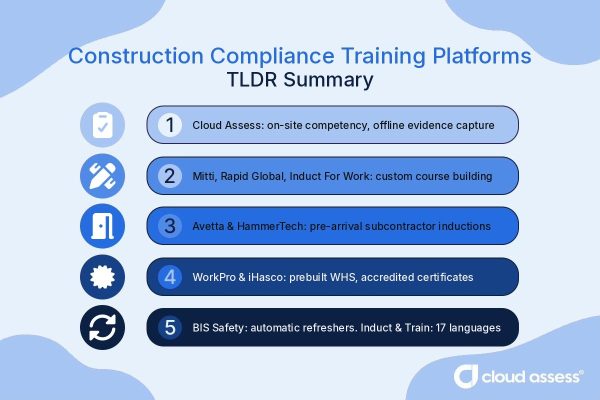
Best Construction Compliance Training Platforms TLDR Summary
Cloud Assess is a compliance training and assessment platform built for frontline construction workforces, combining mobile and offline delivery with verification of competency and photo, video, and signature evidence capture. It brings contractors and labour hire crews to the same standard as employees, with automated recertification that keeps refresher training ahead of expiring tickets and licences.
For teams building their own content, Mitti runs authoring through to verified competency with AI-built microlearning, Rapid Global supports unlimited custom courses and SCORM uploads, and Induct For Work covers toolbox talks, SWMS acknowledgement, and high-risk briefings.
Avetta and HammerTech suit pre-mobilisation and subcontractor compliance across large contractor networks, BIS Safety Software centres on training records, requirement matrices, and automatic refresher reissue, while WorkPro, iHasco, and Induct & Train by Keyzo deliver prebuilt WHS modules, accredited off-the-shelf courses, and multilingual inductions in 17 languages.
What is Construction Industry Compliance Training Software?
Construction compliance training software is a system that delivers, records, and proves the mandatory training construction workers need. It covers site inductions, work health and safety awareness, high-risk work refreshers, and toolbox talks. Employers use it to train workers, subcontractors, and visitors. The software then holds the evidence that the training happened. That evidence matters to regulators, principal contractors, and tender panels.
Construction crews move between sites and rarely sit at a desk. So these platforms also offer capabilities to deliver training on phones and assign it by role, site, or project. They help teams track tickets and licences against each worker and flag renewals before they lapse. Reporting pulls the records back out when someone asks for proof.
Quick Picks
- Best Fit For Verifying Compliance Training On Site: Cloud Assess
- Best Fit For End-To-End Compliance Training: Mitti
- Best Fit For Pre-Mobilisation Compliance Training: Avetta
- Best Fit For Compliance Training Records And Refreshers: BIS Safety Software
- Best Fit For Prebuilt WHS Compliance Training: WorkPro
- Best Fit For Custom Compliance Course Library: Rapid Global
- Best Fit For Multilingual Compliance Induction Training: Induct & Train by Keyzo
- Best Fit For Subcontractor Compliance Training: HammerTech
- Best Fit For High-Risk Work Briefings And Toolbox Talks: Induct For Work
- Best Fit For Off-The-Shelf Certificated Compliance Courses: iHasco
Top Construction Compliance Training Solutions
Best Fit For Verifying Compliance Training On Site
#1 Cloud Assess
Average User Score: 4.7 / 5




Cloud Assess is a compliance training and assessment platform built for frontline workforces. It enables construction businesses to prove a worker is safe to perform the task. It offers mobile and offline delivery capabilities that allow training and assessment to work smoothly on any site. The platform supports verification of competency in the field, shortening time to productivity.
Cloud Assess also helps supervisors clear crews for high-risk tasks before work starts. It allows compliance training to follow a company’s own procedures and site conditions. The platform comes with built-in automated recertification that keeps refresher training ahead of expiring tickets and licences. It brings contractors and labour hire crews to the same standard as employees through a unified view. It also supports compliance management, keeping records ready for regulators and principal contractors with photo, video, and signature evidence capture.
This makes Cloud Assess well-aligned for:
- Builders and contractors delivering compliance training on site
- Multi-site projects using contractor and labour hire workforces
- High-risk work that requires verified practical competency
- Safety, HR, and training managers accountable for compliance evidence
Key Features
- Compliance training delivery
- Site induction pathways
- Course and resource library
- Role-based assignment
- Assessment builder
- Practical observation sign-off
- Verification of competency
- Photo and video evidence
- Digital logbooks
- Offline mobile app
- Licence and ticket tracking
- Expiry alerts
- Recertification workflows
- Skills and compliance matrix
- Audit trail per worker
Pros
- Verifies compliance training on site with photo and video evidence
- Delivers compliance training offline so remote crews stay covered
- Keeps refresher training on schedule through automated recertification reminders
- Builds custom compliance courses to match site-specific procedures
- Produces audit-ready records for regulators and principal contractors
Pricing
Cloud Assess offers an all-inclusive solution for employee training in high-risk, high-compliance industries. Every feature is included from day one, including mobile offline assessment, verification of competency, skills matrix and automated compliance tracking. There are no upgrade paths or feature gates. Visit our pricing page for an accurate quote.
Rating
4.7/5 (average rating from Capterra, G2, GetApp, Software Advice)
Best Fit For End-To-End Compliance Training
#2 Mitti
Average User Score: 4.6 / 5

Mitti covers the full compliance training cycle, from course creation through to verified competency. It enables businesses to build, deliver, and evidence training in one place. Its AI tool helps teams create courses quickly by turning existing procedures into structured lessons. The platform delivers bite-sized microlearning lessons on mobile, so workers learn in the flow of work.
Mitti also helps companies confirm that workers can apply what they learned. They do this by logging in-person competency checks against the training record. It keeps classroom, digital, and practical training in a single record. This allows training history to stay complete as workers move between sites.
This makes Mitti well-aligned for:
- Businesses wanting compliance training built and delivered in one platform
- Frontline crews training in short sessions between tasks
- Teams turning existing procedures and documents into courses
- Safety and operations managers tracking training alongside site activity
However, the platform is not built around the practical, high-risk assessment that construction compliance often requires.
Key Features
- Compliance training delivery
- Site induction workflows
- Toolbox talk sessions
- Editable course library
- Role and site assignment
- In-lesson quizzes
- In-person competency checks
- Offline course access
- Credential expiry tracking
- Recurring course reissue
Pros
- Runs compliance training end to end, from authoring to records
- Verifies training on the job with in-person competency checks
- Keeps classroom, digital, and practical training in one record
- Builds compliance courses quickly using AI and ready-made content
- Repeats earlier lessons automatically to reinforce compliance knowledge
Cons
- No nationally accredited course delivery
- Limited depth for formal qualifications
- Not built for practical, high-risk assessment
- Reporting customisation options are limited
Pricing
Mitti offers three pricing plans: a Free plan for up to 10 teams, a Premium plan starting $29 per seat per month, and a custom Enterprise plan available on request.
Rating
4.6/5 (average rating from G2, Capterra, GetApp, Software Advice)
Best Fit For Pre-Mobilisation Compliance Training
#3 Avetta
Average User Score: 2.2 / 5

Avetta manages contractor compliance from prequalification through to site access, with training as the step that clears a worker. It offers online inductions and assessments that allow training to be completed ahead of arrival. The platform supports assignment by role, site, and project, giving each worker access to the specific training their job requires.
Avetta also converts existing safety material into online courses. It offers elective courses that support cross-training between trades.
This makes Avetta well-aligned for:
- Principal contractors mobilising large contractor workforces
- Projects where site access depends on completed training
- Businesses inducting workers across multiple sites and clients
- Safety and site access teams clearing workers before mobilisation
However, training modules cannot be completed offline, so workers need connectivity beforehand.
Key Features
- Online induction training
- Site-specific training modules
- Learning management system
- Instructor-led training scheduling
- Role and location assignment
- Training assessments and tests
- Multilingual assessments
- Qualification validation
- Training expiry tracking
- Site access verification
Pros
- Clears workers before mobilisation through site-specific inductions and assessments
- Targets training by role, site, and project requirements
- Tests comprehension with assessments built into each induction course
- Converts existing course material into online format
- Extends learning with elective courses for upskilling and cross-training
Cons
- Training cannot be completed offline
- Course setup often needs vendor support
- Better suited to larger contractor networks
Pricing
Avetta doesn’t make pricing information available on their website. Contact their team directly for a custom quote.
Rating
2.2/5 (average rating from G2, Capterra, GetApp, Software Advice)
Best Fit For Compliance Training Records and Refreshers
#4 BIS Safety Software
Average User Score: 4.8 / 5

BIS Safety Software pairs a learning management system with a dedicated training record system. It enables businesses to keep every worker’s training current without manual tracking. It offers a training matrix that allows requirements to be mapped to roles, sites, and locations. The platform supports automatic course assignment when a record expires, so refresher training reissues itself.
BIS Safety Software also alerts workers and supervisors months ahead of expiry. It offers gap reporting that shows expired, missing, and upcoming training in one view.
This makes BIS Safety Software well-aligned for:
- Businesses managing training records across multiple sites
- Contractors tracking refresher training at scale
- Teams consolidating records from classroom and external providers
- Safety and training administrators preparing for audits
However, course content is aligned to North American regulations rather than Australian or UK requirements.
Key Features
- Safety training delivery
- Compliance course library
- eLearning authoring tools
- Training requirements matrix
- Exam engine
- Competency management system
- Classroom session management
- Certification expiry alerts
- Record of training
- Training reporting dashboards
Pros
- Assigns refresher courses automatically when training records reach expiry
- Warns workers and supervisors months before training expires
- Blended learning support keeps online, classroom ,and external training in one record
- Maps training requirements to roles, locations, and sites
- Shows expired, missing, and upcoming training through gap reporting
Cons
- Content aligned to North American regulations
- Feature depth slows initial configuration
- Reporting takes time to customise
Pricing
BIS Safety Software doesn’t make pricing available on their website. Contact their team directly for a tailored quote.
Rating
4.8/5 (average rating from G2, Capterra, GetApp, Software Advice)
Best Fit For Prebuilt WHS Compliance Training
#5 WorkPro
Average User Score: 4.3 / 5

WorkPro combines a prebuilt WHS module library with workforce screening and credential checks. It enables businesses to meet safety training obligations without building courses first. The platform supports role-based bundles, giving each position the modules its duties require. This speeds up implementation across a workforce and helps employees become productive more quickly.
WorkPro also keeps module content current with Australian WHS legislation and Safe Work Australia guidance. It carries currency records for two years, reducing the need for repeat training as workers move between employers.
This makes WorkPro well-aligned for:
- Businesses needing WHS training courses available immediately
- Labour hire and recruitment agencies placing construction workers
- Employers meeting duty of care obligations across mixed workforces
- HR and safety teams without course development resource
However, modules confirm knowledge rather than observed ability. High-risk tasks still need practical assessment elsewhere.
Key Features
- WHS training courses
- Construction safety modules
- Induction program builder
- Automated training requests
- Module assessment tasks
- Certificate issuing
- Licence and ticket register
- White card verification
- Expiry alerts
- Compliance reporting dashboard
Pros
- Delivers WHS compliance training from a library of prebuilt courses
- Keeps content current with Australian WHS legislation
- Bundles modules by role, including construction site workers
- Holds training currency records for two years, reducing repeat training
- Sends training requests in bulk to speed workforce rollout
Cons
- Module depth limited to general awareness training
- No options for on-site practical assessment
Pricing
WorkPro doesn’t offer pricing details on their website. Contact them directly for a tailored quote.
Rating
4.3/5 (average rating from G2)
Best Fit For Building Custom Compliance Courses
#6 Rapid Global
Average User Score: 4.1 / 5

Rapid Global gives businesses control of their own compliance course content. It enables safety teams to build training that matches their sites, procedures, and trades. It offers unlimited course creation, allowing a library to grow as projects and requirements change.
Rapid Global also lets businesses supplement their own content with expert-built and pre-written courses, or SCORM uploads. It offers custom forms and assessments that confirm workers understood the material.
This makes Rapid Global well-aligned for:
- Businesses with site-specific procedures to train workers on
- Contractors delivering training across multiple sites and clients
- Safety teams maintaining their own course content
- Employers needing training that changes with project requirements
- Companies investing in pre-built courses that need a platform to deliver them from
However, certificates are issued from your own templates rather than nationally accredited ones. This means the platform can’t deliver the training needed for licensed high-risk work. That still requires an accredited provider.
Key Features
- Induction training delivery
- Safety training modules
- Course builder
- SCORM content upload
- Site and role assignment
- Mobile delivery
- Document verification
- Licence expiry tracking
- Automated training reminders
- Compliance status dashboard
Pros
- Builds an unlimited library of custom compliance courses in-house
- Edits course content in a browser without vendor involvement
- Supplements custom courses with pre-written content and SCORM uploads
- Tests comprehension through custom forms and assessments
- Shows who a course change affects before publishing
Cons
- Pre-built courses need to be purchased from separate vendors
- No delivery of nationally accredited training
Pricing
Rapid Global offers a Rapid One pricing plan that gives organisations access to every product. The pricing details are only available upon request.
Rating
4.1/5 (average rating from G2)
Best Fit For Multilingual Compliance Induction Training
#7 Induct & Train by Keyzo
Average User Score: No ratings available

Induct & Train delivers compliance training to workforces that do not share a first language. It enables businesses to train every worker in a language they read confidently. It offers delivery in 17 languages, so quizzes and course content are understood in the worker’s own language, not pieced together from a language they don’t speak fluently. This means global or multi-site teams don’t need to recreate training for each region. It also cuts the safety risk that comes with workers guessing at instructions they don’t fully understand. The platform supports assignment by job role, giving each worker the training their duties require.
Induct & Train also extends beyond induction to ongoing training for existing teams. It offers configurable dashboards that show training and certification status across sites.
This makes Induct & Train well-aligned for:
- Businesses employing workers with limited English
- Contractors managing training across multiple sites and roles
- Employers wanting policy sign-off recorded alongside training
- Safety and HR teams reporting on training status
However, the platform is built for UK compliance frameworks, so Australian WHS obligations need configuring from scratch.
Key Features
- Online induction training
- Training module builder
- Toolbox talk delivery
- Role-based assignment
- Course translation
- Retraining scheduling
- Construction Skills Certification Scheme (CSCS) card validation
- Certification approvals
- Digital permits
- Training completion reporting
Pros
- Delivers compliance training in 17 languages for mixed workforces
- Extends training beyond induction with modules for existing teams
- Assigns training and policies by job role, requesting certifications
- Tracks training and certification status through configurable dashboards
Cons
- No prebuilt compliance course library
- Built around UK compliance frameworks
Pricing
Induct & Train offers a range of pricing plans that are tailored to suit different business needs. Contact them directly for a quote.
Rating
No ratings available
Best Fit For Subcontractor Compliance Training
#8 HammerTech
Average User Score: 4.3 / 5

HammerTech focuses on the compliance training of subcontracted workers rather than direct employees. It enables principal contractors to standardise training across dozens of trades and subcontractor businesses, rather than chasing compliance separately for each one. It offers site-specific video orientations with quizzes, allowing workers to be trained before they arrive. The platform also supports assessment gating, so site access depends on the worker passing.
HammerTech also gives subcontractors self-service portals for uploading worker training records. It offers training gap reporting that flags upcoming renewals across every trade.
This makes HammerTech well-aligned for:
- Principal contractors managing large subcontractor workforces
- Projects with dozens of trades cycling through site
- Businesses standardising training across multiple subcontractors
- Safety teams evidencing trade partner compliance
However, training content centres on site orientation, so trade-specific compliance training sits elsewhere.
Key Features
- Video induction training
- Custom training uploads
- Comprehension quizzes
- Pre-arrival completion
- Automated training tracker
- Licence and ticket upload
- Training expiry alerts
- Skills matrix
- Subcontractor compliance visibility
- QR site sign-in
Pros
- Trains subcontractor crews before they arrive on site
- Delivers site-specific video orientations with built-in quizzes
- Gates site access until orientation assessments are passed
- Lets subcontractors upload worker training records themselves
- Flags training gaps and renewals across every trade
Cons
- No off-the-shelf course library
- Training scope centres on orientations
- Built around general contractor workflows
Pricing
HammerTech is priced based on your business needs. Contact their team directly to get an accurate quote.
Rating
4.3/5 (average rating from G2, Capterra, GetApp, Software Advice)
Best Fit For High-Risk Work Briefings and Toolbox Talks
#9 Induct For Work
Average User Score: No ratings available

Induct For Work handles the short, recurring safety briefings that run alongside formal training. It enables businesses to record that a worker received and accepted a briefing. It offers time-stamped digital signatures on safe work method statements (SWMS), toolbox talks, and permits, giving supervisors proof of acceptance against each worker profile. The platform supports overnight content updates, so a briefing can reflect a change in site conditions the next morning.
Induct For Work also converts existing PowerPoint material into online courses. It offers voice narration generated from slide text, supporting workers who find written content harder to process.
This makes Induct For Work well-aligned for:
- Businesses running regular toolbox talks across sites
- High-risk work requiring documented briefing acceptance
- Contractors briefing crews on changing site conditions
- Supervisors needing signed proof of safety communication
However, Induct For Work has no off-the-shelf briefing content. Every SWMS, toolbox talk, and high-risk briefing has to be built by the business before it can be delivered.
Key Features
- Mobile induction training
- Toolbox talk sign-off
- SWMS acknowledgement
- Plant pre-start forms
- Language packs
- Digital signature capture
- Worker profile records
- Licence expiry chasing
- Induction progress tracking
- Compliance dashboards
Pros
- Delivers toolbox talks and high-risk briefings with signed acknowledgement
- Records time-stamped signatures against each worker’s SWMS and permits
- Updates briefing content overnight and alerts every worker
- Converts existing PowerPoint presentations into online courses
- Adds quizzes, video, and voice narration to any course
Cons
- No ready-made training content
- Course authoring is slide-based
- Advanced setup may need assistance
Pricing
Induct for Work offers Premium, Premium+, Ultra, and Ultra+ pricing plans that start from $129 per month.
Rating
No ratings available
Best Fit For Off-The-Shelf Certificated Compliance Courses
#10 iHasco
Average User Score: 4.4 / 5

iHasco supplies compliance training courses that are ready to assign without any setup. It enables businesses to meet a training obligation and hold evidence of it the same day. Its courses are independently accredited, so certificates carry recognised backing alongside internal sign-off. The platform supports construction duties including asbestos awareness, working at height, lifting equipment, and site management regulations.
iHasco also reviews and updates course content as legislation changes. It offers short courses of 20 to 35 minutes, making them accessible before or in between shifts.
This makes iHasco well-aligned for:
- Businesses needing certificated training immediately
- Employers covering statutory duties across trades
- Contractors evidencing training to clients and regulators
- Teams without course development capability
However, the courses are written to UK legislation, so Australian obligations need separate coverage.
Key Features
- WHS compliance courses
- Course assessments
- Course assignment
- Multilingual course access
- Training interval settings
- Automated renewal reminders
- Forced training sessions
- Document and policy module
- Completion certificates
- Training reporting dashboards
Pros
- Issues accredited certificates as proof of compliance training completion
- Covers construction duties including asbestos, working at height, and Construction (Design and Management) Regulations
- Approved by IOSH, RoSPA, CPD, and IIRSM
- Reviews and updates course content as legislation changes
- Runs short courses that fit around site work
Cons
- Content aligned to UK legislation
- Limited scope to tailor content
- No site-specific induction content
Pricing
iHasco offers a customised training plan based on the number of learners. A pay-as-you-go plan is also available based on the number of courses a business needs.
Rating
4.4/5 (average rating from G2, Capterra, GetApp, Software Advice)
Construction Compliance Training Buyer’s Guide
- Check whether the platform proves competency or only completion. Many compliance obligations require a worker to demonstrate a task safely, observed by someone competent to judge it. Course completion records knowledge. Confirm the platform can capture a practical sign-off if your high-risk work needs one.
- Decide who you need to train, not just employ. Compliance risk sits heavily with subcontractors and labour hire crews. Check whether the platform can train workers you do not employ, and whether that costs extra per worker.
- Look at where the content comes from. Platforms either supply ready-made courses, let you build your own, or both. Ready-made content gets you training quickly. Built content matches your actual sites and procedures. Decide which problem you have before you compare libraries.
- Test how training works without connectivity. Sites lose signal. Check whether workers can complete training offline and sync later, or whether they need a connection at the moment of delivery.
- Check how refresher training is triggered. Tickets, licences and inductions expire. The platform should reassign the course automatically when a record lapses, rather than relying on someone noticing.

Frequently Asked Questions (FAQs)
Construction Compliance Training FAQs
Is compliance training software a legal requirement in construction?
No. Australian WHS law requires that workers receive information, training, instruction, and supervision appropriate to their work, and that the business can demonstrate it. UK law sets a similar duty under the Health and Safety at Work etc. Act 1974 and the CDM Regulations require employers to provide information, instruction, training, and supervision, and to be able to show they’ve done it. Neither specifies how. Software is a way of delivering and evidencing that duty, not the duty itself. What matters to a regulator is whether the training happened, whether it suited the risk, and whether you can produce the records.
How is compliance training different from a site induction?
A site induction covers a specific site: its hazards, layout, emergency procedures, and rules. Compliance training covers obligations that follow the worker regardless of where they are working, such as working at height, hazardous manual tasks, or silica awareness. Most construction businesses need both, and many platforms handle one better than the other.
Can compliance training software issue a white card or high-risk work licence?
No. Those are nationally recognised credentials and can only be issued by a registered training organisation. Compliance training software can deliver the training around them, track when they expire, and hold the evidence. Check whether a platform delivers accredited training itself or simply records credentials issued elsewhere.
How often does construction compliance training need to be refreshed?
It varies by obligation. Some credentials carry a fixed currency period, others are set by the business, and some are triggered by a change in role, site, or procedure. A practical approach is to set refresher cycles against whichever is shortest: the licence period, your own policy, or the client’s site requirements.


