

Online learning is shifting how individuals and organisations engage with, design, and manage education. Learners expect options that match their pace, location, and goals. Educators and trainers are focusing on creating structured, interactive online experiences.
Effective online learning programs leverage different types, formats, and tools. Each has unique strengths and challenges. When combined, they create programs that engage learners and meet clear objectives.
In this guide, we explore:
- What online learning means
- How it compares to other delivery methods
- The main types of online learning used today
- Common delivery methods that educators, trainers, and organisations use
- Online learning benefits for learners, training providers, and frontline organisations
- Practical strategies for implementing online learning programs
- Technologies driving online learning and their growing role in education
- Challenges that can arise and effective ways to manage them
What is Online Learning?
Online learning is an educational method for delivering training, facilitating discussions, and conducting assessments over the internet. Training providers and Learning and Development (L&D) teams use it to deliver remote and hybrid training. Any updates they make to online training materials reflect instantly for every learner.
Learners can access online learning resources through computers, tablets, or mobile devices. They can join online sessions and webinars, complete quizzes and assessments, capture photo and video evidence, and interact with instructors and peers. These activities help them collaborate and receive real-time feedback. Many online learning platforms also provide access to pre-recorded lectures and learning activities that can be completed at the learner’s own pace.
How Does Online Learning Compare to Other Learning Approaches?
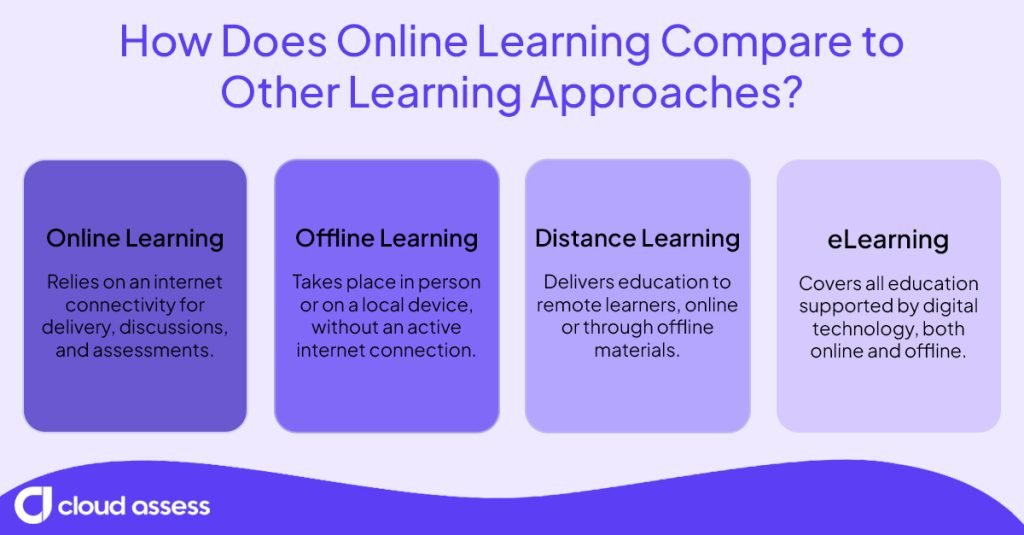
Online learning is the best fit when learners need live interaction, instant updates, and real-time feedback, which other approaches can’t always provide.
Online Learning vs Offline Learning
Online learning relies on a stable internet connection. Learners use the connection to access materials, join sessions and discussions, and complete assessments.
Offline learning takes place in person or on a local device, without an internet connection. Classroom instruction, workshops, and downloaded courses all fall under offline learning. With downloaded courses, learners can also complete assessments offline. Their responses and evidence sync to the organisation’s system once they reconnect.
Online Learning vs Distance Learning
Distance learning delivers education to learners in a different location from their educators.
Online learning is now a popular way to reach distance learners. However, it isn’t the only method. Some programs still send learners printed materials or pre-recorded content. Online learning doesn’t always happen remotely either. Learners in the same classroom often use online platforms during hybrid sessions.
Online Learning vs eLearning
eLearning, short for electronic learning, is education supported by digital technology. It covers courses and training on computers, tablets, and mobile phones, both online and offline. Offline formats include pre-installed training software and downloaded courses.
Online learning is a specific type of eLearning that relies on an internet connection. All online learning is eLearning, but not all eLearning is online.
What Are the Different Types of Online Learning?
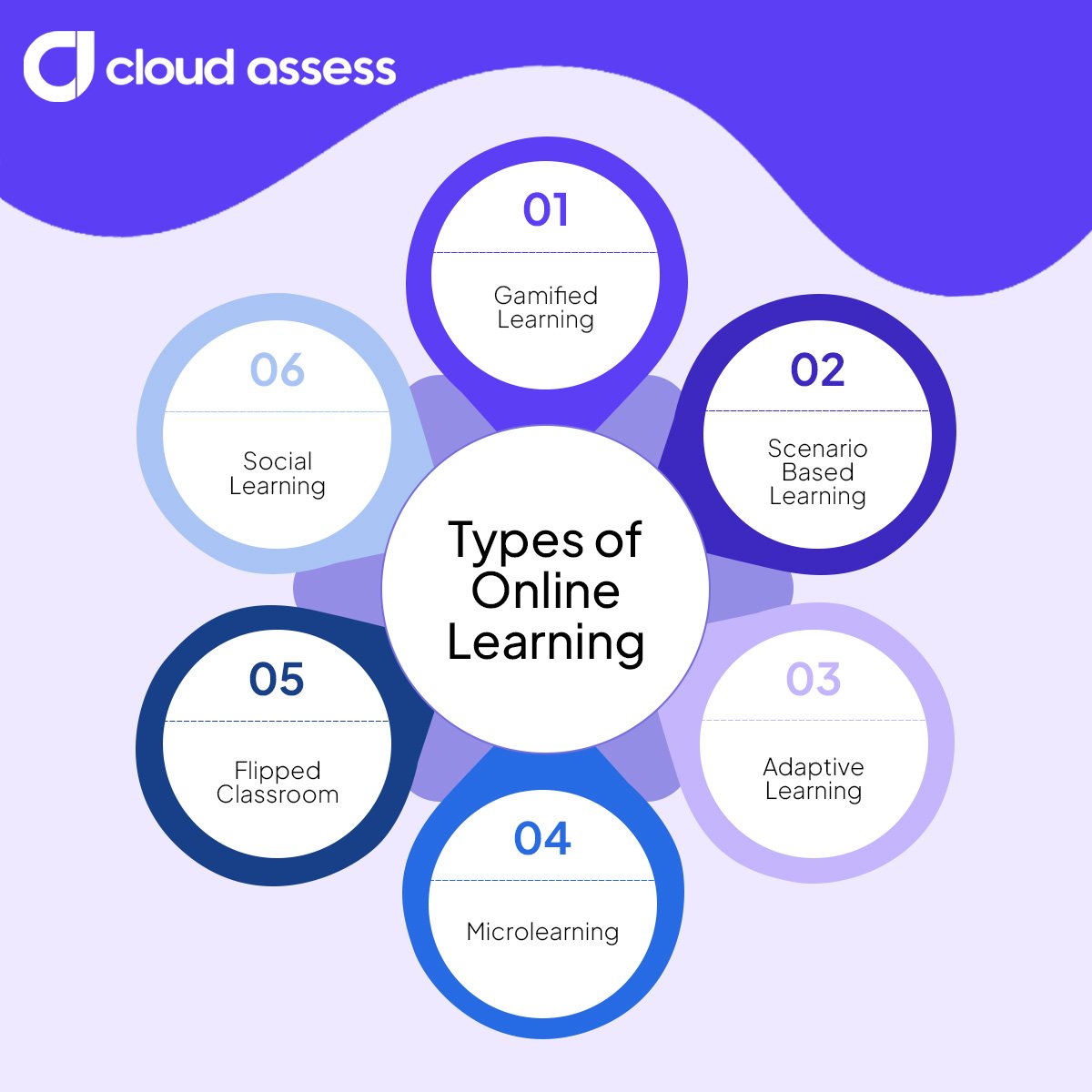
Types of online learning are teaching approaches that shape how learners engage with content. They describe how a course is designed, not how or when it’s delivered. A gamified course, for example, can run live or self-paced.
Gamified Learning
Gamification boosts engagement in courses learners might otherwise rush through, such as mandatory compliance training. It uses digital platforms to turn lessons into structured activities with points, levels, and rewards. These systems track learner progress and unlock new content based on performance. This creates a guided and measurable path through the course. It also provides a sense of competition and achievement that keeps learners coming back regularly.
Scenario-Based Learning
Scenario-based learning is best for safety and compliance training, where learners need to practise decisions without real-world consequences. It places learners in realistic workplace situations within an online course. Learners make decisions and see the consequences of each choice. Each response leads them down a different branch of the scenario.
Adaptive Learning
Adaptive learning platforms work best for groups with mixed experience levels, so each learner can skip what they know and focus on their gaps. They use data and algorithms to personalise each learner’s experience. The platforms analyse the modules a learner has completed and their performance on quizzes, tasks, and interactions to identify patterns in their understanding. This can indicate strengths and gaps in knowledge. The system then adjusts the content, sequence, and difficulty to suit the learner’s current level of understanding.
Microlearning
Microlearning works well for busy or frontline learners who need quick refreshers that fit into a few spare minutes. It delivers small, focused online lessons that break complex subjects into short, self-contained modules. Learners access these lessons through digital learning platforms that track progress. The structure allows quick repetition or review when needed.
Flipped Classroom
A flipped classroom makes the most of live sessions by moving theory online and saving face-to-face time for practice. It reverses the traditional order of instruction and application. It works by providing online materials such as videos and readings before live discussions or practice sessions. Learners study the content independently online. They then use group or instructor-led sessions to apply, test, and expand their understanding.
Social Learning
Social learning builds shared knowledge across teams, especially where experienced staff hold know-how others need. It involves interacting with peers and sharing knowledge in online environments like discussion forums, workplace communication tools, and social platforms. These tools allow participants to discuss their learning experience, ask questions, and exchange resources. Learning happens through conversation and observation.
What Are the Most Common Online Delivery Methods?
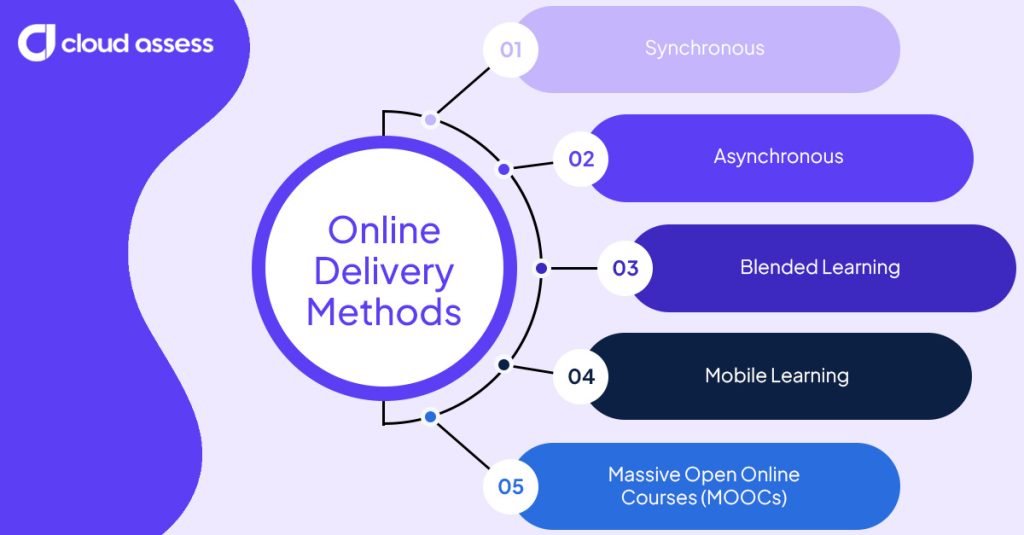
Online delivery methods describe when and how learners access training. Delivery covers timing, such as live or self-paced, and the setting or device used. The same course design can work across several delivery methods.
Synchronous
Synchronous learning works well for discussions, demonstrations, and mentoring that benefit from live questions and instant feedback. It takes place online in real time. Learners and trainers participate in virtual sessions. These instructor-led training sessions use video conferencing or virtual classroom tools. They include lessons, discussions, and collaborative activities.
Asynchronous
Asynchronous learning suits learners with varied schedules, such as shift workers, who need to study whenever time allows. It takes place online, but without live sessions. Learners access recorded lessons, readings, and assessments through online platforms at any time. This allows for self-directed learning, enabling participants to engage with the content at their own pace. The system records and tracks their progress.
Blended Learning
Blended learning supports vocational and practical training, where theory works online but skills need hands-on practice. It combines online instruction with in-person training. Some organisations call this approach hybrid learning. Learners access course materials and complete assessments online, and attend practical sessions in person. Trainers can also record or stream in-person sessions for remote learners. This also allows all learners to revisit the session if they need to.
Mobile Learning
Mobile learning helps frontline and deskless workers train on the devices they already carry. Learners use mobile apps or browser-based platforms to access lessons, videos, and assessments. Course design is adapted for smaller screens and touch-based navigation. This makes it easy to access and engage with content on mobile devices. Mobile apps also often come with offline learning features that allow learners to download content to access later, with progress syncing once they reconnect.
MOOCs (Massive Open Online Courses)
MOOCs suit learners exploring new topics or building general skills, rather than organisations delivering role-specific training. They provide large-scale online courses to anyone who wants to enrol. These are hosted on public platforms and divided into modules that include videos, readings, and quizzes. Thousands of learners can study the same material at the same time, each following an organised course path.
What Are the Benefits of Online Learning?
For Learners
Learners benefit most from the freedom to study at their own pace, on their own schedule, from almost anywhere.

Flexible Access to Education
Online learning gives learners control over when and where they study. They can access courses, videos, and different types of assessments at any time, as long as they have an internet connection. This flexibility allows learners to balance study with work, family, personal, or other commitments. It ensures that they work towards their educational and career goals.
Diverse and Interactive Learning Materials
Online environments combine written, visual, and interactive content to support different learning styles. Learners can watch demonstrations and complete exercises online. They engage with materials at their own pace, whether at their own home or in another setting. This structure helps them explore topics more thoroughly than traditional text-based approaches.
Progress Tracking and Structured Feedback
Online platforms make it easy for learners to review their performance and identify areas for improvement. They can also access feedback through the same systems. This creates a continuous feedback loop that supports steady progress and accountability.
Continuous Skills Development
Skills stagnate when they’re not used, and industry needs change over time. Online learning supports ongoing skill development through short, modular courses. Learners can return regularly to complete new certifications or refresh specific skills as their role evolves.
For Vocational Education and Training (VET)

For training providers, online learning’s main value is managing apprenticeships, reporting, and assessment evidence in one accessible place.
Shared Visibility for Apprenticeships
Apprenticeships involve three parties: the apprentice, the employer, and the training provider. All three agree to the training plan and follow progress against it. With online learning, the plan, evidence, and progress sit in one shared platform. Employers and trainers can review work and sign off remotely between site visits.
Wider Reach for Training Providers
Online delivery helps training providers reach learners outside major cities. Regional and remote learners can enrol without relocating or travelling long distances. Providers can grow enrolments without opening new campuses.
Simpler Compliance Reporting
Training providers must report learner data to government bodies. In Australia, Registered Training Organisations (RTOs) report to the National Centre for Vocational Education Research (NCVER). In England, providers submit Individualised Learner Record data to the Department for Education. With online delivery, enrolments, participation, and results are recorded digitally from the start. Providers can draw on these records for reporting instead of entering data manually.
Audit-Ready Assessment Evidence
Online assessment helps training providers build a complete evidence record for each learner.
Assessors can record practical tasks on video, collect third-party reports from supervisors, and conduct identity checks to confirm the work is the learner’s own.
For Australian VET providers, the Standards for RTOs 2025 require assessment evidence to be valid, sufficient, authentic, and current. These are known as the rules of evidence. If an RTO is audited, they need to show the Australian Skills Quality Authority (ASQA) or their state regulator how each judgement was reached. In England, Ofsted inspections and awarding organisations’ quality checks look for similar evidence.
For Frontline Workforces
For frontline workforces, online learning brings training to the site, the shift, and the device, rather than pulling workers away.

Site Inductions Before Day One
Online learning moves site inductions ahead of a worker’s first shift. Contractors and new starters cover hazards, rules, and emergency procedures online before arriving. Supervisors can confirm completion in advance, then focus on site-specific briefings in person.
Training at the Point of Work
Online learning reaches frontline workers who rarely sit at a desk. Workers complete short online modules on a phone or tablet during their shift. Training fits around breaks, shift handovers, and quiet periods on site.
Efficient Use of Resources
Online learning reduces the cost of training frontline teams. Workers at remote or regional sites complete modules on demand, so organisations save on travel, venues, and printed materials, and fewer people leave the roster for a training day. That frees up the L&D budget for priority skills and site-specific training.
For example, Future Force Training & Recruitment replaced paper-based assessments with a single online platform, achieving a 50% reduction in assessment-related admin time through live updates, centralised access, and fewer post-session follow-ups.
Visibility of Licences and Competencies
With online learning, every completed course and assessment is recorded against the worker. Supervisors can see who holds the right licences and competencies for each task. They can roster qualified workers rather than delaying work until someone is trained. Rostering qualified workers reduces risk and keeps projects moving. Organisations can also assign online refresher training before tickets expire.
Consistent Training Across Sites
Online learning gives every site the same training and assessment standard. A single course can reach workers at multiple locations, so no one’s training depends on which site or supervisor they have.
For example, Komatsu manages three training streams for around 300 employees in one platform. This cut admin and shortened assessment turnaround times.
How to Implement an Online Learning Plan in 9 Steps
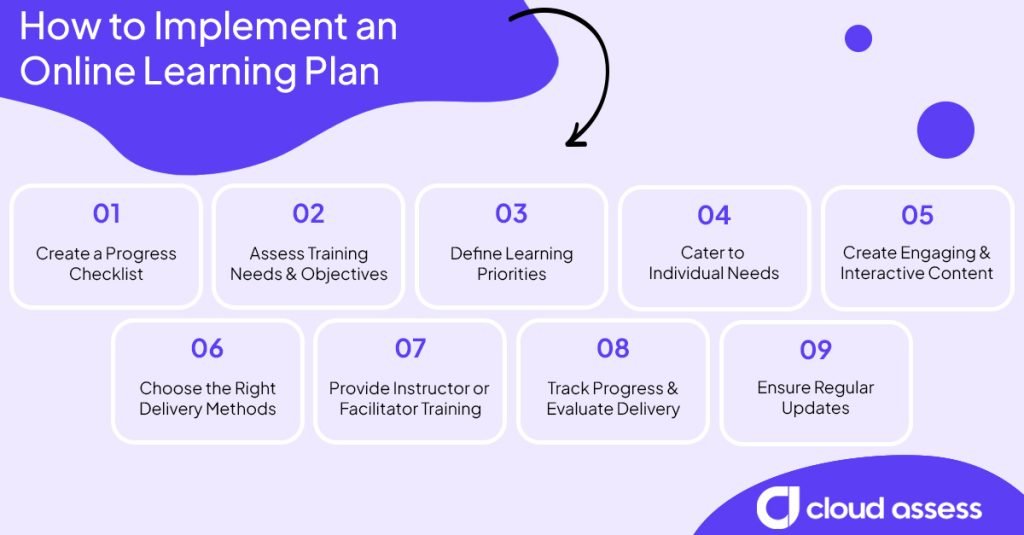
A structured plan helps organisations launch online learning that meets real skill needs, rather than adopting tools without clear goals.
1. Create a Progress Checklist
Before you start, decide how you’ll measure progress at each stage. Write questions to ask at each step of your plan. Return to them as you move through each phase. The answers help you spot problems early, before they affect learners. Below are some examples of questions that you can ask. Be sure to adapt them to suit your program.

Ensure trainers, instructors, and facilitators know how to make the most of online learning environments. In workplace environments, this may mean training instructors on how to lead virtual meetings and manage live polls or breakout rooms. Vocational trainers might need training to effectively integrate online simulations into their activity plans.
Schedule short training sessions that show facilitators how to upload content. Make sure they also learn how to track learner progress and communicate effectively within the platform.
8. Track Progress and Evaluate Delivery
Use built-in analytics to monitor progress beyond completions. In workplace settings, track training against performance metrics linked to job outcomes. In vocational training, review practical assessment results.
Collect learner feedback through surveys or discussions. Identify patterns such as topics where learners struggle or disengage. Use this information to refine your content and methods accordingly.
9. Ensure Regular Updates
Review and update your online learning content regularly. Corporate programs need updates when policies, regulations, or systems change. Vocational content should reflect new industry standards or technology.
Schedule content reviews every few months. Replace outdated materials, refresh examples, and ensure the platform runs smoothly across devices.
Which Technologies Support Online Learning?
The right technology depends on whether you’re managing compliance, personalising learning, selling courses, or supporting collaboration.
Learning Management Systems
A learning management system (LMS) delivers, tracks, and manages online learning. It stores course materials, hosts assessments, and records learner progress. An LMS for corporate training manages onboarding, compliance training, skill development, and refresher training. An LMS for RTOs organises lessons, streamlines marking processes, and supports AVETMISS-compliant reporting.
Learning Experience Platforms
A learning experience platform (LXP) focuses on personalised, learner-driven experiences. It uses data to recommend courses, articles, and videos based on individual goals and interests. Organisations often use LXPs to create flexible learning ecosystems. These ecosystems allow employees to explore content beyond mandatory training. In vocational contexts, they help learners access additional resources that support their technical skills and ongoing development.
Online Course Platforms
Online course platforms are built for creating and selling courses to external audiences. Instructors and organisations use them to publish courses, take payments, and attract new learners. Some organisations create training that’s useful beyond their own teams. Selling it through an online course platform adds a new revenue stream.
Microlearning Apps
Microlearning apps deliver short, focused learning units such as flashcards, quick quizzes, or short videos. Corporate teams often use these apps for just-in-time learning or refresher training. Vocational learners use them to reinforce technical concepts in short sessions.
AI & Adaptive Learning Tools
Many online learning platforms now include AI features. Adaptive learning tools in many learning management systems adjust content based on each learner’s progress, rather than having them follow a fixed path. Learners can also ask AI assistants to explain difficult concepts at any time.
With AI assessment generators, organisations turn a prompt or document into assessments within minutes. This provides them with content that’s tailored to their requirements and processes. L&D teams and trainers should review these assessments before distributing them, but reviewing content is significantly quicker than developing it.
AI marking tools also help training providers grade large volumes of assessments. Assessors receive a suggested starting point for each judgement. This speeds up their grading and helps maintain consistent standards across assessors. However, the final decision always remains the assessor’s responsibility, supporting responsible AI use in VET.
Collaborative Learning Tools
Collaborative learning tools help small groups work towards shared objectives. Group members can work on the same document or whiteboard simultaneously, even from different locations. In corporate environments, employees use project management tools to distribute training tasks and deadlines among themselves. In vocational training, assessors can see each learner’s contribution to group work. They can then assess each learner individually, as competency-based assessment requires.
What Are Common Challenges In Online Learning?

Reliance on Internet Connectivity
Online learning depends on stable internet access. Learners in remote or low-connectivity areas may face interruptions during live sessions or technical difficulties when downloading materials. This can disrupt progress and limit participation.
Solution: Choose a platform that combines online and offline learning. Learners can then download materials and complete courses or assessments without a connection. Their progress syncs once they reconnect. It’s also best practice to test materials on low-bandwidth connections and optimise video files for easier streaming.
Reduced Social Interaction
Learners studying online can feel isolated without face-to-face interaction. This reduces motivation and can impact learner engagement. Collaboration and informal discussion often happen naturally in classrooms. But they need to be deliberately built into digital environments.
Solution: Integrate social and collaborative learning tools. These include discussion boards, live group sessions, or breakout activities. Encourage trainer feedback, peer review, and shared projects to boost interactions.
Digital Fatigue
Extended screen time can cause fatigue and reduce concentration. Learners juggling multiple online sessions in a day may find it difficult to stay engaged.
Solution: Design sessions and courses that balance online activities with breaks for offline reflection or assignments. Balancing different media types such as text, audio, and video can also help to reduce screen strain.
Self-Discipline & Motivation
Self-paced and asynchronous online learning requires self-management and self-motivation. Without set class times or direct supervision, some learners may struggle to find the time for training, impacting their progress.



