

The business world never stands still, and in today’s fast-moving landscape, technology evolves at lightning speed. For companies, this means continuous upskilling and reskilling are essential. Yet, finding time to enrol in traditional training courses is increasingly difficult. This challenge has fuelled the rise of microlearning apps. These deliver training in small, focused chunks that fit into even the busiest workdays.
In this article, we look at 20 of the top microlearning platforms available on the market.
What is a Microlearning App?
Microlearning apps are platforms and tools that deliver training in bite-sized chunks. These platforms can be desktop, mobile, or cloud-based. This helps teams access microlearning courses anytime, anywhere and on any device. They prioritise maximum knowledge retention through short, repetitive courses that can be completed in minutes.
Some platforms allow businesses to create custom training. Others offer curated content libraries. Whichever option organisations prefer, what’s important is that the microlearning examples are short enough to fit into employees’ daily workflows.
Microlearning App TLDR Summary
Cloud Assess is a skill-based LMS built for frontline and deskless workforces. Its offline functionality, AI assessment tools, and free course library make it a strong fit for vocational and workplace training.
For sales and software onboarding, Spekit and Whatfix deliver microlearning in the flow of work. GoSkills, LearnUpon, BizLibrary, Cornerstone, and Tovuti LMS suit broader organisational or enterprise learning needs, with varying depth of LMS features and content libraries.
Frontline-focused platforms include EduMe, Axonify, TalentCards, MobieTrain, and SC Training, each offering mobile-first, bite-sized delivery with spaced repetition and gamification.
Peer-led and lightweight content sharing is covered by Learnie and 7taps, while Qstream and OttoLearn specialise in adaptive reinforcement and spaced repetition.
Duolingo serves language learning only, and Coursera and Trakstar Learn provide curated or converted content for compliance and professional upskilling.
For vocational providers needing assessment rigour, blended delivery, and compliance support, platforms with robust LMS features and offline access will be the strongest fit.
Best Microlearning Platforms




Cloud Assess is a powerful learning management system (LMS). Designed for skill-based training and assessment, it’s the perfect fit for registered training organisations and frontline workers. On top of simplified, multimedia course creation, Cloud Assess also offers an extensive free course library. These modules offer short, focused lessons across various roles and industries. This provides employees with continuous learning opportunities, ensuring professional development and performance enhancements.
Cloud Assess’ drag-and-drop course creator and assessment builder make it quick and easy to develop courses. Interactive features also make training engaging for learners, while automation tools reduce administrative burden. Advanced LMS features make it easy for companies to create tailored training programs, deliver them in various ways, and track the results.
Best of all, the platform’s mobile-first approach and offline functionality make it easy for frontline and deskless workers to access microlearning materials and assessments on the move. Even in low connectivity areas, learners can access training, with progress syncing as soon as they’re back online.
Key Features
- LMS features
- Student management system features
- Drag-and-drop course creator
- AI assessment generator
- AI marking tools
- Social learning features
- Collaborative learning features
- Digital badges and microcredentials
- Free microlearning content library
- Blended learning delivery
- Compliance management
- Certification management
- Advanced reporting
- Real-time analytics
- Customisable dashboards
- Extensive branding options
Pros
- Course creator helps organisations create their own microlearning material to ensure focused learning
- Automation and artificial intelligence features reduce administrative burden and save organisations time and effort
- Customisable reporting helps to actively monitor and compare learning analytics to training objectives
Pricing
Cloud Assess offers an all-inclusive solution for employee training in high-risk, high-compliance industries. Every feature is included from day one, including mobile offline assessment, verification of competency, skills matrix and automated compliance tracking. There are no upgrade paths or feature gates. Visit our pricing page for an accurate quote.
Rating
4.7/5 (average rating from Capterra, G2, GetApp, Software Advice)
#2 Duolingo

Duolingo is one of the most popular microlearning apps on the market. The app teaches languages using gamified, bite-sized learning experiences. Learning streaks, reminders and points keep users actively engaged. The platform is also well-known for being fun and easy to use.
However, Duolingo is a single-purpose app. It specifically focuses on learning languages, without any scope for training in other subjects. While it does offer a plan for businesses, the main benefit is reduced rates. Companies cannot create or customise their own content.
Key Features
- Gamified language lessons
- Daily practice reminders
- Bite-sized lessons and challenges
- Voice recognition
- Custom learning paths
- Achievement badges
- Leaderboards
- Multilingual support
Pros
- Extremely engaging design
- Ideal for language learners
- Supports gamified habit-building
- Widely accessible anytime, anywhere, on any device
- Personalised practice paths
Cons
- Focuses on languages with no business training tools
- Content isn’t customisable
- Few tracking capabilities for own learning, and fewer for employee training
Pricing
Duolingo for Business supports businesses with 10-1000 users. Pricing starts at $67.89 per user yearly, with per-user pricing reducing as user numbers increase. Pricing for larger organisations is also available on request.
User Volume
Duolingo is popular with individuals and educational institutions focusing on casual or supplementary language learning.
Rating
4.6/5 (average rating from Capterra, G2, GetApp and Software Advice)
#3 Learnie

Learnie is a microlearning app that focuses on peer-led and user-generated content. Its mobile app makes it quick and easy to upload microlearning videos, allowing employees to create their own microlearning modules. This supports knowledge-sharing and informal training. Learnie also streamlines learning experiences and seamlessly integrates into any workflow.
This does cause some limitations, however. There are no advanced LMS features, and creating long-form content and courses can lead to disorganised and unstructured learning modules.
Key Features
- Peer-to-peer and social learning
- Community video feeds
- Short-form content creation and delivery
- Collaborative and user-generated content
- Learning paths
- Group analytics
- Microcredentials and digital badges
- Feedback and interactive quizzes
Pros
- User-generated content helps teams learn from colleagues and share knowledge seamlessly
- Encourages peer feedback and active engagement with training content
- Mobile-native learning experience makes the platform easy to access and navigate
Cons
- Informal structure is unsuitable for complex training requirements
- Limited LMS and tracking functionality
Pricing
Learnie pricing starts at $1500 per year on their Community plan. This accommodates 10-20 users. Business and Enterprise plans are also available for larger organisations. Contact them directly for an accurate quote or to book a demo.
User Volume
Learnie is a good fit for small businesses, community groups, and non-profits looking for peer-led microlearning.
Rating
4.9/5 (average rating from Capterra, G2, GetApp and Software Advice)
#4 Spekit

Spekit is a sales enablement platform with microlearning functionality. While it is more fitting for sales teams, it can be adapted to other small teams in terms of basic online training needs. The platform features course and assessment creation capabilities. This helps companies create custom courses that cater to their unique team’s requirements. For sales teams, it also offers playbooks and a handy Chrome extension that can train reps as they work.
However, Spekit doesn’t focus on multimedia or mobile-first content. This makes it less accessible than some of the other platforms in this list.
Key Features
- In-app guidance with real-time tooltips
- Chrome extension for learning
- Knowledge base
- Workflow automation
- Usage analytics
- Salesforce integration
- Slack notifications
- Custom branding
- Learning progress tracking
Pros
- Great for sales teams looking for microlearning in the flow of work
- Simple content creation and workflow automation reduce administrative burden
- Strong reporting and analytics features
Cons
- Can be limiting to businesses looking to roll out a company-wide solution
- Only suitable for desktop use
- Limited multimedia and mobile support
Pricing
Spekit doesn’t make pricing available on their website. You would need to contact them directly for a product tour or quotation.
User Volume
Designed for mid-to-large tech and SaaS companies needing real-time software training and onboarding.
Rating
4.7/5 (average rating from Capterra, G2, GetApp and Software Advice)
#5 GoSkills

GoSkills offers an LMS and course builder focused on bite-sized learning. It supports professional and personal development of business, productivity and leadership skills. The platform allows for rapid course creation, customisation, and ready-to-use integrations. It also features plans for both individuals and organisations. Course templates and a handy app make it a good option for effective, on-the-go learning.
However, GoSkills isn’t designed for regulated industries or large-scale compliance. It doesn’t support offline access or deep system integrations. Overall, it focuses more on individual skill development than organisational learning strategy.
Key Features
- Skill-based learning
- Certificate courses
- Video microlearning courses
- Business LMS access
- Customisable learning paths
- Course editor
- Advanced analytics and insights
- Progress tracking
Pros
- LMS and course builder offer great flexibility for multi-purpose training
- Custom dashboards for company-specific reports
- Quick to learn, easy to use, and engaging
Cons
- May not fit complex or compliance training needs
- Few customisation options
- Offline functionality not included
Pricing
GoSkills offers a free plan which provides limited access to their LMS and course library. Their LMS Pro plan provides tools for creating and delivering microlearning training. Pricing starts at $9.71 per learner monthly. GoSkill Courses provides access to a vast library of pre-created courses from $13.91 per learner monthly. Their Platinum pricing tier offers access to both from $15.28 per learner monthly.
User Volume
Targets small to mid-sized businesses focused on office productivity and business skill development.
Rating
4.8/5 (average rating from Capterra, G2, GetApp and Software Advice)
#6 EduMe

EduMe is an online course platform that provides frontline workforces with microlearning opportunities. It includes an adaptable course builder and LMS that helps organisations engage learners. Extensive integrations, shareable content, and a mobile-first approach make EduMe accessible for employees wherever they are. It’s designed to be used in the flow of work for employee training. This makes EduMe a great microlearning content app for retail and other busy workplaces.
However, EduMe offers limited offline access to courses and assessments. This can make it a challenging platform for deskless workers or those in low-connectivity areas.
Already Tried EduMe?
These alternatives may be a better fit for your needs.Key Features
- Bite-sized lessons
- Multimedia content support
- Course creation studio
- Survey tools
- Learner performance metrics
- User segmentation
- WhatsApp integrations
- SMS delivery options
Pros
- User-friendly for quick adoption
- LMS and course builder allow for flexibility and a reduced tech stack
- Strong feature set and content distribution offering
Cons
- Lacks advanced LMS features for corporate training needs
- Limited offline functionality
- Course templates can feel generic
Pricing
Edume doesn’t make pricing available on their website. You would need to contact them directly to book a demo or request a quotation.
User Volume
Geared towards gig economy, retail, and logistics companies with dispersed, mobile-first workforces.
Rating
4.7/5 (average rating from Capterra, G2, GetApp and Software Advice)
#7 Axonify

Axonify offers training software for frontline workers in particular. The platform offers accessible, on-the-go learning that addresses knowledge and skill gaps. Their bite-sized and focused learning modules help employees access flow-of-work training. Features like an intuitive course builder, AI-assisted learning, and robust reporting also reduce administrative burden.
However, companies looking for full-course creation, social features, or offline access may find Axonify limiting. It can also be difficult to find relevant training for specific roles in a busy job environment.
Key Features
- 3-5 Minute focused lessons
- Daily microlearning pushes
- Reinforcement algorithm
- AI-personalised training
- Customisable learning paths
- Knowledge check quizzes
- Leaderboards
- Native mobile app
- Broadcast messaging
Pros
- Easy to set up and use offers a lower learning curve than many competitors
- Good use of artificial intelligence for personalising training and recommending relevant content
- Designed for frontline teams that need consistent access anytime, anywhere, on any device
Cons
- Best suited for simple training needs
- Organising content can prove challenging
- Limited branding and customisation options
Pricing
Axonify doesn’t make pricing available on their website. You would need to contact them directly to request a product tour or quote.
User Volume
Built for large enterprises in retail, healthcare, and manufacturing needing knowledge reinforcement.
Rating
4.7/5 (average rating from Capterra, G2, GetApp and Software Advice)
Not Sure That Axonify Meets Your Needs?
These alternatives may be better suited to your organisation.#8 TalentCards

TalentCards is an LMS for small businesses that makes it easy to build microlearning modules in minutes. It uses a digital card format that reduces lesson time, while making content engaging and memorable. AI-assisted course creation reduces design time and spaced repetition boosts long-term knowledge retention.
However, while TalentCards’ course builder is quick and easy to use, administrative features are limited. It doesn’t offer much multimedia support or content-branching options. This can cause frustration over time.
Key Features
- Drag-and-drop editor
- Card-based lessons
- Spaced repetition
- In-app quizzes
- Offline access
- Gamification tools
- Reporting tools
- Lesson completion tracking
Pros
- Intuitive course builder for designing microlearning modules
- Supports offline learning
- Simple user interface allows easy adoption and learning
Cons
- Limited design flexibility and few customisation features
- Limited assessment options
- Doesn’t offer advanced reporting and analytics to meet the needs of larger organisations
Pricing
Small teams of up to 5 users can use TalentCards as a free microlearning app. Their Standard pricing tier includes 50 users from $50 monthly. The Premium plan adds AI course and assessment creation tools and advanced features from $75 monthly.
User Volume
Fits frontline workforce training needs in sectors like hospitality, transport, and field services.
Rating
4.6/5 (average rating from Capterra, G2, GetApp and Software Advice)
#9 MobieTrain

MobieTrain is another platform that offers microlearning modules for frontline training. The focus is on modern learning in the flow of work and accessibility across various locations. MobieTrain offers a mobile-first experience with spaced repetition and gamification elements. This improves learners’ engagement and knowledge retention. On top of supporting tailored content, the platform also offers a content library of hospitality and retail courses.
However, MobieTrain isn’t the best fit for corporate training in technical or knowledge-heavy industries. The platform offers limited advanced training features and few integration options.
Key Features
- Social and collaborative learning
- Mobile learning modules
- Custom learning paths
- Embedded video support
- Flashcards and quizzes
- Micro-assessments
- Multi-language support
- KPI dashboards
Pros
- Intuitive interface makes it easy to set up and learn
- Offers an engaging learning experience
- Multi-language options make it suitable for globally distributed teams
Cons
- Limited existing learning content outside of hospitality and retail industries
- Few integration options
- Few advanced reporting and analytics features
Pricing
MobieTrain offers Growth, Professional and Enterprise pricing tiers. However, they don’t offer detailed pricing on their website. You would need to contact them directly to book a demo or request a quotation.
User Volume
Ideal for enterprises in retail, fashion, and hospitality requiring multilingual mobile training.
Rating
4.6/5 (average rating from Capterra, G2, GetApp and Software Advice)
#15 7taps

7taps is a mobile microlearning platform focused on fast content delivery. Users create short, visual lessons that any learner can access without needing to log in. It’s perfect for quick updates, onboarding snippets, or knowledge checks. The interface is simple and supports sharing by link, email, or QR code. This makes it a good fit for startups and agile teams.
However, 7taps isn’t intended for full learning management. There are no formal assessments or complex reporting tools. Offline support and learner tracking features are also minimal.
Key Features
- One-screen learning
- Instant share link
- Drag-and-drop builder
- Visual learning cards
- Built-in stock images
- Email or SMS delivery
- Mobile-first viewer
- No login required
- Completion tracking
- Analytics exports
Pros
- Quick and easy content creation
- QR codes, shareable links and SMS and email delivery make it easy to share microlearning modules across teams
- Works well for training reminders and policy updates
Cons
- Doesn’t offer advanced course creation and tracking features for in-depth training
- Limited customisation options
- Limited offline functionality
Pricing
7taps offers a Free pricing plan for individual designers to create basic microlearning courses. Their Starter plan starts at $99 monthly for one editor seat. It includes learning paths and advanced sharing options. Pricing for their Enterprise plan is available on request.
User Volume
Best for startups, marketing teams, and training consultants needing instant, lightweight content sharing.
Rating
4.9/5 (average rating from Capterra, G2, GetApp and Software Advice)
#14 Qstream

Qstream is a microlearning platform that focuses on question-based scenarios and spaced repetition. It’s designed for reinforcement, especially in sales, finance, and healthcare. Users receive short daily challenges and knowledge checks. Managers can monitor performance through detailed dashboards and real-time analytics. This makes it a good fit for compliance training.
But Qstream isn’t an LMS. It’s quiz software without many options for developing longer-form content, supporting multimedia materials, or onboarding teams. You’d also need a substantial and structured question bank for the platform to perform well.
Key Features
- Quiz-based microlearning
- Spaced reinforcement
- Sales training focus
- Real-time feedback
- Peer leaderboard
- Mobile delivery
- Heatmap analytics
- Certification support
- Manager dashboards
Pros
- Strong focus on repetition and training retention makes learning engaging and memorable
- Gamification features and learning streaks encourage employees to return to training regularly
- Strong performance tracking and analytic features for measuring the impact of training
Cons
- Content delivery is quiz-centric without much multimedia support or versatility
- Requires detailed question libraries which can be time-consuming to create
Pricing
Qstream doesn’t make pricing available on their website. You would need to contact them directly to request a quotation.
User Volume
Works well for regulated industries that require regular knowledge reinforcement. These include finance, healthcare, and pharma.
Rating
4.5/5 (average rating from Capterra, G2, GetApp and Software Advice)
#13 LearnUpon

LearnUpon is a blended learning platform that includes microlearning capabilities alongside in-person training features. It supports short modules, multi-audience delivery, and detailed analytics. Users can brand portals, assign tracks, and manage certification. This makes it a good fit for companies that want to train both their teams and their customers.
However, LearnUpon isn’t as mobile-friendly as some competitors. Its offline functionality is also relatively limited. This makes it less suitable for frontline and deskless workforces.
LearnUpon Not Meeting Your Needs?
These alternatives may be a better fit.Key Features
- Microlearning modules
- Personalised learning paths
- Custom branding
- Mobile compatibility
- Automated enrolments
- Email notifications
- Certification tracking
- Multi-portal support
- Advanced reporting features
Pros
- Helps companies deliver bite-sized training to employees and customers
- Strong branding and customisation options
- Strong integrations with various platforms make it easy to adopt into any tech stack
Cons
- Setup and admin require technical expertise
- Limited offline features
Pricing
LearnUpon offers Essential, Premium and Enterprise pricing plans. You would need to contact them directly for a detailed plan comparison or to request a quotation.
User Volume
A good option for mid-sized and large organisations seeking flexible training across internal and external audiences.
Rating
4.8/5 (average rating from Capterra, G2, GetApp and Software Advice)
#12 SC Training

SC Training, formerly EdApp, is a customised eLearning solution. It helps teams create and deliver microlearning courses quickly and at scale. The platform includes a template-based course builder, built-in content library, quizzes, and gamification features. Admins can assign training, monitor engagement, and build custom learning paths. It’s particularly effective for industries like retail and hospitality with frontline or globally dispersed teams.
However, SC Training may not provide the depth of analytics that larger enterprises require. Its user interface is intentionally simple. This can limit detailed insights into learner performance and training outcomes.
How Does SC Training Compare To Cloud Assess?
We look at the two platforms side by side.Key Features
- Cloud-based LMS
- Editable course templates
- Social learning features
- Spaced repetition
- Gamified lessons and quizzes
- Analytics dashboards
- Course completion tracking
- Mobile-first design
- Offline access
Pros
- Mobile-first microlearning experience that’s easy to deploy and adopt company-wide
- Built-in templates make it quick and easy to develop training courses and learning materials
- Strong gamification features and spaced repetition boost learner engagement and knowledge retention
Cons
- Limited deep content creation tools
- Only provides basic analytics and training tracking features
Pricing
SC Training has a Free plan available for companies with up to 10 learners. Their Premium pricing starts at $5 per learner and $24 per admin monthly. This includes mobile course creation and advanced analytics among other features. Enterprise pricing is available on request.
User Volume
Designed for businesses of all sizes needing simple, mobile-first learning delivery
Rating
4.6/5 (average rating from Capterra, G2, GetApp and Software Advice)
#11 BizLibrary

BizLibrary offers an all-on-one learning and development platform for various learning needs. It helps companies quickly develop courses, deliver and track them with advanced LMS features. The platform also comes with extensive short video and multimedia course libraries. This makes it a good option for companies that want to enrol teams in existing courses and develop new training content.
However, the BizLibrary interface can feel slightly dated. This makes it difficult to find good-fit courses. Reviews also suggest that some existing content is outdated. This can make it difficult to stay up-to-date with the latest industry trends.
Key Features
- Short video lessons
- Skill-based learning paths
- Course curation service
- Pre-built content library
- Compliance training modules
- Gamification tools
- Assessments and quizzes
- LMS and HR system integrations
- Detailed reporting
Pros
- Extensive course catalogue supports professional and personal development
- Course curation makes it quick and easy to enrol learners from day one
- Personalised learning paths support structured microlearning
Cons
- Navigation can be challenging, especially on mobile devices
- Limited certification options
- Interface and certain course content are outdated
Pricing
BizLibrary offers Comply, Essentials and Skills pricing plans. These provide access to specific segments of their course libraries and varying tracking features. You would need to contact them directly to request a demo or quote.
User Volume
Suitable for SMEs and mid-market firms focused on soft skills, compliance, and leadership training.
Rating
4.5/5 (average rating from Capterra, G2, GetApp and Software Advice)
#10 Whatfix

Whatfix is a content creation and management platform that adapts perfectly to microlearning. It offers a no-code app builder, a smooth content delivery platform, and advanced reporting and analytics tools. In-app tool tips help learners access training as they work. Behaviour tracking also helps them improve their processes over time.
However, while Whatfix’s course builder is easy to use, the platform isn’t a standalone LMS. It doesn’t offer the advanced features that companies need to create, deliver and track training across teams.
Key Features
- Real-time guidance
- Process walkthroughs
- In-app tooltips
- Contextual help
- Behaviour tracking
- Knowledge repositories
- Performance support widgets
- Multi-format content
- Learning analytics
- User segmentation
Pros
- Intuitive interface makes the platform easy to use
- Supports seamless software onboarding and improved adoption
- Real-time guidance and tooltips help employees learn as they work
Cons
- Can be complex to deploy and setup
- Not suitable as a standalone learning platform
- Less mobile support than competitors
Pricing
Whatfix offers Standard, Premium and Enterprise plans. You would need to contact them directly for an accurate quotation or to book a demo.
User Volume
Targets large enterprises using complex software systems requiring in-app onboarding and support.
Rating
4.6/5 (average rating from Capterra, G2, GetApp and Software Advice)
#16 Tovuti LMS

Tovuti LMS is a feature-rich learning portal. It includes microlearning tools alongside broader training capabilities. Users can build interactive lessons, live sessions, quizzes, and certifications. Flexibility is a core strength, as the platform supports multiple roles, content types, and branded portals
However, for smaller companies with simple training needs, Tovuti’s extensive feature list may be excessive. The interface also has a steep learning curve.
Key Features
- Interactive course elements
- Drag-and-drop builder
- Virtual classroom tools
- Gamified learning
- Quiz and survey tools
- Leaderboards
- Mobile access
- Event calendars
- Certification management
Pros
- Feature-rich platform with various tools to meet versatile training needs
- Supports visual and multimedia content
- Gamification features, quizzes and leaderboards make microlearning courses engaging and competitive
Cons
- Feature list can be overwhelming for small teams
- Steep learning curve with setup taking significant time and training required to navigate the platform
Pricing
Tovuti LMS doesn’t make pricing available on their website. You would need to contact them directly to book a demo or get pricing.
User Volume
Suitable for large education providers, non-profits, and enterprises wanting a highly customisable LMS.
Rating
4.8/5 (average rating from Capterra, G2, GetApp and Software Advice)
#17 Cornerstone Learning

Cornerstone is a popular workforce development and learning experience platform. They acquired Grovo, a popular microlearning platform, in 2018. Since then, they’ve integrated microlearning tools within their broader enterprise LMS. Cornerstone offers a large video content library, skill tracking, and compliance-ready courses. The platform also supports custom learning paths and analytics. This makes it a good option for highly-regulated and global businesses.
However, Cornerstone Learning comes with an excessive feature list. Microlearning is only being a small part of their offering. This makes it a less suitable option for small companies or those with basic training needs.
Already Know Cornerstone Isn’t Right For Your Needs?
Check out these alternative solutions.Key Features
- Microlearning video library
- Custom course builder
- Skill tracking tools
- Compliance content modules
- Customised learning paths
- Visual dashboards
- Advanced reporting and analytics
- Continuous professional development focus
Pros
- Extensive, versatile and scalable feature set to meet various corporate training needs
- Strong focus on hard and soft skill development
- Integrates with full Cornerstone OnDemand suite of workplace learning and development tools
Cons
- Limited standalone microlearning features
- Extensive feature set makes the platform less suitable for small teams
Pricing
Cornerstone doesn’t make pricing available on their website. You would need to contact them directly to book a demo or request a quotation.
User Volume
Caters to mid-sized and large enterprises in regulated industries that need structured learning and compliance content.
Rating
4.3/5 (average rating from Capterra, G2, GetApp and Software Advice)
#18 Trakstar Learn

Trakstar Learn is skill management software that enables simple microlearning through quizzes, presentations, and voice-overs. It focuses on helping teams learn new skills and refine their competencies. The platform converts PowerPoint presentations and PDFs into online lessons. Businesses can track completions, scores, and feedback across roles. This makes it a good option for delivering policy, onboarding, and compliance training.
However, Trakstar Learn isn’t as mobile-friendly or visually appealing as some competitors. The interface is dated, and there aren’t many options for blended learning delivery.
Key Features
- PowerPoint course conversion
- Voice-over support
- Micro-assessments
- Course grouping
- Learner feedback
- Quiz logic branching
- Role-based access
- Completion reports
Pros
- PowerPoint and PDF conversions make it easy to turn existing materials into microlearning modules
- Support skill- and competency-based training and compliance support
- No technical expertise required to use the platform
Cons
- Few options for customisation or engaging visual design
- Interface feels outdated and isn’t mobile-focused
Pricing
Trakstar Learn doesn’t make pricing available on their website. You would need to contact them directly to request a live demo or quote.
User Volume
Targets corporate organisations delivering compliance and onboarding training, especially in healthcare and service industries.
Rating
4.3/5 (average rating from Capterra, G2, GetApp and Software Advice)
#19 OttoLearn

OttoLearn is a learning and development tool that delivers adaptive microlearning using spaced repetition and short activity bursts. It’s designed to support continuous learning efforts with personalised progress tracking. Admins can build structured paths and push targeted content. However, employees can also enrol in courses for upskilling and professional development. This makes it an effective tool for encouraging lifelong learning, supporting daily practice and knowledge retention.
But OttoLearn doesn’t offer as many visual and multimedia tools as some competitors. It may also be less useful for companies needing formal compliance training or advanced reporting.
Key Features
- Adaptive microlearning
- Continuous learning cycles
- Spaced repetition
- Activity feed
- Learner scorecards
- Embedded learning widgets
- Role-based learning paths
- Micro-content authoring
- Completion feedback
- Various system integrations
Pros
- Highly adaptive to the needs of busy professionals who need training to fit seamlessly into their workflows
- Encourages daily use and continuous learning
- Focus on developing new skills and advancing existing ones
Cons
- Few multimedia or visual content options
- Fewer LMS features than some competitors
- Only basic reporting and analytics features
Pricing
OttoLearn’s microlearning solutions start from $250 per month. You would need to contact them directly for a personalised quote or demo.
User Volume
Well-suited to distributed teams needing ongoing microlearning in sales, retail, and field operations.
Rating
No reviews available on Capterra, G2, GetApp and Software Advice
#20 Coursera
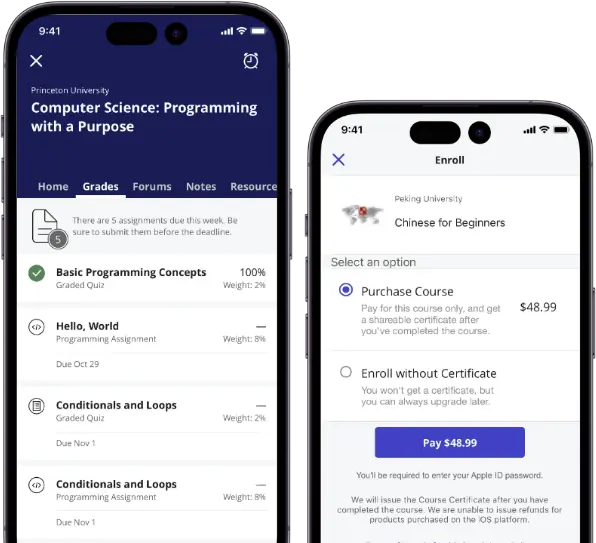
Coursera for Business is an online course platform that offers short modules, guided projects, and certificates. Users can access training at their own pace through mobile apps or a browser. Coursera includes content from top universities and businesses. The platform supports individual learning and team enrolment. It’s best for upskilling in digital, business, and technical fields.
However, Coursera is more focused on course curation than course creation. Even on the For Business model, Companies can’t develop their own content for the platform. This makes it more suitable for academic-style learning than operational training.
Key Features
- Short professional courses
- Guided projects
- Mobile access
- Video lessons
- Certificates of completion
- Peer reviews
- Instructor-led options
- Skill quizzes
- Self-paced learning
- Mobile notifications
Pros
- Curates high-quality courses from top institutions around the world
- Supports self-paced learning across a wide range of subjects
- Strong mobile support and engaging course content
Cons
- Doesn’t support content creation
- Limited options for employee progress tracking
Pricing
Coursera for Business offers a Team Pricing tier for companies with 5-125 users. Pricing for this plan starts at $319 per user yearly. Enterprise pricing for larger organisations is available on request.
User Volume
Targets busy professionals and corporate teams wanting access to curated academic and professional courses.
Rating
4.5/5 (average rating from Capterra, G2, GetApp and Software Advice)
Microlearning Apps Buyer’s Guide
When considering microlearning platforms for your business, there are some best practices to keep in mind during your search. Follow this step-by-step approach to ensure a good-fit purchase.
- Determine Your Needs:
- User Volume: Consider the number of users you’ll need to be able to support via your chosen software solution.
- Type of Content: Establish which types of content would best suit your microlearning needs. Will you need video, online training courses, mobile learning, or a combination of these?
- Branding Needs: Do you need a branded solution for your clients or enterprise? Consider whether the software you’re evaluating offers this at an affordable price point.
- Check Key Features:
- User-friendliness: Ensure that users will be able to engage and prosper on your chosen platform by checking reviews online or testing the software yourself.
- Offline Capabilities: If you have a distributed workforce that frequents remote areas, you may need options such as offline capability.
- SCORM Compliant: Check if the platform supports easy import for your SCORM courses.
- Assessment Options: Check that your tools provide adequate assessment options to ensure a competent and capable workforce (especially within regulated industries).
- Consider Integration and Compatibility:
- Tech Stack Compatibility: Check that your chosen tools offer compatibility with your existing tech stack to negate manual data transfer.
- Existing Devices: Ensure that if your organisation makes use of existing devices, that your platform offers relevant solutions (native apps are best).
- Evaluate Support and Training:
- Customer Support: Check online reviews for signals of customer support levels you can expect at the provider of choice.
- Training Resources: Look for existing training modules or resources that can help you quickly onboard and effectively use your new platform.
- Hidden Costs:
- Hidden Costs: Most microlearning platforms offer subscription-based pricing models. However, ensure that your platform of choice has no hidden costs that could blow your budget.
- Check Online Security:
- Data Security: Check that your chosen platform has a strong reputation when it comes to the data security of you and your customers.
- Certification and Standards Compliance: Check whether your platform is capable of offering proof of certification and compliance – especially within regulated industries.
- Make Use of Trials:
- Free Testing: Use free trials to thoroughly test and vet your chosen platform before making any commitments. This will ensure a fit-for-purpose solution that moves you closer to your microlearning goals.
Embrace Microlearning Apps in Your Business
There are many proven benefits of microlearning. Thus, it makes sense to embrace it and find a strong microlearning platform that can help get your teams to the next level in their job capability.
However, it is important to not forgo the benefit that traditional learning can offer to complex subjects. Thus it makes sense to opt for a flexible platform that can give you the best of both worlds.
Consider Cloud Assess, a powerful learning solution forged in the strict requirement of the Australian registered training organisation (RTO) landscape. This makes Cloud Assess a great fit for various learning requirements.



