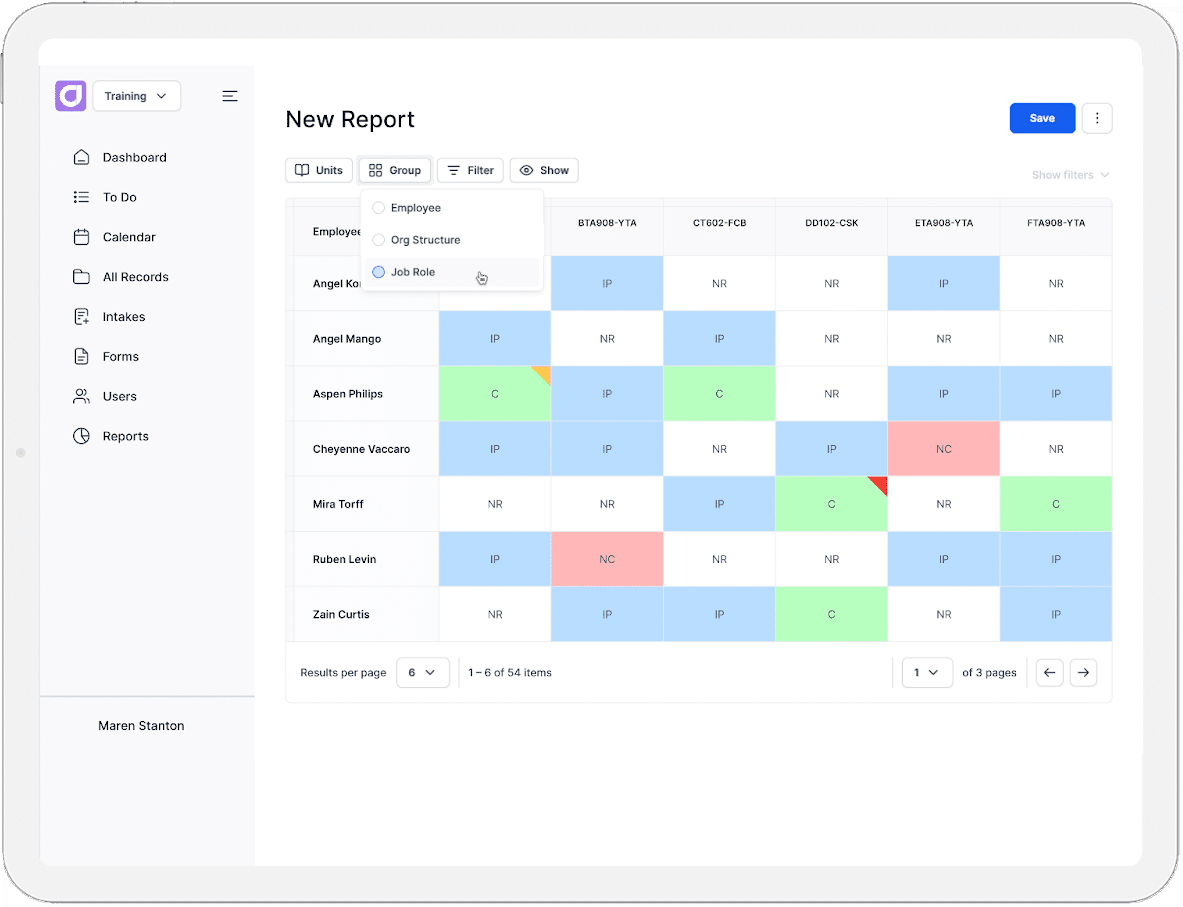
Most organisations have limited visibility into the skills that exist within their workforce. Not because the information is missing, but because it tends to be scattered across spreadsheets, buried in performance reviews, or held informally by individual managers. Skills mapping software is designed to solve this, offering a clear, searchable view of an organisation’s talent.
The challenge is that this software is only as good as the data feeding into it. That data already exists within HR platforms, employee records, role structures, and career histories. The trouble is that these two systems are often disconnected. This leaves teams manually re-entering information, working from outdated records, or maintaining two versions that hold different information.
This is where integration comes in. It links the two systems, creating a living picture of organisational capability that updates as people join, move, and develop. When it’s handled poorly, it can result in duplicated admin and a skills map that is outdated almost as soon as it is built. When it’s handled well, it removes the manual work entirely and keeps the data trustworthy.
In this article, we’ll explore:
- What skills mapping software actually is
- Why companies are adopting these tools
- What the software does in practice
- Why integration with HR platforms matters
- Which HR platforms are worth connecting to skills mapping software
- The different integration approaches available to choose from
- The core challenges to plan for during integration
- A practical roadmap for integration implementation
- How to measure whether it’s working
What is Skills Mapping Software?
Skills mapping software is a system that identifies, records, and tracks the skills held across a workforce. It centralises this data, giving organisations a single, structured view of what capabilities exist, and where.
Depending on the platform, it might function as a dedicated skills ontology, a talent marketplace matching employees to internal opportunities, or a tool that connects skills gaps directly to relevant training.
Skills Mapping Software vs Skills Matrix Software
Skills mapping software operates at an organisation-wide level. It connects with other workplace platforms and draws on a broad range of data sources rather than being confined to a single team or department.
Skills matrix software is built around tracking skills for a specific team, project, or department. It often uses a rating scale rather than drawing on broader organisational data. It works well as a standalone tool for a defined group.
Why Companies Are Adopting Skills Mapping Tools

Upskilling and Reskilling
Upskilling and reskilling only work when training targets the right gaps. Roles change faster than job descriptions do. New tools, compliance requirements, and business priorities all demand new skills. Without visibility into what employees already know, training budgets often go towards the wrong priorities.
Skills mapping software shows where the gaps actually sit. This lets organisations target training where it will have the most impact, instead of applying a one-size-fits-all approach.
Internal Mobility
Internal mobility depends on knowing who has the right skills, not just who has the right title. Filling a role from within is often faster and cheaper than hiring externally. It also supports employee retention and career mobility since they are more likely to stay when they can see a path forward.
The challenge is visibility. Without a clear view of skills across the organisation, internal talent is easy to overlook. Skills mapping software reveals employees who are good candidates for internal recruiting, even when their current role doesn’t suggest it.
Workforce Planning
Strategic workforce planning means looking ahead at what skills the business will need, not just who’s currently on the team. Leaders can use skills data to identify where a team might need more people, where it has more than it needs, or where a specific skill needs to be built before a project starts. Skills mapping software gives leaders this visibility ahead of time. It turns workforce planning into a proactive exercise, rather than a reactive one.
What Skills Mapping Software Actually Does
Builds a Skills Taxonomy or Ontology
Building a skills taxonomy usually starts with HR or L&D teams. They use existing role or job data already held in the business, along with external skills libraries. These could include:
- The Skills Framework for the Information Age (SFIA)
- Sector-specific frameworks like the Australian and New Zealand Standard Classification of Occupations (ANZSCO)
They use this information to define what each skill means and how it applies within the organisation. This gives every skill a clear, consistent definition, so “advanced Excel” means the same thing across every team.
Some platforms take this further by mapping how skills relate to each other. For example, they may show which skills build on one another, or which ones tend to appear together. This is called a skills ontology.
Either way, the result is a structured library the rest of the system runs on. Every other feature, from assessments to gap analysis, depends on this foundation being consistent.
Assesses and Tracks Employee Skills
Once a taxonomy exists, the next step is populating it with real data. Organisations typically use a mix of methods to do this.
- Self-reporting. Employees record their own skills and proficiency levels.
- Manager reviews. Managers validate or adjust what’s been self-reported.
- AI inferences from work data. Software suggests likely skills based on activity, such as completed projects or system usage. This usually still requires human validation.
Relying on any single method has drawbacks. Self-reports can be overstated or understated. Manager reviews depend on how closely a manager actually observes someone’s work. Combining methods gives a more balanced, reliable picture than any one approach alone.
Identifies Gaps Against Role or Project Requirements
With skills data in place, organisations can compare it against what a specific role or project actually requires.
For a role, this means checking whether the person currently in it, or being considered for it, holds every skill or certification the role calls for. Missing even one requirement creates a visible gap. For a project, requirements are often more specific and short-term, tied to a particular scope of work rather than an ongoing position.
The software compares these requirements against the skills already recorded across available staff, showing exactly who qualifies and who doesn’t. The result is a gap analysis, showing precisely where current capability falls short. From there, HR and L&D teams can decide how to close the gap. Whether they can do it via training, hiring, or moving someone internally who already holds the right skills. This is known as skill mobility.
Why Integration Matters
Avoids Data Silos and Duplicate Records
Integration avoids the problem of skills data living in one system and employee data living in another. Without a link between the two, teams end up entering the same information twice, once in the skills platform, once in the HR system. Over time, these records drift apart, and it becomes unclear which version is accurate.
Keeps Skills Data Current
Integration keeps skills data updated as roles, hires, and organisational changes happen. When a new employee joins, is promoted, or changes teams, that information already exists in the HR platform. A live connection means the skills map reflects this automatically, rather than relying on someone remembering to update it separately.
Makes Skills Data Actionable Inside Existing Workflows
On its own, a skills map is only useful if someone opens it and acts on what they see. Integration changes this by pushing skills data directly into the systems teams already use. It informs decisions automatically, rather than sitting separately as a report someone has to go and check. This is especially valuable for:
- Recruiting. Skills data appears alongside a candidate’s profile in the ATS. This helps hiring teams compare candidates against the specific skills a role requires, not just their listed experience.
- Performance reviews. A manager preparing for a formal review can see an employee’s recorded skills and proficiency levels directly in the performance platform. This gives specific, evidenced points to raise instead of general impressions.
- Succession planning. For critical roles, leaders need to know who could step in if that person left tomorrow, long before any vacancy exists. Integrated skills data lets them track potential successors against the role’s requirements over time. This ensures gaps in development are visible and can be addressed well ahead of a departure.
Key Platforms to Integrate With
- HRIS (Human Resources Information System) and Core HR: The HRIS is the system of record for employee data. This includes job titles, departments, employment status, and reporting lines. It’s usually the most foundational system in the HR tech stack. It’s also the one most other platforms, including skills mapping software, need to reference.
- Applicant Tracking Systems (ATS): The ATS manages the recruitment pipeline, holding candidate profiles, applications, and hiring stages. It’s typically the first system where skills-related data appears, before a candidate becomes an employee.
- Learning Management Systems (LMS): The LMS delivers and tracks training content. This includes course completions, certifications, and compliance training. It holds a record of what training employees have completed, though not necessarily what skills they’ve gained as a result.
- Performance Management Tools: These platforms manage formal review cycles, goal-setting, and performance ratings. They typically capture qualitative feedback and outcomes. But they don’t offer a structured view of the specific skills behind that performance.
- Talent Marketplaces and Internal Mobility Platforms: These platforms list internal opportunities, such as open roles, secondments, or short-term projects. They are designed to match employees to them based on relevant experience or skills.
Common Integration Approaches

API-Based Integration (Real-Time Sync)
An API (Application Programming Interface) connects two systems directly, allowing data to pass between them as changes happen. When an employee’s role updates in the HRIS, that change reflects in the skills mapping platform almost immediately, and vice versa. This is the most current option, but it typically requires developer resources to build and maintain.
Middleware / iPaaS Solutions
iPaaS (Integration Platform as a Service) tools sit between systems. They manage the connection without requiring custom code for each one. Platforms like these are often used when an organisation needs to connect several systems at once, rather than building a separate integration for each pair.
Native Connectors Offered by Vendors
Some skills mapping platforms offer pre-built connectors to popular HR systems. These are typically faster to set up than a custom API integration. That’s because the mapping between systems has already been configured by the vendor. But they may offer less flexibility if specific fields or workflows need adjusting.
Data Warehouse / ETL Approach
ETL (Extract, Transform, Load) means data from both systems is extracted and transformed into a consistent format. Then it is loaded into a central warehouse on a scheduled basis, rather than syncing in real time. This suits organisations that want a unified view of workforce data for reporting. But it means the skills data isn’t always current to the minute.
Trade-Offs Between These Approaches
Each approach balances the same three factors differently:
- How current the data stays
- How much technical resource it requires
- How much flexibility it offers
Real-time API integration keeps data current but demands the most technical investment. A data warehouse approach is easier to maintain but sacrifices immediacy. The right choice usually depends on how quickly skills data needs to reflect changes, and what technical resources are available in-house.
Core Integration Challenges to Plan For

Data Standardisation
Matching skills taxonomies across systems is rarely straightforward. One platform might use “communication skills,” while another lists “verbal communication” and “written communication” separately. Without agreement on this early, integration produces mismatched or duplicate skill entries instead of a clean, unified view.
Duplicate or Conflicting Employee Records
When two systems hold overlapping employee data, discrepancies are common. A name change, a role update, or a departmental move might be reflected in one system but not the other. Left unresolved, these conflicts undermine trust in the data on both sides.
Privacy and Permissions
Integration raises the question of who can see what skills data. Not every manager needs visibility into every employee’s full skills profile. And, not every system should expose the same level of detail. This needs to be defined before data starts flowing between platforms, not worked out afterwards.
Change Management
Getting employees and managers to trust and use the data takes more than a working integration. If people don’t understand why the data exists or how it’s used, they may under-report skills. They may also ignore the system, or view it as a compliance exercise rather than a genuine tool. Effective change management usually means explaining the purpose clearly, and showing people how the data benefits them directly. It means giving managers time to adjust before the system becomes part of their regular workflow.
Keeping the Integration Maintained
As both systems update independently, an integration built once can break silently over time. A vendor might change their API, a field might get renamed, or a workflow might shift. Ongoing maintenance needs to be planned for, not treated as a one-off task.
A Practical Implementation Roadmap

1. Audit Existing HR Tech Stack and Data Structure
An audit matters because integration problems are far easier to fix upfront than after two systems are already connected. Before connecting anything, it helps to know what’s already there. List every HR system in use, and check what data each one holds. Then identify where records overlap or conflict between systems.
2. Define a Shared Skills Taxonomy
Integration only works if both systems agree on what each skill means. Defining a shared taxonomy before connecting platforms prevents the same skill being labelled differently across systems. Otherwise, these inconsistencies need to be reconciled later, once far more data is already flowing between them.
3. Communicate and Train Stakeholders
Integration changes how employees and managers interact with skills data, so they need to understand why before the system reaches them. Explain what the integration means for their day-to-day work, and give managers time to practise using the data before the pilot begins. This step protects everything that follows. A pilot can work technically and still fail if the people using it don’t trust or understand it.
4. Pilot With One HR Platform First
Rather than integrating the skills mapping software with every HR platform at once, start with a single connection first. This will often be your HRIS. This keeps the rollout manageable and surfaces any data or process issues early, before they’re multiplied across multiple integrations.
5. Set Up Governance for Data Ownership and Updates
Governance means assigning clear ownership. Someone needs to be responsible for keeping the taxonomy current. That same person or team should also resolve conflicts when data doesn’t match between systems. Without this, integrations tend to drift out of sync over time.
6. Expand to Additional Systems Once the Pilot Proves Value
Once the first integration works reliably, the same approach can extend further. This might mean connecting your LMS or performance management system next. Each new system builds on lessons learned from the pilot.
How to Measure Success

Adoption Metrics
This tracks how many employees and managers are actually using the skills mapping software. That includes completing self-assessments, updating skill records, or logging in regularly. Low adoption usually signals a change management issue rather than a technical one.
Time-to-Fill for Internal Roles
This measures how long it takes to fill an open role using internal candidates. An improvement in this metric after integration suggests the skills data is helping teams identify and match internal talent faster than before.
Reduction in External Hiring
This tracks the proportion of roles filled internally versus externally over time. An increase in internal fills indicates the organisation is making better use of existing talent, rather than defaulting to an external hiring process.
Accuracy of Skills Data Over Time
This looks at how well the recorded skills data matches reality, often checked through periodic audits or manager validation. Data that drifts out of date quickly points to a gap in the update process, whether that’s integration, governance, or user habits.
How Cloud Assess Supports Skills Mapping and Integration
Cloud Assess brings skills mapping and training together in one platform, rather than treating them as separate systems. With Cloud Assess, organisations have access to an integrated platform that allows them to:
- Track employee skills against defined role requirements, giving a clear view of where gaps exist.
- Link gaps to training, connecting identified gaps directly to relevant courses already available within the platform.
- Integrate with existing HR infrastructure, connecting with systems such as Humanforce and SAP SuccessFactors, along with a range of other workforce management platforms.
- Keep data connected, so skills information stays in sync with the HR systems already running the business, without duplicating records or creating a separate source of truth.
For organisations already managing training and compliance requirements, this makes Cloud Assess a natural fit for connecting skills data to the rest of the HR tech stack.