


Skills Management Software Solutions TLDR Summary
Cloud Assess combines role-based skill requirements, assessment, and gap reporting in one platform, with a built-in live skills matrix, course authoring, and an offline mobile app.
SkillsDB and TalentGuard suit organisations consolidating one skills record and governed job architecture across the business, while Skills Base and MuchSkills focus on gap analysis, matrix heatmaps, and team or project visibility.
Kahuna and Xapify verify frontline skill levels through assessor sign-off and observation checklists at the point of work.
AG5, Augmentir, and Bounti check coverage by machine, shift, and site for production, roster, and multi-venue teams.
Employee skills management software answers three questions. Which skills each role needs, which skills employees already have, and at what level.
Most organisations answer them with tools built for something else. Learning libraries report course completions. Performance tools record annual ratings. Both are useful records in their own right, but neither holds a current view of skill levels, so the answers arrive out of date or not at all. That problem multiplies across departments. Each team records skills its own way, and nothing pulls the results into a single view of your workforce.
Which platform suits you depends on which part of that you need to fix first. We’ve put together a list of skills management software solutions. Each is matched to the part of skills management it handles best, so you can start from the job you need done.
What is Skills Management Software?
Skills management software is a digital system that records, maps, and assesses employee skills to help organisations identify gaps, plan training, and make hiring decisions. Platforms differ in what they offer, but four capabilities are critical to managing employee skills across an organisation:
- A skills framework. Sets out which skills each role needs, and at what level. One framework across departments keeps levels comparable between teams.
- Skills assessment. Establishes the level someone has actually reached. Methods vary by platform, from self-rating and manager rating through to formal assessment and on-the-job observation.
- A skills matrix. Shows who holds which skills and at what level. People run down one axis, skills across the other, and managers filter the view by team, role, or site.
- Gap analysis. Compares the level a role needs against the level someone has reached. Totalling those gaps shows whether one person needs training or a whole team is short of a skill organisations depend on.
| Order | Category | Platform |
|---|---|---|
| 1 | Best Fit for End-to-End Skills Management | Cloud Assess |
| 2 | Best Fit for a Single Skills Record Across the Business | SkillsDB |
| 3 | Best Fit for Skills Tracking and Gap Analysis | Skills Base |
| 4 | Best Fit for Assessor-Verified Skills Records | Kahuna |
| 5 | Best Fit for Skills Coverage by Shift and Workstation | AG5 |
| 6 | Best Fit for AI-Powered Skills Management | Xapify |
| 7 | Best Fit for Skills Coverage Against Schedules | Augmentir |
| 8 | Best Fit for Enterprise Skills Management | TalentGuard |
| 9 | Best Fit for Team and Project Skills Visibility | MuchSkills |
| 10 | Best Fit for Frontline Skills Development | Bounti |
Top 10 Skills Management Platforms
Best Fit for End-to-End Skills Management
#1 Cloud Assess
Average User Score: 4.7 / 5




Cloud Assess is a flexible all-in-one solution built for organisations that need skills management and development in one place. The platform combines role-based skill requirements, assessment, and gap reporting in a single platform.
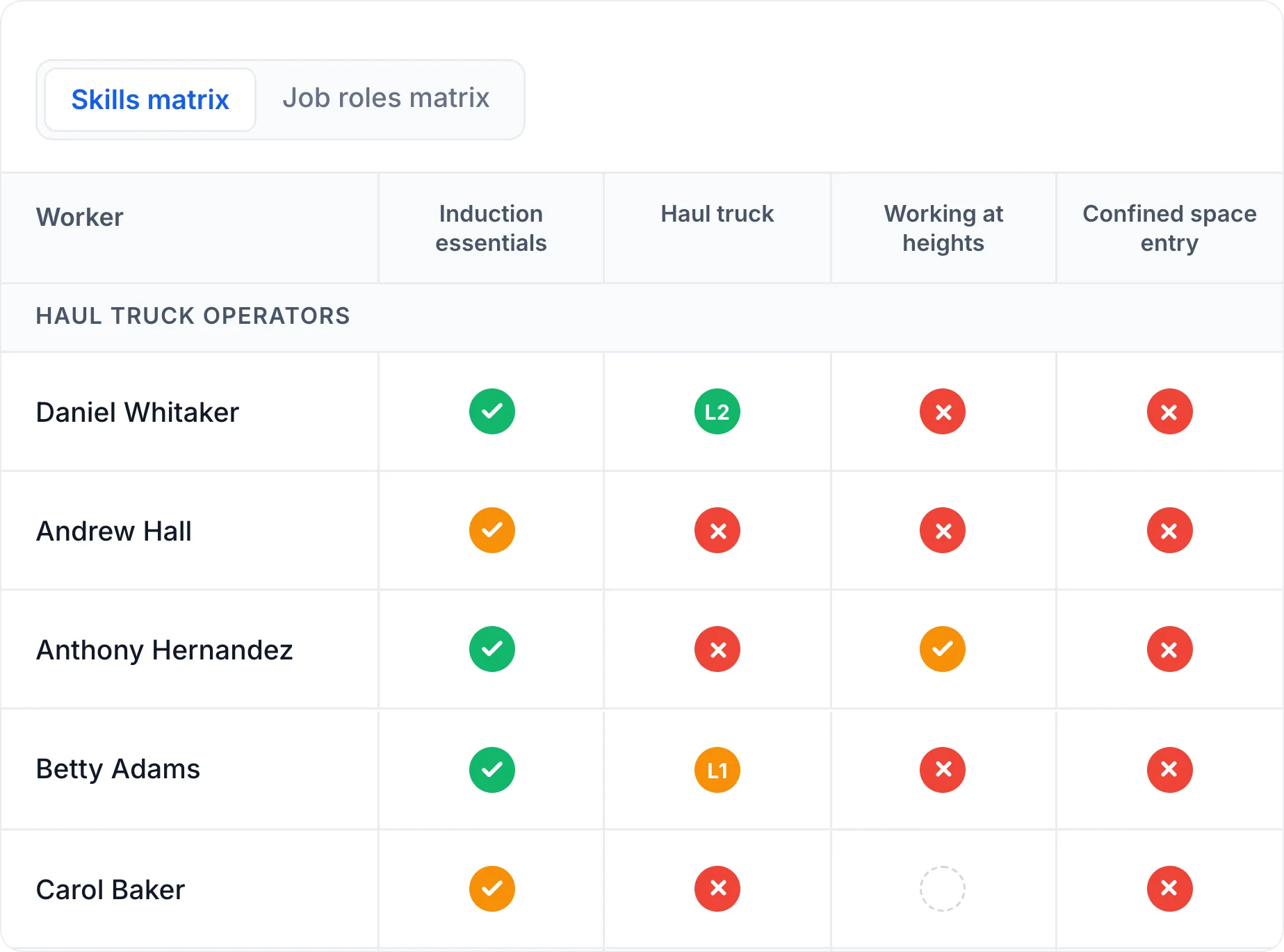
It comes with a built-in live skills matrix tool that allows companies to track workforce skills, identify skill gaps, and develop targeted training initiatives to address them. The platform offers a flexible assessment builder that lets organisations confirm skill levels through written tasks, practical demonstrations, or observation on the job. It includes an eLearning authoring tool that allows companies to build and deliver the training that closes those gaps, without moving records into a separate system.
The platform also offers real-time reporting that shows where the gaps sit across departments. It provides a mobile app that works fully offline, so skills development and assessments can continue without internet connection.
This makes Cloud Assess well-aligned for:
- Companies managing frontline site crews, shift, and contract workers in one system
- Employers who need proof a skill was demonstrated, not just recorded
- Businesses whose training records and skills records currently sit apart
- Multi-site operations standardising skill levels across departments
- Teams replacing spreadsheet-based skills matrices
Ditch the spreadsheets
See every gap, every expiry and every role requirement in one live, AI-powered skills matrix. Audit-ready, whichever regulator you answer to.
Key Features
- Online skills matrix
- Skill tracking and gap analysis
- Role-based skill matching
- Learning Management System (LMS) features
- Dynamic course authoring tool
- Training certification management
- Compliance management
- Versatile types of assessments
- Real-time reporting and analytics
- Mobile app with offline functionality
- Workflow automation
- Customisable content, dashboard and reporting
- Extensive integrations with third-party tools
- Free course library
Pros
- Role-based skill matching that sets the level each role requires
- Skill tracking and gap analysis that show where a team falls short
- Training certification management that keeps licences and tickets with skill levels
- Offline mobile app that lets assessors record results on site
- Workflow automation that cuts admin on reassessment cycles and reminders
Pricing
Cloud Assess offers an all-inclusive solution for employee training in high-risk, high-compliance industries. Every feature is included from day one, including mobile offline assessment, verification of competency, skills matrix and automated compliance tracking. There are no upgrade paths or feature gates. Visit our pricing page for an accurate quote.
Rating
4.7/5 (average rating from Capterra, G2, GetApp, Software Advice)
Best Fit for a Single Skills Record Across the Business
#2 SkillsDB

SkillsDB is a skills intelligence platform built to hold one skills record for the whole organisation. Its skills library allows companies to store every skill the business recognises with a single definition and proficiency scale. This ensures that a skill level recorded in one department means the same thing in another. The platform’s job architecture and competency frameworks let organisations hold skill requirements for every role in one place.
This makes SkillsDB well-aligned for:
- Organisations consolidating skills data held separately by each department
- Enterprises managing one skills record across multiple countries
- Businesses standardising skill definitions between functions
- Companies tracking employee and partner certifications in one system
However, the platform is built for enterprise-scale deployment. This means smaller organisations pay for depth they are unlikely to use.
Key Features
- Skills Library
- Job Architecture
- Competency and career frameworks
- Proficiency assessment
- Gap analysis
- Skills surveys
- Searchable skills database
- Learning plans
- Training approvals
- Certification tracking
Pros
- Skills search that finds internal capability before recruiting externally
- Skills surveys that collect skills people hold but never recorded
- Proficiency assessment that records self-ratings and manager ratings together
- Training plans that let organisations act once a gap appears
Cons
- Enterprise-scale depth that smaller organisations will not use
- Skill levels are rated, not assessed
- Role benchmarks needed before gap analysis works
- No training delivery to close identified gaps
Pricing
SkillsDB offers a free plan for up to 50 users, a Team plan starting from $7, and a Scale plan starting from $10 per user, per month. A custom plan is also available upon request.
Rating
4.6/5 (average rating from Capterra, GetApp, Software Advice)
Best Fit for Skills Tracking and Gap Analysis
#3 Skills Base
Average User Score: 4.5/5

Skills Base is a skills management platform built around reporting on skill levels across a workforce. Its skills matrix heatmaps allow companies to view capability density across a team, department, or location in one view. The platform’s proficiency versus target reporting lets organisations compare recorded skill levels against the level each role requires. The platform’s skill trend reports show whether capability in a given skill is building or declining over time.
This makes Skills Base well-aligned for:
- Organisations reporting skills data to executive and workforce planning teams
- Businesses tracking whether capability is building or declining over time
- Managers building and scheduling their own reports rather than requesting them
- Companies measuring training impact against recorded proficiency improvements
However, skill levels depend on employees rating themselves. That means organisations get a record that goes stale whenever people stop updating it.
Key Features
- Skills matrix
- Skills taxonomy builder
- Skills mapping
- Skills assessment
- Skills audit
- Gap analysis
- Proficiency versus target reporting
- Skill trend reporting
- Report builder
- Certification tracking
Pros
- Proficiency versus target reporting which shows shortfalls against role requirements
- Skill trend reporting that tracks whether capability is building or declining
- Skills audit tool that reviews what the workforce holds at a point in time
- Report builder that lets managers build and schedule their own reports
Cons
- Record goes stale without ongoing updates
- Training impact reporting needs a connected LMS
- No training delivery in the platform
Pricing
Skills Base has a free tier which allows companies to track skills for up to 25 users and 250 skills. The Teams plan starts at $2.25 and the Enterprise plan starts at $4 per user, per month. Pricing for their Ultimate plan is available on request.
Rating
4.5/5 (average rating from G2)
Best Fit for Assessor-Verified Skills Records
#4 Kahuna
Average User Score: 4.9/5

Kahuna is a skills management platform built for organisations that need frontline worker skill levels validated. Its flexible assessment forms allow companies to confirm skills through structured assessment, on-the-job observation, and certification checks. It helps assessors record results in the field, including in remote and offshore environments. The platform’s Team Matrix gives managers and supervisors the verified skill profile of a team across shifts and locations in one view.
This makes Kahuna well-aligned for:
- Organisations that need skill levels confirmed by an assessor
- Businesses in safety-critical operations where completion records are not enough
- Companies validating skills at the point of work
- Supervisors checking verified team coverage across shifts and locations
However, Kahuna’s assessment frameworks need configuring before the platform is usable. Organisations without defined role requirements face a setup project first.
Key Features
- Team Matrix
- Assessment frameworks
- Digital skills checklists
- Automated skill assignments
- Employee dashboard
- Talent Finder
- Capability planning
- Development plans
- Analytics and reporting
- Mobile app with offline access
Pros
- Assessment frameworks that set the validation method each skill requires
- Digital skills checklists that guide assessors through each validation step
- Capability planning that models the skills a future project will need
- Talent Finder that identifies who is qualified for a given role
- Automated skill assignments to tie requirements to role, location, or job code
Cons
- Assessment frameworks need configuring before use
- Admin setup requires dedicated internal ownership
- Relies on connected systems for training delivery
- Built for technical and frontline roles only
Pricing
Kahuna doesn’t make pricing information available on its website. Contact their team directly for an accurate quote.
Rating
4.9/5 (average rating from G2)
Best Fit for Skills Coverage by Shift and Workstation
#5 AG5
Average User Score: 4.4/5

AG5 is a workplace skills management software built for frontline and production teams. It offers a training requirements feature that allows companies to attach skill requirements to a specific machine or piece of equipment. This means supervisors and planners can filter employees by machine and equipment type alongside shift and department. This allows them to check coverage for a single production line as well as a whole team.
This makes AG5 well-aligned for:
- Manufacturing and production teams staffing lines, shifts, and machines
- Planners checking coverage for a single line rather than a department
- Organisations whose skill requirements differ by equipment rather than by role
- Managers filling positions at short notice from a qualified pool
However, mapping requirements to individual machines and equipment takes time to set up. Organisations with simpler role-based needs may find the depth more than they need.
Key Features
- Skills matrix
- Skills library
- Training requirement filters
- Workforce readiness
- Skill gap analytics
- Certificates and licences
- Employee profiles
- Training history
- Workflow approvals
- Audit trails
Pros
- Training requirements set by role, team, or machine
- Workforce readiness view that confirms who is qualified per task
- Skill gap analytics that flag shortages before they affect production
- Workflow approvals that control what enters the skills matrix
- Employee profiles that hold skills, certificates, and training history together
Cons
- Machine-level mapping takes time to set up
- Simpler role-based needs may not justify the detail
- Training records depend on LMS integration
- Skill levels entered by managers, not assessed
Pricing
AG5 offers three pricing plans: Core, Accelerate, and Enterprise. Pricing details are available on request.
Rating
4.4/5 (average rating from G2, Capterra, GetApp, Software Advice)
Best Fit for AI-Powered Skills Management
#6 Xapify
Average User Score: No rating available

Xapify is an Australian-built skills management platform for frontline and deskless workforces in high-consequence industries. Xapify offers an AI-powered skills matrix that allows companies to consolidate skills data and training requirements in one live view. This comes with smart notifications that flag when a skill is expiring or a job role changes. It provides workforce analytics capability that lets leaders report across a team, product line, facility, or the whole organisation.
This makes Xapify well-aligned for:
- Frontline operations in manufacturing, utilities, logistics, transport, and healthcare
- Organisations verifying skills against their own Standard Operating Procedures (SOPs)
- Supervisors signing off skills on the floor rather than at a desk
- Businesses reporting on skills by facility or product line
However, the platform is verification-led, so organisations wanting career pathways and development planning need additional software alongside it.
Key Features
- Skills matrix
- Role-based skill profiles
- Observation checklists
- Digital sign-offs
- SOP integration
- Skills verification
- Smart notifications
- Workforce analytics
- Workflow automation
- Mobile access on phone and tablet
Pros
- Role-based skill profiles for setting requirements per operational role
- Observation checklists that help verify critical skills at the point of work
- Standard operating procedure integration that ties each skill to your own procedures
- Smart notifications that flag expiring skills and role changes
- Workforce analytics for reporting by team, facility, or product line
Cons
- Verification-led, with little skill development planning
- No career pathways or progression tools
Pricing
Xapify doesn’t provide pricing information on its website. Contact their teams directly for accurate pricing details.
Rating
No rating available
Best Fit for Skills Coverage Against Schedules
#7 Augmentir
Average User Score: 4.4/5

Augmentir is a connected worker platform for manufacturers, with skills management built around how work gets scheduled. Its capacity planning feature allows operations leaders to see coverage gaps against employee scheduling. This ensures a shortfall shows up before the roster is set rather than on the day. The platform then lets companies assign work based on the skills recorded for each person, so jobs reach people already endorsed for them.
This makes Augmentir well-aligned for:
- Manufacturers planning coverage ahead of the roster rather than reacting to gaps
- Operations leaders allocating jobs based on recorded skills
- Plant managers needing training progress and availability in one view
- Organisations where skills data drives daily scheduling decisions
However, Augmentir is built specifically for manufacturing and industrial operations. Companies outside those sectors would need to configure the platform for their needs.
Key Features
- Skills matrix
- Skills assessments
- Skill endorsements
- Capacity planning
- Skills-based work assignment
- Onboarding programs
- Digital work instructions
- Workforce intelligence reporting
- Expiring skills alerts
- Compliance tracking
Pros
- Capacity planning that shows coverage gaps against the roster
- Skills-based work assignment that routes jobs to endorsed workers
- Skill endorsements recorded automatically or confirmed by a supervisor
- Expiring skills alerts for flagging qualifications before they lapse
- Employee onboarding programs that track readiness for new starters
Cons
- Not suitable for organisations outside of manufacturing and industrial operations
- Skills sit inside a much wider platform
Pricing
Augmentir doesn’t make pricing details publicly available. Request a demo with their sales team to get a custom quote.
Rating
4.4/5 (average rating from G2)
Best Fit for Enterprise Skills Management
#8 TalentGuard
Average User Score: 4.8/5

TalentGuard is a skills intelligence platform built for organisations managing role and skill definitions across thousands of employees. Its AI engine allows companies to generate role and skill data from job descriptions they already hold. It comes with a central governance workspace that lets HR teams version and approve every change. This ensures the definitions stay consistent as the business reorganises.
This makes TalentGuard well-aligned for:
- Enterprises consolidating role and skill definitions after a merger or restructure
- HR teams that need an approval process before role changes go live
- Organisations replacing a manual job architecture project
- Businesses standardising proficiency levels across job families and locations
However, TalentGuard assesses skills through ratings and manager verification. It doesn’t support practical assessment of on-the-job tasks. Operational and frontline teams may need another system to evidence competency.
Key Features
- Skills taxonomy
- Job architecture
- Role and skill governance workspace
- Proficiency levels
- Skills assessment
- Gap analysis
- Development planning
- Career pathing
- Certification tracking
- Talent insights
Pros
- Skills taxonomy generated from existing job descriptions
- Governance workspace that versions and approves every change
- Proficiency levels connected to roles, job families, and locations
- Gap analysis that reports against governed role standards
- Skill development planning that follows from the same framework
Cons
- No assessment for operational or frontline roles
- Output quality depends on existing role data
- Suits organisations with dedicated HR capacity
Pricing
TalentGuard doesn’t provide pricing details on their website. Request a demo with their team to get an accurate quote.
Rating
4.8/5 (average rating from G2, Capterra, GetApp, Software Advice)
Best Fit for Team and Project Skills Visibility
#9 MuchSkills
Average User Score: 4.5/5

MuchSkills is a skills visibility platform built for organisations that staff work by project rather than by fixed role. Its team builder allows companies to assemble a team for a project by skill, certification, and availability at the same time. The platform’s skill gap and talent risk analysis shows where capability is thin across a team. This helps managers act before it affects delivery.
This makes MuchSkills well-aligned for:
- Consulting and professional services firms staffing client work
- Managers building project teams by skill rather than by availability alone
- Organisations tracking utilisation alongside their skills data
- Teams that need a live view of capability at team level
However, MuchSkills is built around current availability and utilisation. Organisations cannot model the skills they will need for future projects or growth.
Key Features
- Skills matrix
- Skill and competency mapping
- Skills taxonomy
- Gap analysis and talent risk reporting
- Team builder
- Utilisation reporting
- Capacity planning
- Certification tracking
- Employee development plans
- Organisational chart
Pros
- Team builder that assembles a project team by skill and availability
- Skill and competency mapping across teams, roles, and projects
- Gap and talent risk reporting that flags thin capability early
- Organisational chart that shows skills distribution across the structure
- Employee development plans tied to identified gaps
Cons
- No modelling of future skill needs
- Skill levels are self-reported with manager validation
- Requires managers to maintain availability data
Pricing
MuchSkills offers a Starter plan that starts from $5.50 per user monthly for up to 100 employees. They also offer Professional, Consulting Suite, and Enterprise plans with pricing details only available upon request.
Rating
4.5/5 (average rating from G2)
Best Fit for On-The-Job Skills Management
#10 Bounti
Average User Score: No ratings available

Bounti is a mobile skills platform built for frontline teams in hospitality, retail, and food production. Companies can place QR codes where tasks happen. Workers scan them to start the relevant training at the point of work. Companies can also assess workers’ skills on the job. Role-based skill tracks let companies set each role’s skills and sequence. The skills matrix records worker levels across teams, roles, and locations. Managers use those levels to assign shifts and target training at gaps.
This makes Bounti well-aligned for:
- Frontline teams in hospitality, retail, and food production
- Organisations that want training assigned automatically when a gap appears
- Managers assigning shifts based on recorded skill levels
- Businesses managing skills across multiple sites or venues
However, Bounti is built around operational roles with defined tasks. Organisations with varied professional roles get less structure to work from.
Key Features
- Skills matrix
- Role-based skill tracks
- On-the-job assessments
- Manager dashboard
- Automated training assignment
- AI course builder
- QR code course access
- Certification tracking
- Multilingual translation
- Mobile app
Pros
- Role-based skill tracks that set the requirements for each role
- Automated training assignment when the matrix shows a gap
- Manager dashboard that analyses gaps across a team
- Multilingual delivery across 135 languages
- QR code access that starts training at the point of work
Cons
- Less structure for varied professional roles
- No enterprise-wide skills reporting
Pricing
Bounti offers two pricing plans: Operations Suite for medium businesses, and Enterprise. Pricing details are only available upon request.
Rating
No ratings available
Buyer’s Guide for Finding the Best Skills Management Platform
Choosing the best software for managing employee skills across departments, sites, shifts, and locations is harder than comparing feature lists. This is because platforms differ most in how they do the same job.
- Check how role requirements get set. Every platform records skills. Fewer let you define the level each role needs, which is what makes a gap calculable. Ask whether requirements attach to a job title only, or to tasks, machines, and locations as well. Also find out whether one framework covers every department or each team builds its own.
- Establish where skill levels come from. This is the biggest difference between platforms. Some record what employees claim, with a manager confirming it. Others record what an assessor has confirmed through a test, a practical task, or observation on the job. Both are valid, but only the second gives you evidence that a skill was demonstrated. If your workforce operates in safety-critical conditions, ask what happens when a rating is challenged.
- Match the matrix to how you allocate work. The best software for creating a skills matrix depends on what you plan to do with it. A matrix that filters by department suits an organisation planning training. One that filters by shift, site, or machine suits an organisation staffing a production line. Ask what the smallest unit you can filter to is, and whether the people who allocate work can use the matrix themselves.
- Decide whether you need the training as well. Some platforms identify gaps and stop there, leaving you to close them in a separate learning system. Others deliver the training and feed the results back into the matrix. The first is fine if your learning system already works. The second removes the reliance on separate solutions.
- Consider how people will use it. If your workforce is site-based or on shift, check whether assessors can record results on a phone. Also check whether the app works without connectivity, and whether workers can share a device. A platform nobody can reach at the point of work will fall back to paper.
- Ask what keeps the record accurate. A skills matrix is only useful while it reflects reality. Ask what triggers a reassessment, and how expiring qualifications are flagged. Also find out who is responsible for updating a level when someone moves roles. This is the difference between a platform and a spreadsheet, which holds the levels someone typed in on the day they typed them.
Frequently Asked Questions (FAQs)
Skills Management Systems FAQs
What is the difference between skills management software and skills management matrix software?
Skills management software covers the whole process, from setting role requirements through to assessing skills and reporting gaps. Skills management matrix software is a subset where the matrix is the main interface, so managers work directly in the grid rather than generating it as a report. Most platforms offer both.
How long does it take to implement skills management software?
This depends on whether your role requirements already exist. Platforms that generate a framework from your job descriptions can produce usable data in weeks. Building role requirements from scratch, or mapping them to individual machines and tasks, turns implementation into a project measured in months.
Who owns skills management software inside an organisation?
Ownership of skills management tools usually sits with HR or L&D, but the people who rely on the data are supervisors and operations managers. Platforms built for HR report by job family and career level. Platforms built for operations report by shift, site, and task. The mismatch is a common reason rollouts stall.
Does skills management software replace our LMS?
Rarely. Most platforms record skills and identify gaps, then rely on your learning system to close them. A small number deliver training and assessment in the same platform, which removes the reconciliation between the two records.


