Training in today’s modern world goes beyond lectures, handouts or classroom sessions. Modern learners want to engage with training and tackle hands-on challenges that help them connect with learning materials. At the same time, there’s been a shift from physical classrooms to digital platforms that offer accessible, adaptable, and scalable training.
The way training is designed needs to evolve. Educators need to embrace the principles of eLearning content design. But what exactly does that involve?
In this article, we explore:
- What eLearning content design is
- Why content design is critical in eLearning environments
- Use cases for engaging eLearning courses
- Core elements of content design in eLearning
- Steps for designing an effective eLearning training program
- Best practices for boosting engagement
- How real companies use Cloud Assess for eLearning content design
What is eLearning Content Design?

eLearning content design is the process of developing content for digital platforms to maximise accessibility, engagement and knowledge retention. It involves planning and structuring training programs, designing the flow of eLearning content, and creating learning materials that support the overall learning experience.
What is the Difference Between eLearning Content Design and eLearning Authoring Software?
Why is Content Design Important in eLearning?
Content design makes eLearning accessible, engaging, consistent, and adaptable for every learner.
- Accessibility. Effective content design ensures eLearning is accessible and inclusive. This means incorporating universal design principles and assistive technologies that work seamlessly across devices, even in low-connectivity areas, while also supporting learners with disabilities and diverse training needs.
- Engaging Learning Experiences. Well-designed content captures and holds learners’ attention through interactive elements, storytelling, and meaningful practice. It encourages active participation and deeper thinking, which improves long-term knowledge retention and supports the transfer of learning into real-world scenarios.
- Consistent Look and Feel. A consistent structure, tone, and visual style across modules helps learners focus on the content rather than reorienting themselves each time. It also reinforces brand identity and creates a professional and seamless learning experience, even when training content is being developed collaboratively or by multiple educators.
- Adaptability. Strong eLearning content design allows for easy updates, localisation, and repurposing across different formats or audiences. It’s also adaptable to a range of learning styles, allowing learners to engage with content in the way that works best for them. This flexibility helps organisations scale training more efficiently and respond to changing demographics and needs.
What are Strong Use Cases for Engaging eLearning Content?

Education
eLearning helps education providers reach learners who can’t easily attend in person.
eLearning content is increasingly being adopted across schools, universities, and Vocational Education and Training (VET) providers. Its accessibility allows students to enrol in courses they may not otherwise have access to, whether due to financial or geographic constraints. Many educators are embracing blended learning approaches, which combine digital and in-person training. This requires careful eLearning content development to ensure alignment and seamless flow between online learning and classroom sessions.
Flipped classroom models are also gaining popularity, where foundational knowledge is delivered through self-paced resources, such as digital materials, printouts, or assigned readings. Classroom time is then spent on collaboration, social learning, or hands-on activities.
New Hire Onboarding
Organisations use self-paced eLearning to give every new hire a consistent start.
Onboarding is a good opportunity to introduce new hires to your organisation’s culture of continuous learning. Carefully designed induction training programs ensure that every employee develops a strong understanding of company policies, standard operating procedures, and shared values.
eLearning courses allow new hires to access role-relevant training at their own pace, steadily building their knowledge and confidence. Quizzes, scenario-based learning, interactive simulations and video walkthroughs help bring the content to life and clarify their place within the organisation. This approach saves time for HR and managers and delivers a more scalable and consistent employee onboarding experience.
Upskilling and Reskilling
Organisations can close emerging skill gaps by delivering targeted, role-specific eLearning.
As new technologies emerge and organisational needs change, employees need to continuously adapt to stay productive and effective in their roles. Without regular training, they risk skill stagnation, where their capabilities begin to fall behind industry expectations. At the same time, when businesses fail to recognise or develop their employees’ potential, it can lead to career stagnation, with workers feeling there’s limited opportunity for growth or advancement.
To address both challenges, companies need to invest in upskilling and reskilling initiatives. These programs support skill mobility, helping employees shift into new roles or functions to meet business needs. eLearning makes this process more accessible by delivering targeted, role-specific training that supports continuous professional development without disrupting day-to-day operations.
From technical skills and compliance updates to leadership development, digital learning offers flexibility and scalability. Employees can access content on demand, track their progress, and immediately begin applying new skills, ensuring businesses remain agile and competitive in a fast-changing landscape.
Maintaining Industry and Regulatory Alignment
Updating eLearning courses centrally keeps every employee trained on current standards.
Industry best practices are constantly evolving, and training programs must be agile enough to keep pace with changing industry standards, technologies, and regulatory requirements. eLearning courses are particularly well suited to this, thanks to their adaptability and ease of distribution.
Online learning materials can be updated quickly, with changes instantly rolled out across your entire organisation. This reduces the risk of employees relying on outdated information and eliminates the hassle of managing multiple training versions. Once a course is revised, employees can be re-enrolled immediately, ensuring everyone stays informed and compliant with the latest developments.
What are the Core Elements of eLearning Course Design?
Delivery Formats

One of the biggest benefits of developing eLearning courses is that they can be delivered in various formats. We’ve already looked at blended learning and flipped classrooms, for example, but here are a few other elements that define eLearning course content.
- Microlearning delivers content in short, focused bursts that learners can complete quickly and easily. It’s ideal for reinforcing key concepts, providing just-in-time support, or fitting training into busy schedules.
- Immersive eLearning experiences use technologies like virtual reality (VR), augmented reality (AR), or 360° video to create lifelike learning environments. This format is particularly effective for high-risk or hands-on scenarios where experiential learning enhances retention.
- Adaptive eLearning personalises the learning experience by adjusting content based on a learner’s performance, preferences, or progress. It ensures each individual receives training that’s most relevant to their current skill level and learning needs.
Design Strategies

Design strategies play a key role in keeping learners engaged, improving usability, and enhancing knowledge retention. Here are a few essential strategies to consider during the course development process:
- Interactive design encourages active participation through elements like clickable content, drag-and-drop activities, simulations, and knowledge checks. These help learners stay focused and reinforce learning through practice.
- Gamification uses fun and competitive elements like points, levels, leaderboards, streaks and rewards to motivate learners. It adds a layer of challenge and progression that boosts engagement, encourages course completion and motivates learners to return to training content regularly.
- Visual design makes learning content easier to digest by using images, infographics, icons, and consistent layouts. Strong visual hierarchy and design cues help guide learners through complex information more efficiently.
- Intuitive platforms that are easy to use ensure learners can navigate content without confusion or frustration. Clear structure, intuitive navigation, and minimal distractions all contribute to a smoother, more effective learning experience.
6 Steps to Design Effective eLearning Content
1. Define Objectives
The first step in designing effective eLearning programs is to identify the learning objectives you want to achieve.
For example, if your goal is to improve accessibility, you should prioritise responsive eLearning design so content works seamlessly across desktops, tablets, and mobile devices. If your focus is on knowledge retention, your course design should incorporate repetition, with interactive and gamified elements to reinforce learning and boost engagement.
Having a clear understanding of learning objectives at the outset will help you ensure designs support the desired outcomes.
2. Visualise Your eLearning Program

Before you begin writing or designing content, it’s important to have a clear vision of what you want to cover and how it will be delivered. This involves outlining the structure of your course, the learner journey, and the types of content or interactions that will support your learning objectives.
eLearning designers often use tools like storyboards, mockups, mind maps, and prototypes to help visualise a course or training program. Using a combination of these methods allows you to map out content logically, identify potential gaps early, and assign specific content types to different stages of the training. This upfront planning helps streamline the development process, making design more efficient and reducing the risk of major revisions later on.
3. Find the Right Tools
Whether you’re creating videos and infographics or building full training courses and assessments, choosing the right tools is essential. Fortunately, cloud-based training and assessment platforms like Cloud Assess are available to support different stages of eLearning development.
- Independent Learning encourages learners to explore content on their own and apply it in real-world contexts to deepen their understanding.
5. Review and Refine the Program
Review the program as a whole to ensure it runs smoothly. This step helps identify any major issues, inconsistencies, or gaps that can be addressed before enrolling learners. It’s especially important for ensuring a seamless experience in self-paced learning environments, where direct support may be limited.
Consider running a pilot with a small group of learners who complete the course from start to finish. Their feedback can highlight usability or clarity issues that designers may have overlooked.
6. Measure and Optimise

It’s essential to track the success of your program by analysing key training metrics like enrolments, completion rates, drop-off points, and learner engagement.
These insights could reveal where learners are struggling, allowing you to optimise eLearning and in-person components for better alignment with learning objectives.
What are the Best Practices For Designing Engaging Content?
Consider Your Audience
Effective eLearning design starts with a deep understanding of who your learners are. Consider their job roles, prior knowledge, digital literacy, and learning preferences when shaping content.
Tailoring the tone, format, and difficulty level of your training to suit your audience ensures the learning experience is relevant, accessible, and impactful. This helps boost engagement and increases the likelihood that learning will transfer into skills and improve proficiency levels.
Leverage Subject Matter Experts
Working with subject matter experts (SMEs) ensures your training content is accurate, up to date, and aligned with real-world practices. SMEs bring depth and credibility to your courses, helping to identify key learning points that might be missed by generalist designers.
Collaborating early in the design process helps streamline content development and ensures learning outcomes are both meaningful and achievable. Their input is especially valuable for technical or compliance training courses.
Make it Visually Engaging
Visual design plays a significant role in how learners experience and retain information. A clean, consistent layout with thoughtful use of colour, typography, and spacing helps make information easier to process.
According to cognitive learning theory, good aesthetics not only make content more appealing but also reduce cognitive load by guiding attention and clarifying structure. Well-designed visuals support comprehension and can elevate the overall quality of your course.
Create Moments of Delight
Incorporating small, unexpected touches like engaging animations, humour, or personalised feedback can surprise and delight learners. These moments improve the overall training experience and help create a stronger emotional connection to the content. When done thoughtfully, they boost motivation and keep learners coming back. It’s a subtle way to enhance satisfaction without distracting from the learning goals.
How Does Cloud Assess Support eLearning Content Design?
Cloud Assess is a training and assessment platform for registered training organisations (RTOs) and high-compliance industries. Organisations use it to build interactive eLearning, practical assessments, and evidence portfolios. Trainers can create content in the platform or import existing courses. Learners access it online or offline through the mobile app.
Access Mining: Interactive Content for Underground Work
Access Mining works in underground metalliferous mines. Most of its work areas have no internet access. The team needed training content that worked without a live connection.
Access Mining builds all its learning and assessment content in Cloud Assess. Its trainers create interactive SCORM (Sharable Content Object Reference Model) modules, multimedia lessons, and practical assessments. They do this in-house, without external content developers.
Learners download checklists before heading underground. They complete them offline and submit them on their return. Assessors capture photo and video evidence below ground, then sync it on the surface. Access Mining has run a fully paperless training operation from day one.
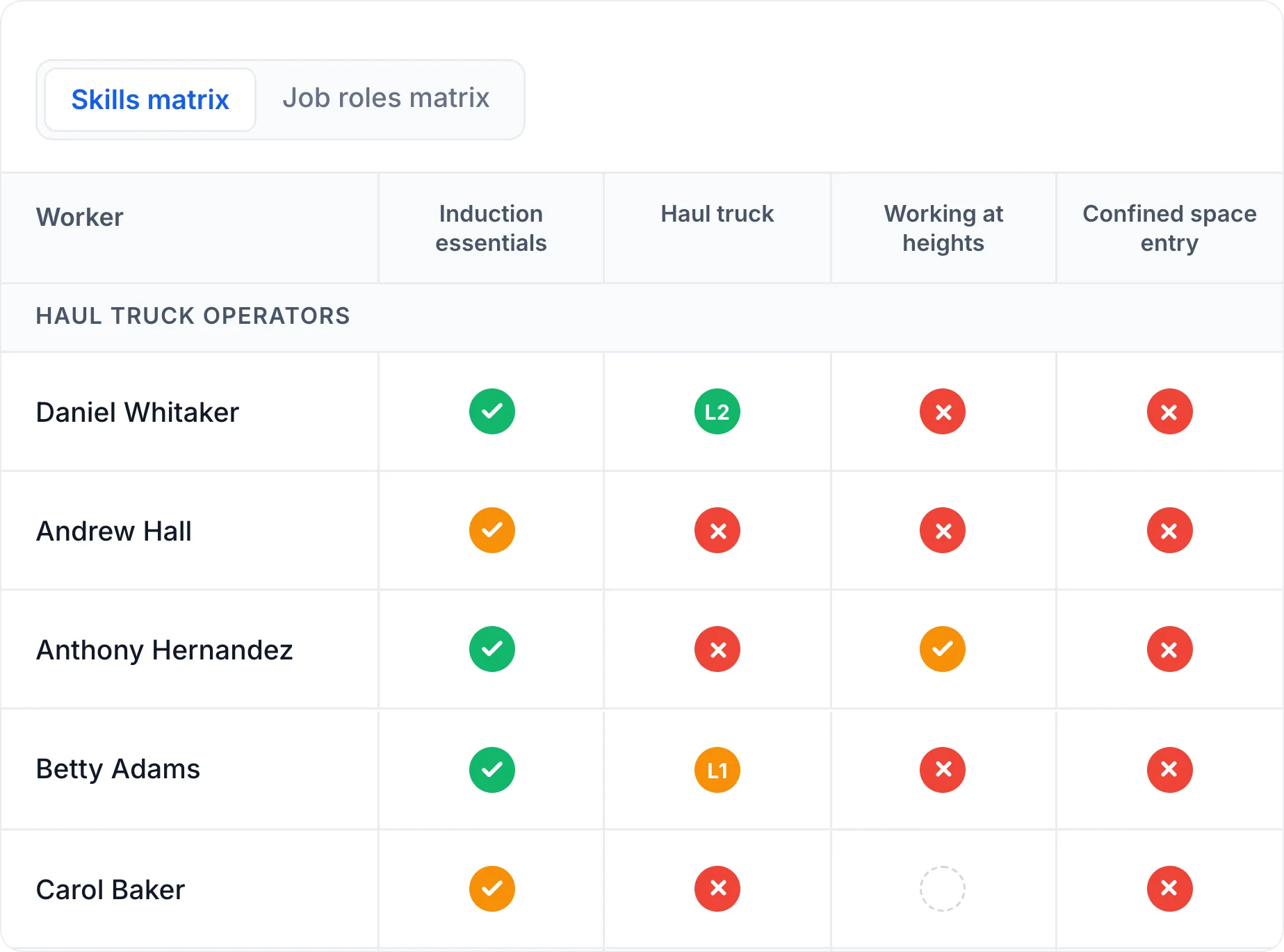
Supervisors use live competency matrices to see who is ready for each task.
Queensland Rail: Mapping Assessments to Real Operating Conditions
Queensland Rail trains more than 1,500 drivers and crew. Every person’s training history must be evidence-based and audit-ready. Generic units of competency didn’t reflect real rail operations, so the team had to contextualise them.
Queensland Rail built a four-stage assessment program in Cloud Assess. It covers normal and adverse scenarios, like livestock on tracks or failed boom gates. Each stage maps back to the requirements of the relevant units of competency. Digital logbooks record who trained where and when. They also track required repetitions and store photos, videos, forms, and checklists.
In simulator sessions, assessors follow scripts in Cloud Assess and inject hazard events. They capture evidence and outcomes at the same time.
Daysafe Training: A Flipped Classroom That Doubled Capacity
Daysafe Training is an RTO delivering high-risk industrial training. It used to run theory and practical in a single classroom day. This capped how many learners each trainer could take.
Daysafe moved theory online, so learners complete it before the training day. Face-to-face time now focuses on practical assessment. Trainers deliver two units a day instead of one.
The team creates and maintains assessments in Cloud Assess with full revision history. This lets them refine content quickly based on learner performance. Around 99% of learners report no issues navigating the eLearning.