What is a Skills Matrix? Uses, Guide & Free Template

Contents

Share

Get the latest insights

Most organisations cannot say with confidence who holds which skills. Workday’s Global State of Skills report found only 54% of business leaders have a clear view of skills within their organisation, which means nearly half do not.

That uncertainty matters most where skills carry risk. In mining, construction, healthcare, and manufacturing, skills evidence is a compliance requirement. A gap there is an audit exposure.

A skills matrix closes that gap. It gives organisations a single, current record of who holds which skills, so they can produce evidence on demand rather than reconstructing it after the fact. 

In this article, we’ll explore: 

  • What a skills matrix is, what it’s used for, and what it should include
  • How to develop a skills matrix and maintain one
  • What strong examples look like

TL;DR

A skills matrix maps the skills each role requires against the level every worker has reached in them. It replaces assumptions about who can do what with a record supervisors and training managers can act on. Once the grid is populated, gaps become visible, and training, hiring, and task allocation follow the evidence rather than instinct.

A matrix is only accurate while it is maintained. It needs updating as workers are signed off, change roles, or leave.

What is a Skills Matrix?

A skills matrix is a grid that maps the skills each role requires against where every worker currently stands on them. It’s a visual tool that gives supervisors and training managers a single view of who is cleared for which tasks across teams, sites, floors, and locations.

Workforce Skills

Workforce Skills gives you a live view of every skill, every gap and every expiry across your workforce. Purpose built for frontline workers.

Cloud Assess Workforce Skills - Frontline training

How is a Skills Matrix Different From Other Matrices

What it MapsWhat a Cell RecordsWhat it's Used For
Skills MatrixA specific, teachable ability a role requiresCan operate a forkliftConfirming who can perform which tasks
Competency MatrixWhether a worker meets the standard for a task, including knowledge and judgementAssessed as meeting the site's safe operating procedureProving sign-off against a standard
Capability MatrixWhether a worker can apply skills in unfamiliar conditionsAdapts safely to a new traffic management planWorkforce and succession planning

Skills Matrix vs Competency Matrix

A skills matrix records what a worker can do. A skill is demonstrable on request, and it can be taught, practised, and observed.

A competency matrix records whether they perform to the required standard, consistently, and in the conditions the work presents. It’s a formal judgement against a standard.

Skills and Capability Matrix

A skills matrix records task-level ability against the specific tasks and conditions a role requires.

A capability matrix records how well a worker applies that ability when conditions change, such as a new site, procedure, or piece of equipment.

A skills and capability matrix holds both in one grid.

How Does a Skills Matrix Work?

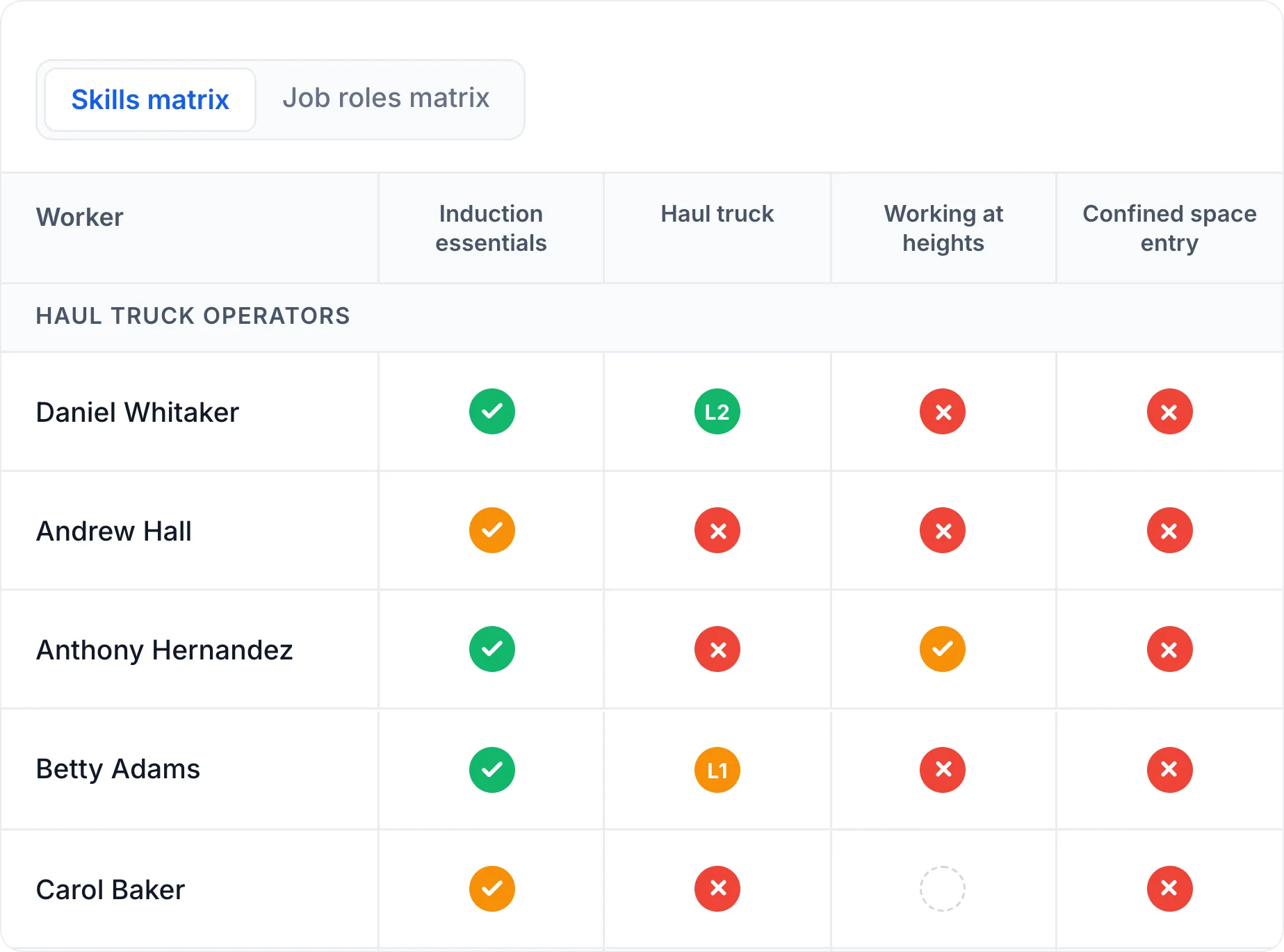
A skills matrix works by holding two lists against each other. Workers sit down one side and the skills their roles require across the top. Every cell is the intersection of one worker and one skill.

What the cell records depends on what the skill needs. Some matrices use a proficiency level, rating each worker on a scale from no experience through to being able to train others. Others use a status, showing whether a requirement is current, expiring, expired, or not yet started. Requirements that expire need the second, since a proficiency score says nothing about whether a ticket is still valid.

Requirements come from the role. Mapping each worker to a role sets which skills apply to them, so the grid distinguishes a genuine gap from a skill their role never needed.

Reading down a column shows how many workers hold a requirement. Reading across a row shows what one worker is cleared for, and what is about to lapse.

What Should Be Included in a Skills Matrix?

A skills matrix for employees and contractors includes four elements:

  • The workers. One row per person, with their role. Larger matrices add site, crew, or department as separate fields so the grid can be filtered to one group.
  • The skills. One column per skill, listed at task level. Frontline matrices usually group them, so licences and tickets sit separately from mandatory training and assessed competencies.
  • Current status or level. Where each worker stands on each skill, either as a status against the requirement or a proficiency level.
  • Expiry dates. Licences, tickets, and refresher training all lapse. Without dates, a matrix shows someone as current long after their certification has run out.

Download Our Free Skill Matrix Template for Employees

Every company will have unique skills requirements. However, that doesn’t mean that you need to start from scratch. Free skills matrix templates for Excel or Google Sheets can provide an easy starting point for visualising the skills across your organisation. That’s why we’ve put together a skills matrix format that you can jump right into and start adjusting to suit your specific business needs. 

Our template uses a proficiency scale from novice to expert, ready to adjust for your roles.

Download a Free Skills Matrix Template!

Learn more about this free skills matrix on our resource page.

What is a Skills Matrix Used For?

what a skills matrix is used for

  • Allocating work safely. Before a task is assigned, the matrix confirms the worker is cleared for it. A supervisor filling a shift can check who holds the ticket rather than assuming. On regulated sites, this is the difference between a compliant allocation and an exposure.
  • Targeting training. Gaps in the grid show which skills are short and how many workers they affect. That tells you whether the answer is one person booked onto a course or a scheduled session for a whole crew. It means the L&D budget follows proven shortfalls rather than assumed ones.
  • Catching expiries before they lapse. Statuses approaching expiry show which tickets and refreshers need booking now. Without that visibility, expiry is usually discovered when a worker turns up to a task they are no longer cleared for, or when an auditor finds it first.
  • Covering single points of failure. A skill held by one worker is a risk that a resignation, illness, or roster change would expose. Reading down the column shows where cover is thin, so cross-training can be planned before the gap becomes urgent.
  • Evidencing compliance. One of the clearest benefits of a skills matrix tool is what it gives you during an audit. This includes which workers were cleared for which tasks, when they were assessed, and how their status was verified. It replaces a scramble through paper records and inboxes with one source.
  • Succession planning. Comparing a worker’s record against the requirements of a more senior role shows exactly which skills stand between them and promotion. That turns succession planning into a training plan rather than a judgement call.

How to Create a Skills Matrix

a guide on how to create a skills matrix

1. List The Requirements of Each Role

Start with what the work demands, not with what your people can currently do. Go role by role and write down every requirement attached to it.

Most frontline roles carry three kinds of requirements:

  • Licences and tickets. Statutory or industry cards a worker must hold, such as a rail safety worker certification or a professional registration.
  • Mandatory training. Training the role requires and that expires, such as manual handling safety training, infection control, or fire warden duties.
  • Verified competencies. Tasks assessed against a standard, such as medication administration, safe patient transfer, or shunting operations.

Separating them matters because each is evidenced differently. Build the list with supervisors who run the work, and check it against your procedures and the relevant regulations.

2. List Workers and Their Current Skills

One column per worker, with their role alongside their name. If you operate across multiple locations, add site, crew, and supervisor as separate fields rather than folding them into one label. That lets you filter the matrix to the group you need. A ward manager checking cover for tomorrow’s shift wants one unit, not the whole workforce. It also means a worker who moves between sites only needs one row updated.

3. Set Your Rating Approach

Decide what a cell will hold before you populate anything. Two approaches are common, and some matrices use both.

  • A proficiency scale rates each worker against a skill, usually 1 to 5, from no experience through to being able to train others. Office and professional teams tend to use this, since the skills they track improve by degrees and rarely expire.
  • A status records whether a requirement is met and still valid, using categories like current, expiring, expired, and not started. Organisations with frontline workers tend to use this, since licences, tickets, and refresher training all lapse on a date and a score says nothing about whether they are still valid.

Whichever you choose, define what triggers each value, particularly expiring. Ninety days is a common threshold, since it gives enough time to book training before a worker becomes non-compliant.

4. Mark What Each Role Requires

Work through each role and mark the cells that don’t apply as not required. A retail team member has no need for a forklift licence, while the same store’s dock staff do. Do this before you record anyone’s actual status. It tells you how many requirements each role carries, which is the denominator for any compliance percentage you report later.

wps skills matrix generator tool feature image

Generate Your Skills Matrix Free!

Build from scratch or upload a matrix you already have. The generator sets up your roles, requirements, and expiry fields in one view. You get back a matrix showing who is competent and where the gaps sit.

5. Establish Current Status From Evidence 

Go through each required cell and record where the worker actually stands. Knowing how to complete a skills matrix accurately comes down to this step. Work from evidence, not recollection. A copy of the card, a completion record, or a signed assessment, not a supervisor’s memory of it.

Most of that evidence already exists, just not in one place:

  • Your learning management system holds training records for completed courses and refreshers
  • HR and employee onboarding files hold licences collected at hire
  • Supervisors and assessors hold competency sign-offs locally
  • Licensing bodies and card schemes hold anything you can verify directly
  • The worker holds cards you have never sighted

Self-reported status is worth capturing when you have nothing else, but mark it as such. An auditor treats a worker’s own claim differently from a certificate you have on file.

6. Record Expiry Dates

Enter the expiry date alongside every status. Licences, tickets, and refresher training all lapse, and a status without a date stops being reliable the moment it ages.

Some requirements expire on a fixed date printed on the card. Others run from the date of assessment, so you calculate the expiry from your own refresher interval. Record both types the same way so one view shows everything coming due.

7. Identify Skill Gaps and Training Needs

Work through the grid in both directions. Down each column tells you how many workers hold that requirement. Across each row tells you what one worker is cleared for. Reading both ways lets you identify skill gaps where a requirement has lapsed or was never met, and competency gaps where a worker is due for assessment or reassessment.

Each one points to a different action:

  • A lapsed status means that the worker cannot do the task today. Reassign the work and book the training.
  • A status approaching expiry means the clock is running. Schedule training now, before it lapses.
  • A column with one or two workers means you have limited cover. Plan cross-training for someone else on the crew.
  • A requirement nobody holds means an external hiring or training decision, not a scheduling fix.

Write the list in that order. Lapsed statuses affect what happens on shift tomorrow, while a thin column is a problem you have time to solve.

Free Skills Gap Analysis Tool - Cloud Assess

Strengthen Your Skills Matrix

Use our free skills gap analysis tool to pinpoint exactly where skills are falling short.

Tips For Maintaining an Up-to-Date Skills Matrix

an example of a supervisor maintaining an up to date skills matrix

A staff skills matrix is accurate on the day it is built and degrades from then on. Tickets expire, workers change roles, new hires arrive, and training completions land in a system that does not talk to the spreadsheet.

Four things keep it current:

  1. Give it an owner. One person updates the matrix, and everyone knows who that is. Shared ownership means nobody updates it.
  2. Set a review cycle. Monthly suits most operations. Rolling inductions or high turnover need fortnightly, since a matrix that lags by a month misses workers who started and finished onboarding inside it.
  3. Update on the event, not the cycle. Training completions, role changes, and departures go in when they happen. The review cycle is a safety net for what slipped through, not the primary mechanism.
  4. Check expiry dates against the calendar, not the status. A cell reading “current” only means current as at the last update. In a spreadsheet, nothing recalculates when a date passes.

That last point is what breaks most manual matrices. Every expiry date in a spreadsheet is a manual update waiting to happen, and the cost of missing one is a worker doing a task they are no longer cleared for.

Keep Your Skills Matrix Live!

A spreadsheet is out of date the moment it is saved. Cloud Assess Workforce Skills gives you a live skills matrix that updates the second an assessor signs off in the field, even offline. Every cell links to the evidence behind it.

Skills Matrix Examples for Different Industries

What a skills matrix tracks changes with the work. The structure stays the same, but the requirements, the evidence, and the consequences of a gap differ by industry.

a demonstration of a construction matrix use

  • Mining. A mining skills matrix covers site inductions, high-risk work licences, and verifications of competency for plant and equipment. Most assessment happens on site and often out of network coverage, so evidence is captured in the field and synced later. A gap here stops a worker from being rostered.
  • Construction. On construction sites, the matrix tracks white cards, tickets, and trade licences across multiple projects and subcontractors. It has to cover workers the business does not employ directly, which makes contractor records as important as staff ones.
  • Manufacturing. A skills matrix for manufacturing tracks machine operation sign-offs, lockout/tagout, and forklift licences by line and shift. Cross-training is usually the point, since a line stops when the only qualified operator is absent.
  • Warehousing. A skills matrix for warehouse staff covers forklift and high reach licences, load restraint, and manual handling. Shift patterns and agency labour mean it is often used to check cover for tomorrow rather than to plan training for next quarter.
  • Healthcare. Healthcare matrices hold professional registration, mandatory training, and clinical competencies such as medication administration. Registration status is verifiable with the regulator, while clinical competency is assessed internally against a standard.
  • Aged care. A skills matrix for care staff carries manual handling, infection control, and dementia care competencies across a workforce with high turnover. Rolling inductions mean it goes out of date faster than in most sectors, so cadence matters more than completeness.
  • Transport and rail. A transport and rail skills matrix tracks safety worker certification, driver licences and endorsements, fatigue management, and route or network knowledge. Requirements vary by network and by role, so one worker may be cleared for one corridor and not another.

Build and Maintain Your Skills Matrix with Cloud Assess

Cloud Assess is a flexible all-in-one learning management and assessment platform with a built-in live skills matrix. The matrix can cross-references every role profile against every worker. This includes contractors and casuals, and handles both the build and the upkeep.

  • Set up from what you already have. Upload your existing competency frameworks, job descriptions, or matrices, and the AI Skill Importer suggests matching skill structures. Assign each worker to a role and the skills that role requires come with it, so you skip the manual build the steps above describe.
  • Read status at a glance. Each cell shows whether a worker is compliant, expiring, or carrying a gap, with skill levels where a competency has stages. Group the grid by role, site, or skill label to check one crew rather than the whole workforce.
  • Verify competency in the field. Assessors complete verifications on site, offline if needed, with photo, video, and GPS-stamped evidence. Every completed verification flows into the matrix, so records stay current without anyone re-entering them.
  • Stay ahead of expiry and audits. Configurable alerts reach managers before credentials lapse, and re-certification workflows trigger the renewal. Skills status exports by role, business unit, or location in PDF, CSV, or Excel when an auditor asks.

Interested in seeing the matrix populated with your own roles? Book a demo and we’ll walk through it with your requirements.


Workforce Skills

Workforce Skills gives you a live view of every skill, every gap and every expiry across your workforce. Automate training assignment or manually enrol. Purpose built for frontline workers.

Cloud Assess Workforce Skills - Frontline training

Frequently Asked Questions (FAQs)

Skills Matrix FAQs

Employee skills matrix software replaces the spreadsheet with a digital system that updates itself. A live skills matrix changes status the moment an assessment is signed off, and tracks expiry dates against the calendar rather than by hand. Related categories include skills management software, competency management systems, and training matrix software.

Skills mapping is the process of working out which skills each role requires and who currently holds them. A skills matrix is the grid that holds the result. Mapping happens first, and it is repeated whenever roles or requirements change, which is what keeps the matrix current.

A skills matrix analysis is the review of a completed matrix to find where requirements are unmet. It involves reading each column to check how many workers cover a skill, and each row to check what one worker is cleared for. The output is a prioritised list of gaps, ordered by whether they affect work today or in a few months.

A skills matrix shows workers which skills stand between them and the next role, which turns progression into something visible rather than assumed. It also supports personalised employee development plans, which tend to improve employee engagement and retention.

Work from evidence rather than recollection, and record how each status was established. Combine your training records, HR files, and assessor sign-offs rather than relying on self-reporting alone. Regular review keeps it accurate as tickets expire and workers change roles.

You might also like

LMS vs SMS: Which Do You Need?

