

TL;DR
Organisations use training matrix software to compare every worker against their role’s training requirements and spot gaps.
Cloud Assess is built for frontline workforces, combining training delivery, competency-based assessment, and matrix reporting in one platform, with offline access for remote sites.
BIStrainer and HSI both serve safety compliance, with BIStrainer focused on audit-ready training records and HSI supplying pre-built compliance courses for construction, energy, and environmental services.
Poka and TeamGuru suit manufacturing, with Poka built for training on the factory floor and TeamGuru for comparing training completion across multiple sites.
SkillStation and Boxcore address UK and Irish requirements, covering CSCS validation, Building Safety Act evidence, and subcontractor training compliance.
AG5 is the standalone option for organisations that already deliver training elsewhere. Kallidus Learn and PowerDMS serve enterprise and policy-driven training.
Employee training is crucial for businesses in all industries, but managing and measuring its effectiveness can be challenging. Companies need a platform that not only facilitates course creation and delivery but also tracks engagement, progress, and the return on investment of their training initiatives.
This is where training matrix software excels. It offers clear insights into employee training progress, identifies knowledge and training gaps, and helps you measure learning effectiveness throughout your entire organisation. By pinpointing exactly where training issues exist, it provides actionable steps to enhance workforce skill development and performance.
What is Training Matrix Software?
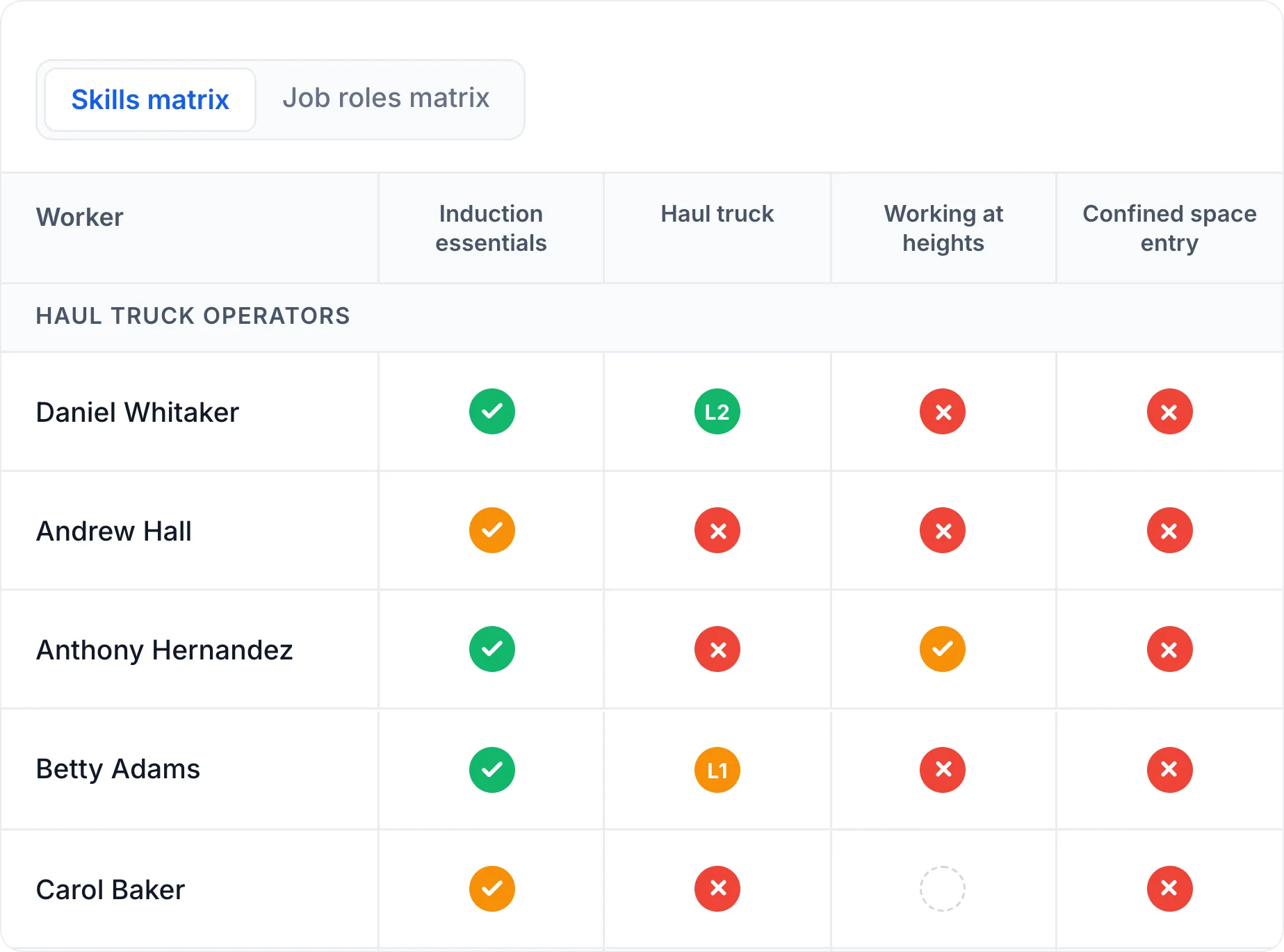
Training matrix software is a digital tool that maps employees against the training, certifications, and compliance requirements their role needs. This gives organisations a clear view of gaps across individuals, teams, and the company. It can be used to create targeted employee development plans and inform workforce planning efforts.
The training matrix uses a simple grid with employees on one axis and training requirements on the other. The training it tracks could be mandatory, statutory, or optional, depending on how extensively an organisation wants to track it.
Organisations can then assign values to show what training is planned, in progress, and complete. Some training matrix software also tracks when training was last completed and when refresher training courses are due.
Training Matrix Software vs Training Management System
Training matrix software compares every worker against the training their role requires. Unassigned training shows as a gap that needs addressing.
A training management system creates, assigns, and delivers the training itself. It produces training materials and courses, rather than only reporting on them.
Training Matrix Software vs Training Tracking Software
Training matrix software helps organisations confirm a team is trained for its work. Organisations map training against roles to spot gaps, often with built-in tracking features like expiry alerts.
Training tracking software, by contrast, helps organisations confirm each person has completed their training. Organisations use it to log completions, certificates, and expiry dates against individuals rather than roles.
Quick Picks
| Order | Category | Platform |
|---|---|---|
| 1 | Best for Frontline Training and Assessment | Cloud Assess |
| 2 | Best for Safety Training Records | BIStrainer |
| 3 | Best Training Matrix Software for Manufacturing | Poka |
| 4 | Best Training Matrix Software in the UK | SkillStation |
| 5 | Best for Multi-Site Training Tracking | TeamGuru |
| 6 | Best Standalone Training Matrix Software | AG5 |
| 7 | Best for Subcontractor Training Compliance | Boxcore |
| 8 | Best for Compliance Training | HSI |
| 9 | Best for Enterprise Training | Kallidus Learn |
| 10 | Best for Policy-Based Training | PowerDMS |
10 Best Training Matrix Software Solutions
Best for Frontline Training and Assessment
#1 Cloud Assess
Average User Score: 4.7 / 5




Cloud Assess is a cloud-based training and assessment platform built for frontline workforce needs. It supports training processes end-to-end, from course creation, to competency-based assessment, to skill tracking across teams and sites.
The platform offers tools for visualising workforce training, skills, and competencies through customisable reporting dashboards. This helps organisations run training needs analyses, and plan skill development through targeted training programs, internal restructuring, or external hiring. It also supports compliance in high-risk industries, where companies need to stay audit-ready at all times.
The platform also provides organisations with a clear audit trail that goes beyond listing training completions. Evidence portfolios that support photo, video, and audio recordings alongside eSignatures from both workers and assessors are attached to every training record. This proves competency, rather than assuming it from a course completion.
Cloud Assess is also designed to work onsite, even in remote areas. A mobile learning app with offline learning features makes it easy for teams to access training in the flow of work. It also helps site managers make informed decisions around task and project assignments.
This makes Cloud Assess well-aligned for:
- Organisations delivering training and assessment from one platform
- Businesses training deskless or mobile workers who need offline access
- Employers running training needs analysis across multiple sites
- Teams tracking skill gaps against role requirements in real-time
Key Features
- Training matrix reporting view
- Skill and competency matrix
- Training Planner with in-app calendar
- Auditable training records
- Digital evidence portfolios
- Mobile training app
- Offline learning functionality
- Customisable reporting dashboards
- Downloadable resource library
- Free course library
- Workflow automation
- Personalised learning paths
- Advanced customisation features
- Training certificate management
- Extensive compliance management
Pros
- All-in-one solution for creating, delivering, and measuring training
- Practical and competency-based assessments support capable workforces
- Simplified matrix views provide real-time visibility into training and competency gaps
- Frontline workers can access training materials and generate reports offline
- Helps organisations make data-driven decisions based on assessment results
Pricing
Cloud Assess offers an all-inclusive solution for employee training in high-risk, high-compliance industries. Every feature is included from day one, including mobile offline assessment, verification of competency, skills matrix and automated compliance tracking. There are no upgrade paths or feature gates. Visit our pricing page for an accurate quote.
Rating
4.7/5 (average rating from Capterra, G2, GetApp, Software Advice)
Ditch the spreadsheets
See every gap, every expiry and every role requirement in one live, AI-powered skills matrix. Audit-ready, whichever regulator you answer to.
Best for Safety Training Records
#2 BIStrainer

BIStrainer is the training matrix solution from BIS Safety Software, built around safety training in particular. The platform offers a centralised record register that holds every training record, certificate, and expiry date in one place. This helps organisations produce them on demand for regulators, clients, or auditors. It also provides gap analysis reporting that shows current training status for every employee and identifies who is missing what. It automates training assignments to keep records current as roles change and certifications expire.
This makes BIStrainer well-aligned for:
- Safety-conscious industries maintaining auditable training records
- Organisations assigning required training automatically by role
- Businesses running gap analysis across a large workforce
- Medium and large enterprises tracking compliance on a recurring cycle
However, BIStrainer is less suitable for small organisations. The feature set can be complex to navigate, and extensive for companies that only want to track training completion.
Key Features
- Audit-ready training records
- Integrated compliance management
- Training certificate management
- Automated training assignments
- Expiry and renewal notifications
- Gap analysis reporting
- Customisable training grid
- Employee training summary reports
- Cloud-based accessibility
Pros
- Assigns training automatically to address gaps
- Safety training focus supports WHS requirements in high-risk industries
Cons
- Extensive features for basic training tracking needs
- Complex features mean a steep learning curve for new companies
- Customisation features can take significant time to perfect
Pricing
BIStrainer doesn’t make pricing available on their website. Contact them directly for a quote or demo.
Rating
4.8/5 (average rating from Capterra, G2, GetApp, Software Advice)
Best Training Matrix Software for Manufacturing
#3 Poka

Poka is the frontline training platform from IFS, designed around the manufacturing industry. It provides organisations with the tools they need to track skills, training, and certification for their frontline workforces. This helps supervisors visualise coverage gaps and address them before they can impact compliance. It also ensures the right people can be assigned to the right shifts based on their training, skills, capabilities, and competencies.
This makes Poka well-aligned for:
- Manufacturers tracking operator training on the factory floor
- Plants monitoring training requirements across shifts and production lines
- Organisations onboarding new production workers at pace
- Businesses validating competency through exams before assigning tasks
However, Poka’s analytics aren’t as detailed as some competitors, and data extraction can be a challenge. This can make it more difficult to apply insights to areas like workforce planning.
Key Features
- Industrial training matrix
- Real-time gap visualisation
- Factory training management
- Team-based skill assessments
- Validation of learning through exams
- Onboarding acceleration tools
- Integration with existing systems
- Analytics and KPI dashboards
- Standardised forms and checklists
- Team communication and collaboration tools
Pros
- Designed around the training that manufacturing workers require
- Highly accessible for frontline and deskless workers
- Supports shift assignment based on training completions
- Allows for technical knowledge sharing across sites
Cons
- Less advanced analytics than some competitors
- Difficult to extract data for reporting
- Limited customisation options
Pricing
Poka doesn’t make pricing available on their site. Contact them for an accurate quote or to book a demo.
Rating
4.7/5 (average rating from Capterra, G2, GetApp, Software Advice)
Best Training Matrix Software in the UK
#4 SkillStation
Average User Score: 4.6/5

SkillStation by Think Eleven is a UK training matrix software provider. It’s designed around UK training and compliance requirements. This includes CSCS card validation and competence evidence for the Building Safety Act. The platform’s Training Data Matrix shows who has been trained and who needs assessment. These can be viewed for individuals, teams, or an entire organisation. From there, companies can build targeted, role-based training plans in the platform to boost workforce readiness.
This makes SkillStation well-aligned for:
- UK organisations evidencing training and competency during audits
- UK construction businesses validating CSCS cards before site access
- Teams mapping role-specific training requirements against existing records
- Organisations developing and executing structured training plans
However, SkillStation is browser-based, without a dedicated mobile app. This can make it less convenient for employees updating records on smaller devices.
Key Features
- Training Data Matrix
- UK regulatory checks
- CSCS card validation
- QR-based competency verification
- Unlimited matrix creation
- Configurable training targets
- Instant access to training records
- Customisable learning paths
- Training plan development tools
- Expiry notifications and retraining functionality
Pros
- UK regulatory focus supports local compliance
- Supports the validation of skills and training before site access
- Training Data Matrix makes training gaps quick to spot
- Effective tool for developing and executing training plans
Cons
- Browser-based, with limited mobile functionality
- Extensive setup and configuration requirements
- Lacks advanced integration options
Pricing
SkillStation pricing starts from £3 per user monthly and scales for larger organisations. Add-on modules are available for an LMS, action planner, skills passport, and more.
Rating
4.6/5 (average rating from Capterra, G2, GetApp, Software Advice)
Best for Multi-Site Training Tracking
#5 TeamGuru

TeamGuru provides a comprehensive training matrix for visualising gaps, built for organisations running multiple sites. Companies apply the same training requirements across every location, then monitor progress by team, department, or site. Plant managers see their own site in detail, while operations leaders compare completion across the group. For workforces that move between sites, organisations confirm a worker meets local requirements before they start.
This makes TeamGuru well-aligned for:
- Manufacturers tracking training completion across multiple sites
- Organisations standardising training requirements across dispersed workforces
- Plant managers reporting on site-level training status
- Operations leaders comparing training compliance across locations
However, TeamGuru offers limited offline capabilities. This can make it more difficult for operators to validate training statuses on remote sites.
Key Features
- Global and individual training tracking
- Role and site-based reporting
- Automated expiry and retraining flags
- Progress monitoring
- Automatic renewal reminders
- Automated expiry and retraining flags
- Data centralisation for training records
- Document-linked retraining alerts
- Custom colour-coded training levels
- Bulk training status imports
- Training plans from gap data
Pros
- Standardises training across sites
- Tracks training status for teams based around the globe
- Automatic retraining flags keep training records current
- Data centralisation makes it easy to find training records
Cons
- Limited offline capability can impact validation
- Customisation is complex
- Limited value for small operations
Pricing
TeamGuru offers Group, Enterprise and Unlimited pricing tiers. Contact them directly for a free trial or to get an accurate quote.
Rating
4.5/5 (average rating from Capterra, G2, GetApp, Software Advice)
Best Standalone Training Matrix Software
#6 AG5
Average User Score: 4.5/5

AG5’s intuitive, standalone training matrix is designed to simplify requirement tracking. It’s purpose-built to help companies visualise training completions, qualifications, and competency across teams. The platform provides real-time updates that keep the matrix current. This reduces the risk of outdated information informing shift or role assignments. It also comes with pre-built templates that make it easy to adopt with minimal setup time. This means organisations gain value from the platform from day one, rather than having to wait for workflows to be set up and customised.
This makes AG5 well-aligned for:
- Organisations moving away from spreadsheet-based training matrices
- Businesses that already run training delivery in a separate system
- Teams tracking qualifications and expiry dates across a workforce
- Organisations wanting a fast setup using pre-built matrix templates
However, AG5 shows where training gaps are but doesn’t include tools to close them. Organisations need a separate platform to create and deliver the training.
Key Features
- Pre-built matrix templates
- Soon-to-expire qualification alerts
- Qualification tracking
- Visual matrix customisation
- Requirement library management
- Notification workflows
- Real-time updates with training information
- Mobile skill assessments
- Audit trails
- HRM and eLearning integrations
Pros
- Highlights training gaps at a glance
- Simple, user-friendly interface that’s easy to navigate
- Pre-built templates speed up adoption
- Effective tool for companies of any size
Cons
- Requires external software for delivery and training plan development
- Limited customisation options
- Only basic reporting features available
Pricing
AG5 offers Core, Accelerate and Enterprise pricing plans. Contact them directly to book a demo or request a detailed quotation.
Rating
4.5/5 (average rating from Capterra, G2, GetApp, Software Advice)
Best for Subcontractor Training Compliance
#7 Boxcore
Average User Score: 5/5

Boxcore is construction training management software built around contractor and subcontractor workforces in the UK and Ireland. It allows companies to set minimum training requirements by role, task, or project. Each subcontractor can upload and update records for their own crew, which feed into a training matrix comparing every worker against those requirements. This gives site managers a view of who is trained before they assign shifts or tasks. Training status also connects to site access, so workers missing a required certification are flagged before entry.
This makes Boxcore well-aligned for:
- Principal contractors evidencing subcontractor training during audits
- UK and Irish construction businesses tracking CSCS and Safe Pass cards across projects
- Site managers checking task-specific training before work starts
- Organisations replacing spreadsheet training registers shared by email
However, Boxcore is built specifically for construction site compliance. Organisations in other industries may find its features less suited to their training needs.
Key Features
- Training matrix software for the UK and Ireland
- Role, task, or project requirements
- Certification expiry tracking
- CSCS and Safe Pass verification
- Digital site inductions
- Subcontractor training records
- Training-linked site access control
- Training register export
- Traffic-light training status
- Mobile access for site teams
- Read-only stakeholder access
Pros
- Designed for UK and Irish contractor and subcontractor compliance requirements
- Generates training matrices on demand
- Links training status to site entry
- Fast setup with minimal platform onboarding required
Cons
- Limited use outside of the construction industry
- No course library or training delivery
- Verifies certificates rather than assessing competence
Pricing
Boxcore doesn’t list pricing details on their website. Contact them directly to book a demo or request a quote.
Rating
5/5 (average rating from Capterra, GetApp, Software Advice)
Best for Compliance Training
#8 HSI

HSI provides a customisable safety training matrix for managing compliance in sectors like construction, energy, and environmental services. Organisations gain real-time visibility for compliance tracking, employee progress, and training gaps. HSI also offers pre-built compliance training modules covering safety and regulatory topics. Companies can integrate these courses into any SCORM-compliant LMS. This helps them add compliance training into existing tools without having to build modules from scratch.
This makes HSI well-aligned for:
- Construction, energy, and environmental businesses meeting safety obligations
- Organisations delivering industry-standard compliance courses at scale
- Teams adding pre-built compliance content to an existing training program
- Businesses tracking compliance status across a dispersed workforce
However, HSI’s compliance training library is built mainly around US regulations, such as OSHA. Organisations outside the US may need to adapt courses to meet local requirements.
Key Features
- Compliance and safety training matrix
- Pre-built compliance training modules
- Interactive training content
- SCORM-supported course packages
- Real-time training tracking
- Automated notifications
- Mobile-friendly platform
- Visual analytics dashboards
- Document management
Pros
- Designed for safety compliance in high-risk industries
- Pre-built courses can integrate with any SCORM-compliant LMS
- Mobile access helps employees train from anywhere
- Interactive content enhances learner engagement
Cons
- Course library built mainly around US regulations
- Feature depth creates a steeper learning curve
- Focus on compliance may not suit all organisations
Pricing
HSI doesn’t make pricing available on their website. Contact them directly for a quote or demo.
Rating
4.6/5 (average rating from Capterra, G2, GetApp, Software Advice)
Best for Enterprise Training
#9 Kallidus Learn
Average User Score: 4.4/5

Kallidus Learn is a UK-based LMS with features for assigning and tracking training by role. It’s designed around enterprise-scale organisations, with a focus on structured and scalable learning. The platform offers reporting that covers training assignments and completions by role, department, site, or across an organisation. Kallidus Learn also prioritises integrations, ensuring training data can be shared across workforce tools, including HR systems. This supports data-driven decision-making at scale.
This makes Kallidus Learn well-aligned for:
- Large enterprises running structured, scalable training programs
- Organisations in regulated industries managing certification renewals
- Businesses connecting training records to existing HR systems
- L&D teams reporting training completion for audit purposes
However, Kallidus Learn doesn’t include a dedicated training matrix view. Its matrix template is a separate spreadsheet for planning mandatory courses. Organisations can view training gaps through embedded Power BI reports instead.
Key Features
- Role and group-based assignment
- Customisable learning pathways
- Certification and renewal tracking
- Configurable manager dashboards
- Overdue training and expiry alerts
- Power BI reporting
- Configurable compliance reports
- HRIS and talent system integrations
Pros
- Powerful reporting tools for tracking employee progress and compliance
- Seamless integration with enterprise tech stacks
- Ready-made compliance course library available
- Automated learning paths tailor training based on role or department
Cons
- Matrix-style reporting relies on Power BI customisation
- Requires HRIS data to drive training assignment
- Limited support for organisations with simple training and reporting requirements
Pricing
Kallidus doesn’t display pricing on their website. You would need to contact them directly for a quote or product tour.
Rating
4.4/5 (average rating from Capterra, G2, GetApp, Software Advice)
Best for Policy-Based Training
#10 PowerDMS
Average User Score: 4.7/5

PowerDMS by NEOGOV combines training and document management in regulated sectors. It helps organisations assign training by role, then link each course to the policy it supports. This means that when policies change, training is automatically updated. Anyone who completed the initial training can be enrolled in refresher training to cover the new content. The platform also keeps a version history for each policy, with a record of who acknowledged it and when. This provides organisations with visibility into training currency alongside certification expiries.
This makes PowerDMS well-aligned for:
- Law enforcement, healthcare, and government agencies evidencing policy training
- Organisations linking training records to controlled policy documents
- Teams tracking internal and external certifications in one place
- Field-based staff completing training and assessments on mobile
However, PowerDMS presents training data through dashboards and reports rather than a matrix. Organisations can track completions and renewals, but not see each employee mapped against every requirement in one grid.
Key Features
- Policy-linked training courses
- Automatic content updates from policies
- Internal and external record tracking
- Certification renewal reminders
- Custom course and assessment creation
- Training request and approval workflows
- Completion and renewal reporting
- Mobile app access
Pros
- Policy changes flow through to training content automatically
- Combines training and document management in one platform
- Tracks externally delivered training alongside internal courses
- Accreditation standards manuals published on the platform
Cons
- No matrix view for mapping requirements to roles
- Built around US regulatory and accreditation frameworks
- Few options for non-compliance-related training
Pricing
PowerDMS doesn’t provide pricing details on their website. Contact them directly for a quotation customised to your needs.
Rating
4.7/5 (average rating from Capterra, G2, GetApp, Software Advice)
Buyer’s Guide for Employee Training Matrix
- Matrix view. Check whether the platform displays training in a true matrix. Some tools only offer dashboards and reports. A matrix lets managers see every employee against every requirement at once.
- Filtering and views. Check whether the matrix can be filtered by team, site, shift, or role. This helps managers focus on the gaps relevant to them, rather than scanning the whole organisation.
- Requirement mapping. Look for the ability to assign requirements by role, site, task, or project. This keeps the matrix accurate as people change roles or move between sites.
- Closing gaps. A matrix shows where gaps are, but organisations still need to close them. Check whether the platform delivers training itself or relies on a separate LMS.
- Expiry and renewals. Look for automated alerts before certifications lapse. Some platforms also flag retraining when a linked procedure or policy changes.
- Industry and regional fit. Many platforms are built for one sector or regulator. Check that requirement templates and course content suit your industry and location. This matters for organisations following Australian WHS or UK HSE requirements.
- Frontline access. Site teams need to check training status quickly. Mobile access and offline availability help supervisors confirm who is approved for a task.
- Audit readiness. Check how quickly organisations can export matrices and evidence for auditors, clients, or principal contractors.
Ditch the spreadsheets
See every gap, every expiry and every role requirement in one live, AI-powered skills matrix. Audit-ready, whichever regulator you answer to.
Frequently Asked Questions (FAQs)
Online Training Matrix Software FAQs
What industries benefit the most from training matrices?
Training matrices suit industries where roles carry mandatory training, licences, or certifications. These include construction, mining, manufacturing, healthcare, transport, and public safety. In these sectors, organisations need to prove workers hold current training before they start a task.
What security features should training matrix software have?
Look for encryption, role-based access controls, and audit trails that log every change to training records. Independent certifications, such as ISO 27001, also show a provider meets recognised security standards.
How often should a training matrix be updated?
Organisations should update the training matrix whenever a worker completes training or a certification expires. With digital platforms, they can record these changes as they happen. Organisations should also review the matrix whenever requirements change, such as new regulations, sites, roles, or procedures.
Is training matrix software scalable as the business grows?
Most training matrix platforms let organisations add employees, roles, and sites as they grow. The key is how requirements are set up. When organisations link training to roles rather than individuals, new starters inherit the right requirements automatically. Bulk imports and filtered views also help as the matrix gets large.
Do we need training matrix software if we already have an LMS?
It depends on what your organisation’s LMS reports. An LMS tracks the courses it delivers, so it shows who completed what they were assigned. A training matrix compares workers against what their role requires, so training nobody assigned still shows as a gap. Some platforms do both.


