

#2 Data Tracking
Behind reporting and analytics is an LMS feature that often goes unrecognised. While many trainers find great use in data visualisation, it requires a good deal of data tracking and collection as well. This can include real-time monitoring of course material.
Heat maps, for example, can capture information about where learners are spending a lot of time and where they are simply scrolling. Long pauses can indicate complex concepts that are difficult to understand, while scrolling tends to indicate a lack of interest or learner engagement. The more detailed the data you’re able to gather and track, the more effective your reporting and analytics will become.
This is particularly true for SCORM content, where comprehensive data tracking can provide insights beyond just learner engagement.
Quality checking, throughput and comparative stats can guide how assessors are marking in comparison to their counterparts. Additionally, tracking the timeline of learner interactions, such as when they are logging in and engaging with course materials, offers a deeper understanding of learning patterns and behaviours. These detailed insights enable you to make data-driven improvements to your training programs, ensuring they meet learner needs more effectively.
#3 Gamification
Learner engagement is key to success in training. The more engaged learners are with your training content, the more they will connect to it. This connection not only helps learners find immediate value in your courses but also improves knowledge retention.
Gamification involves adding fun to the learning experience through elements like daily streaks, leaderboards and challenges. These features encourage learners to return to their training regularly and motivate them to keep learning and growing.
Another powerful aspect of gamification is the use of micro-credentials and digital badging. These rewards recognise and validate learners’ achievements, providing them with tangible proof of their skills and progress. Badges and micro-credentials not only enhance motivation but also offer learners a sense of accomplishment and the ability to showcase their achievements to peers and potential employers.
#4 Integrations and APIs
You are likely already using a number of different technology solutions. Your Learning Management System is going to form part of a greater tech stack. However, if the LMS that you choose doesn’t pair well or share information with your existing systems, adoption of the technology is going to become a challenge. This is why it’s important to ensure that the LMS you choose has integrations with your existing solutions, or connects to them through APIs.
#5 Accessibility
You want as many people as possible to be able to access training materials. And they should also be able to access your courses in whatever way is easiest for them. Accessibility covers both areas. Your training should accommodate different learning styles and cater to people with visual or hearing impairments, as well as those with learning difficulties. Learners should also be able to access courses across different devices, both online and offline, to ensure that lessons are available when they need them most.
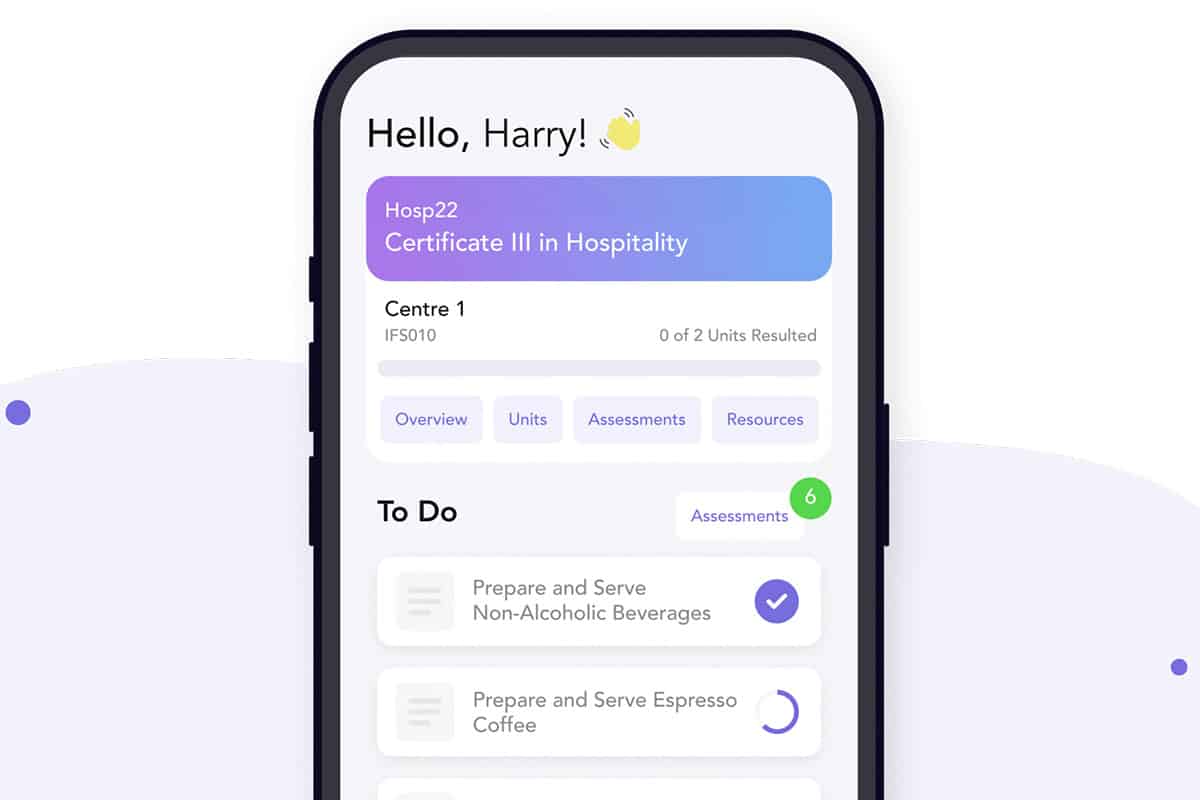
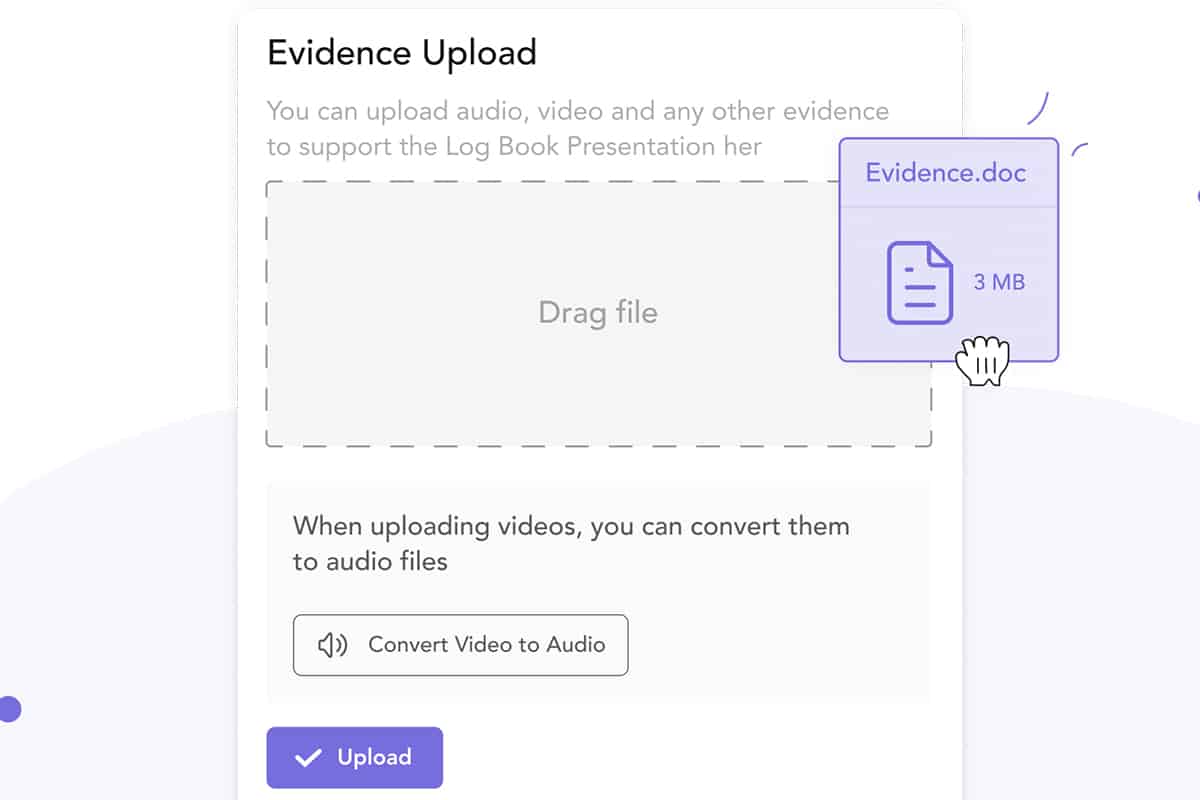
Accessibility is also about the interface. At Cloud Assess, we have designed our platform to be user-friendly and created a Learner App that focuses solely on the work assigned to learners, avoiding distractions. This app allows learners to upload evidence and complete assessments anywhere, anytime, including offline. They can “check out” their assessments when they don’t have internet access and sync their progress once they are back online. This ensures that learners have seamless access to their training materials, enhancing their learning experience and overall success.
#6 Interactive Assessments
Interactive assessments can be considered another method of gamification. Quiz software and surveys which test learners’ knowledge help them better engage with training materials. The interactive nature of these assessments means that learners can get instant feedback, helping them to learn quickly from their mistakes. Learners are also encouraged to keep returning to the training to get better scores or improve their knowledge recall.
#7 Social Learning
Humans are social creatures. We like to share our successes and turn to others for assistance when we’re struggling. Social learning features in an LMS can be invaluable for fostering this kind of interaction.
For example, the “Posts” feature in Cloud Assess allows assessors or trainers to create posts within a course and effectively works as a forum for the cohort. They might share a video, link, or ask a question, prompting learners to collaborate and share their ideas, thoughts and insights.
Community forums, leaderboards and integration with platforms like LinkedIn and Facebook also help learners engage with content on a deeper level by enabling discussions with colleagues, peers and teachers about what they’ve learned.
These features collectively enhance the learning experience by promoting active participation and deeper understanding.
#8 Security
Security is a primary concern for organisations around the world. With cyberattacks becoming more advanced on a practically daily basis, it’s essential for your LMS to include features for data protection. This will help you to stay compliant with regulations like the EU’s GDPR and Australia’s Privacy Act. It will also help you to protect any intellectual property that your training courses might include.
#9 Content Management
It’s worth noting that there is a big difference between content management and course management. Both are LMS features that can be useful to educators, but they do serve distinct purposes.
Content management is a feature that many Learning Management Systems offer to help you keep track of assets. These could include files, infographics, images, video clips, audio clips and other media types. The right LMS will provide you with tools for centralised learning materials. Features like version control and options for tagging and categorising training content will make it easier to find and incorporate into training.
#10 Course Management
Course management is a feature that helps educators create, track and distribute their training courses. Where content management relates to the uploading, storage and access of files, course and training management involve developing them and incorporating them into a training program. An LMS with course management helps you to build courses, schedule their release, enrol learners and manage communication including email announcements and live discussions.
#11 Engaging User Interface
The easier and more intuitive it is to use a platform, the more it’s going to get used. While complex features may add value, they can also be difficult to understand. A learning management system should offer the best of both worlds: it should be easy to use and access while still providing the necessary LMS functionality.
An effective LMS should allow for different usability levels tailored to various roles. This means advanced features are available only to those who need them, preventing distraction for other users. Learners, in particular, need a frictionless interface that encourages the completion of coursework without unnecessary obstacles. This approach ensures that the platform remains accessible and intuitive for all users, enhancing their overall learning experience.
Additionally, having advanced LMS features available for users who want to delve deeper into their learning provides enhanced functionality without compromising the simplicity needed by those who only require basic features. This balance makes the platform versatile and user-friendly for a diverse audience.
#12 Learning Paths & Training Journeys
No two learners are the same. They will have different skills and knowledge, and they’ll grasp concepts at different rates. This is what makes personalised learning paths or training journeys a useful LMS feature. It allows you to enrol all of your learners in the same course, but to adjust the learning that they receive according to their results.
Say, for example, that you enrolled your full team in a compliance training course. Most of the learners understand the concepts of the first lesson easily and move on to the next section. However, one learner may struggle because they don’t have a good understanding of GDPR. A customised learning path will adjust that student’s training to include a GDPR introduction course. Others will progress with more in-depth compliance training but may have their own learning paths adjusted as the course continues.
#13 Branding and Customisation
When you’re running training initiatives, it’s important that the training you create aligns with your brand. A learning management system with robust branding and customisation features allows you to add your own flair and unique elements to your training. This ensures that learners associate their training directly with your company, reinforcing your brand identity throughout the learning experience.
Customising training content to reflect your brand’s look and feel, including logos, colour schemes and messaging, helps create a cohesive and professional training environment. This level of customisation not only enhances learner engagement but also strengthens brand recognition and loyalty among your employees or customers.
#14 Blended Learning
Accommodating different learning styles is critical to the success of any training program. While some students prefer self-paced learning, others thrive when engaging with instructors and peers directly. Blended learning helps educators to find a balance between online and in-person training. It can involve learners coming together in a physical space like a classroom or meeting virtually. However, it can also mean providing learners with training material that they can review in their own time when it’s most convenient for them. Blended learning is all about finding the right combination of techniques that accommodates as many learning styles as possible and adheres to the training requirements associated with the skill or knowledge required.
#15 Certifications
Finishing a training course always comes with a sense of achievement. However, this sense of achievement can be short-lived without any form of accreditation attached to it. When training courses come with certifications, digital badges and other measures of achievement, they can be easily shared and become more valuable. These certifications serve as verifiable proof of skills and knowledge, which can be validated by future employers.
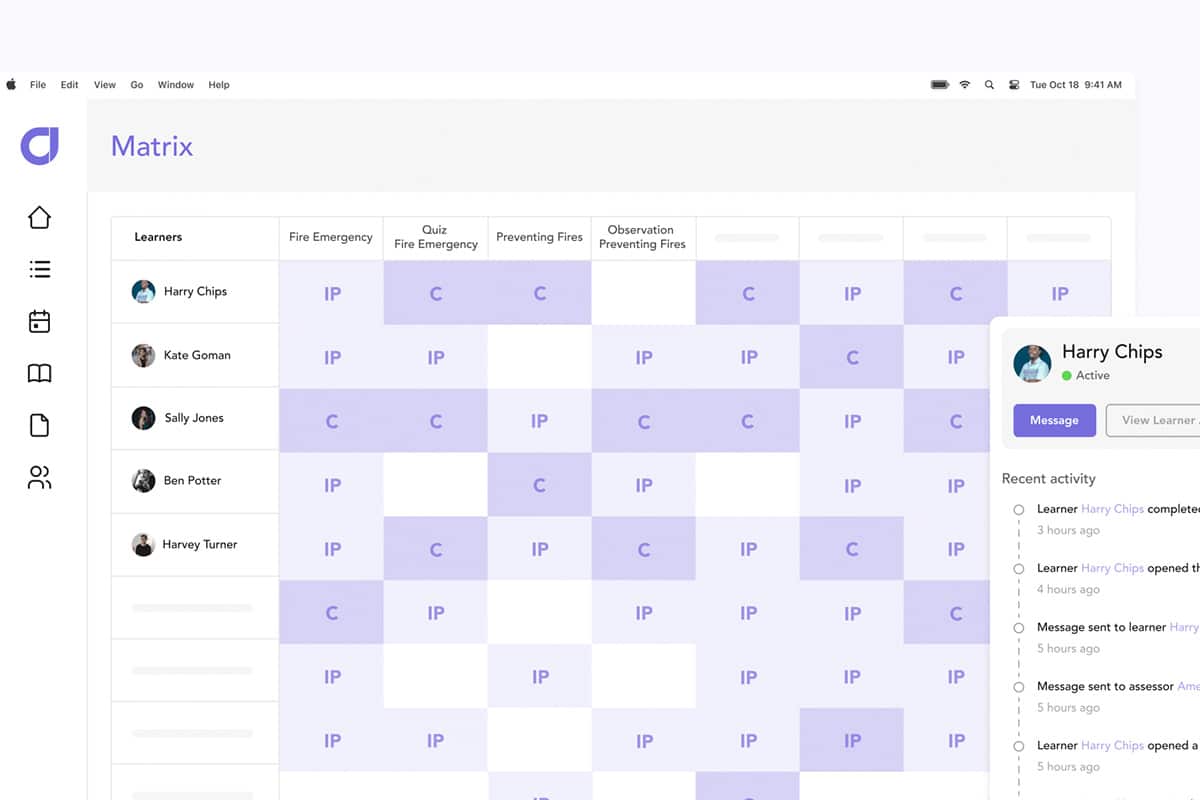
Certifications also offer granularity in skill recognition, which can be integrated into a skills matrix. This allows for precise tracking of specific skills acquired through training, enabling better assessment of learner capabilities. A detailed online skills matrix not only helps in identifying skill gaps but also supports skills mobility within an organisation. By mapping out the skills employees have and the ones they need to develop, organisations can create targeted development plans, promoting continuous learning and career progression.
#16 Automation
The less time trainers need to spend on administration, the more time they’ll have to spend on meaningful tasks. Admin is a necessary evil, but it’s one that should take as little time as possible. This is where workflow automation and artificial intelligence in training can be invaluable LMS features. They can simplify the process of course enrolment, allow for effective and consistent communication,and serve as encouragement for students to continue learning.
#17 Quality Checks
Ensuring that your assessment materials meet the required standards and comply with industry regulations is critical. Quality checks are an essential LMS feature that allows trainers and assessors to perform regular reviews of training content and assessments. This process helps maintain consistency and accuracy in training delivery and assessment outcomes.
By integrating quality checks, your LMS can provide a reliable way to monitor and uphold the standards necessary for compliance. Regular quality checks ensure that any discrepancies or outdated materials are identified and updated promptly, helping to maintain a high standard of training.
Cloud Assess includes robust quality check features, allowing trainers to regularly review and validate training materials, ensuring they meet compliance standards.
#18 Timeline Tracking
Timeline tracking is a feature that enables detailed monitoring of learner activities over time. This tool tracks when learners log in, access materials and complete assessments, providing a clear timeline of their interactions with the course. This feature is invaluable for compliance, as it offers an auditable trail of learner engagement. By maintaining detailed records of learner activity, timeline tracking ensures that all training activities are documented and can be reviewed as needed. This transparency helps organisations demonstrate adherence to training schedules and regulatory requirements.
Cloud Assess provides comprehensive timeline tracking, offering detailed insights into learner interactions and ensuring that all training activities are properly documented and auditable.
#19 Revision Control
Managing different versions of training materials is crucial for maintaining compliance. Revision control is an LMS feature that ensures the most current and compliant version of the content is being used, while also keeping records of previous versions. This feature is essential for compliance as it provides a transparent history of changes made to training materials, ensuring that all updates are properly documented and traceable. With revision control, trainers can easily update content to reflect new regulations or standards, ensuring that all learners receive the most accurate and up-to-date information.
Cloud Assess supports revision control, allowing trainers to manage different versions of training materials efficiently. This feature ensures that all updates are documented and that the most current version is always in use, aiding in compliance efforts.
#20 Alerts and Notifications
Another LMS feature that boosts the effectiveness of training programs is alerts and notifications. These can apply from both an administrative perspective, and for learners as well. And this is another area where automation can be a great asset. You can set up automatic reminders for students after a certain number of days have elapsed without them accessing the learning platform, for example. Or you can set up alerts to notify you when learners complete a course, when a certain action is taken, or when feedback is received.
#21 Offline Learning Functionality
Having access to online courses is a significant advantage for many learners. However, for those without regular internet access, it can pose an added challenge to their learning experience. To address this, an LMS with offline learning ensures that students can learn both online and offline, with their course progress being tracked continuously.
Cloud Assess, for example, offers offline availability where learners can check out an assessment before going offline. They can work on their assessments without an internet connection, and once they reconnect, their progress syncs automatically to the app. This feature guarantees that learners can continue their education seamlessly, regardless of their internet access, ensuring their learning is uninterrupted and their progress accurately tracked.
#22 User Management
User management is about more than just course enrolment. In fact, user management is quite different from learner management. It’s about being able to manage who has access to your LMS, and what information they can view. This is a critical consideration, especially when paired with other LMS features like security and compliance with regulations. Your LMS is likely to contain personal data about your learners, their studies and their course results. It is important to ensure that the learning platform you use also provides you with features for managing who has access to that information.
#23 SCORM & xAPI Compliance
SCORM & xAPI Compliance ensures compatibility with industry-standard eLearning content formats. SCORM (Sharable Content Object Reference Model) and xAPI (Experience API) are widely used standards for creating and managing eLearning content. SCORM ensures that content is compatible and can be shared across different systems, while xAPI allows tracking of a wide range of learning experiences both online and offline. An LMS with SCORM and xAPI compliance enables seamless integration of various learning materials, ensuring consistency and compatibility across different platforms. This enhances interoperability, supports detailed tracking and ensures content compatibility.
#24 Learning Portals
Learning Portals allow organisations to create separate, customised portals for different departments, audiences or clients. Each portal can have its own branding, content and user management, functioning as a mini-LMS within the larger system. This feature is particularly useful for organisations with diverse training needs or those providing training to external clients. It facilitates tailored training experiences, improves organisation and enhances scalability.
#25 Exams
Exams enable the creation and management of various types of assessments, including multiple-choice, true/false, short answer and more. Automated grading and instant feedback help learners understand their performance and areas needing improvement. This feature ensures that assessments are consistent, fair and provide meaningful insights into learner progress. It supports diverse assessment types, offers instant feedback and aids in knowledge retention.
#26 Surveys
Surveys within an LMS enable the collection of training feedback from learners about their experience. This can include their satisfaction with the course content, the effectiveness of the instructor, and suggestions for improvement. Analysing survey results helps organisations refine their training programmes and enhance learner engagement. Surveys provide actionable insights, enhance training programmes and increase learner satisfaction.
#27 Webinar Integration
Webinar Integration allows seamless incorporation of live training sessions into the LMS. By integrating with popular webinar tools like Zoom, Microsoft Teams and Webex, organisations can schedule, manage and conduct live training sessions directly within the LMS. This feature supports blended learning approaches and ensures that live session data is captured and stored within the LMS. It enhances live training experiences, supports blended learning, and centralises training management.
#28 eCommerce Integration
eCommerce integration allows organisations to sell training courses and manage payments directly within the LMS. Features include setting up an online store, managing pricing and discounts, handling transactions through payment gateways like PayPal and Stripe, and bundling courses for sale.
Additionally, it enables online enrolment, where payments for courses are collected through an embedded form. This form sends the relevant information to the appropriate systems, with payment typically collected via Stripe or other payment methods.
This functionality is crucial for organisations offering training to external clients or looking to monetise their training content. It generates revenue, simplifies course sales and enrolments, and provides a seamless purchasing experience.
#29 Data Migration
Data migration ensures a smooth transition from an old LMS to a new one by transferring all existing training data, including user records, course content and historical performance data. This feature minimises disruption and ensures the continuity of training programmes during the migration process. It ensures data continuity, reduces risk and facilitates LMS upgrades.
#30 Multilingual Interface
Multilingual interfaces allow the LMS to support multiple languages, enabling organisations to deliver training to a global audience. This feature includes translation of the LMS interface, course content and assessments, ensuring that learners can access training in their preferred language. It enhances global accessibility, improves learner engagement and supports compliance with local regulations.
#31 Single Sign-On (SSO)
Single Sign-On (SSO) in an LMS enables users to access the system using existing login credentials from corporate email or social media accounts, for example. This feature simplifies the login process, reduces password fatigue and enhances security by relying on a centralised authentication system. It improves user convenience, enhances security, and increases LMS adoption.
How Different LMS Use-Cases Affect Features
Some LMS features are universally useful. For example, effective reporting, analytics and data tracking, personalised learning paths, and integration capabilities are valuable tools for any educator. However, the features that are most valuable may differ according to industry, training objectives and company size.
Small-Businesses
Many start-ups and small businesses only need the basics when it comes to training features. They may not have time for course management and branding. What would be more useful to them is an extensive course library of existing content that they can share with their teams. However, features like gamification, an engaging user interface and social learning will still be valuable assets in helping their learners connect with training material. And for small businesses, automation is especially important. Small teams want to focus their efforts on the business itself as much as possible. Any time they’re able to save on administrative tasks is invaluable.
Enterprises
For bigger businesses, features like branding and customisation are essential. When you’re training large numbers of people, you want to make sure that the learning experience reflects your company culture. With large numbers of learners enrolled in training courses, being able to adjust alerts and notifications is also important. You want to ensure that your workers are progressing through training material, but you also don’t want to have your inbox inundated with messages on an hourly basis. User management, security and compliance are also essential learning management system features for large businesses, since they are processing large amounts of personal data that needs to be protected.
Organisations with Frontline Workers
For industries where employees are rarely found at desks or in offices, features that support accessibility and on-the-job training are essential. A mobile app with offline functionality allows deskless workers to complete training and assessments without internet and sync the information when connectivity returns. This ensures training can be conducted even in the remotest areas, an essential feature for sectors like mining, manufacturing, transport and logistics. It also ensures organisations can prioritise safety training and verify skills in the flow of work, ensuring compliance in high-risk industries.
Vocational Education & Training
There are a number of features that simplify training processes for specific roles. Course management is going to be a must-have. Existing content libraries are useful for general training. Being able to create relevant learning materials that cover content for particular industries and roles helps VETs to address specific needs. Since vocational training also often requires the development of practical skills, features like accessibility and offline learning trackers become necessities, rather than nice-to-haves.
Find the Best Learning Management System (LMS) For Your Needs
Choosing the right LMS for workplace training depends on the specific features that you or your organisation need. Regardless of whether you choose a cloud-based LMS or a hosted LMS, it is important to understand these features. They can help guide you to the best LMS solution tailored to your requirements. Explore our detailed guides on the best LMS options to find the perfect fit for your needs:
- Best Learning Management Systems
- Best LMS for corporate training
- Best LMS for small businesses
- Best enterprise LMS
- Best LMS for Mining
By exploring these options, you can make an informed decision that aligns with your organisational goals and training needs.



